I. Summary
The Windows Memory Manager (WMM) is a critical kernel-mode component responsible for the efficient allocation, deallocation, and protection of memory resources within the operating system. Its primary role involves abstracting physical memory (RAM) through the concept of virtual memory, which enables robust multitasking, stringent process isolation, and optimized resource utilization. The WMM dynamically manages memory, supports advanced features such as memory-mapped files and shared memory, and integrates robust security mechanisms to safeguard against common exploits and unauthorized access. Its continuous evolution is paramount for maintaining system performance, stability, and security across diverse hardware architectures and application demands.
II. Introduction to Windows Memory Management
Core Purpose and Principles of the Windows Kernel-Mode Memory Manager
The Windows kernel-mode memory manager component primarily oversees the physical memory, predominantly Random Access Memory (RAM), for the operating system. Its fundamental objective is to control and maintain the main memory, facilitating the efficient transfer of processes between primary memory and disk during execution. This component is responsible for managing the allocation and deallocation of memory in a virtual and dynamic manner. It also provides essential support for concepts such as memory-mapped files, shared memory, and copy-on-write mechanisms. This dynamic allocation capability is crucial for accommodating varying memory demands and ensuring the efficient utilization of system resources.
The WMM meticulously tracks all memory locations, discerning whether they are in use by a process or are available. It determines the appropriate amount of memory to be allocated to each process, specifies the quantum of memory each process should receive, and decides which processes should reside in memory and when. Furthermore, it diligently monitors when memory is released or shared, updating its status accordingly. For developers and system architects, routines that provide a direct interface to the memory manager are consistently prefixed with “Mm,” serving as a clear indicator of their kernel-mode nature. Examples include MmGetPhysicalAddress. This specific naming convention is not merely an arbitrary choice; it functions as a critical signpost for developers and security researchers, immediately identifying functions that interact directly with the core memory manager. Such interactions imply elevated privileges and potential system-wide impact, making this convention particularly valuable for vulnerability research and driver development, as it directs attention to critical system components where vulnerabilities could have severe consequences, potentially leading to kernel-mode exploits and system compromise.
Distinction between Virtual Memory and Physical Memory
The Windows operating system employs a sophisticated memory abstraction layer, distinguishing between virtual memory and physical memory. Virtual memory functions as a controlling agent, analogous to movie tickets that grant access to seats in a theater; it allows processes to “reserve” conceptual slots in physical memory (RAM). If the physical memory reaches its full capacity, processes that have been committed to virtual memory must await the release of physical memory by other processes to gain access.
Each running process operates within its own isolated virtual address space. The operating system’s Virtual Memory Manager is then responsible for mapping this virtual address space to the available physical memory. This fundamental abstraction enables processes to execute independently of the actual physical memory layout, thereby promoting platform independence and shielding the underlying hardware from direct interaction with individual processes. Physical memory refers to the actual Random Access Memory (RAM) chips or modules installed in a computer, while virtual memory represents a conceptual address space provided and managed by the operating system. The WMM’s reliance on virtual memory is a foundational design choice that underpins Windows’ capacity for robust multitasking, stringent process isolation, and comprehensive hardware abstraction. This abstraction is critical for maintaining system stability, as it prevents one process from inadvertently corrupting the memory space of another, and for enhancing security by limiting direct hardware access.
Evolution of Address Spaces: 32-bit vs. 64-bit Architectures
The architectural progression of Windows operating systems has seen a significant expansion in addressable memory space, particularly with the transition from 32-bit to 64-bit computing. On 32-bit Windows, each process is allocated a 4 GB (2^32 bytes) virtual address space, which is typically divided equally, with 2 GB reserved for the kernel and 2 GB for user programs. This configuration was a substantial improvement over earlier 16-bit Windows versions, such as Windows 1.0, which had severe memory access limitations.
With the advent of 64-bit Windows, the virtual address space available to each process expanded dramatically. Modern 64-bit systems allocate up to 16 TB (2^54 bytes) of accessible memory space, typically divided into 8 TB for user applications and 8 TB for the kernel. All threads within a given process have access to this expansive virtual address space. This significant increase in virtual address space, far exceeding the physical RAM typically installed in systems, underscores a strong commitment to the virtualized memory model. This architectural choice allows for immense future scalability and simplifies application development by liberating developers from the immediate constraints of physical memory limitations. Furthermore, this expanded virtual address space provides a fertile ground for implementing advanced security features like Address Space Layout Randomization (ASLR) and Data Execution Prevention (DEP), which rely on the ability to manipulate and protect large memory regions. The Windows NT line, for instance, marked a pivotal technological advancement by eliminating the 16-bit memory access limitations of its predecessors and introducing a “pure” 32-bit kernel, later evolving to support full 64-bit computing.
III. Fundamental Mechanisms of Memory Management
Paging: Concepts of Pages, Frames, and Page Tables
Paging is a cornerstone memory management technique in Windows, essential for implementing virtual memory. In this system, virtual memory is conceptually divided into fixed-length contiguous blocks known as “pages”. Concurrently, physical memory is partitioned into equally sized blocks called “frames”. These pages and frames represent the smallest units of data that the operating system manages when virtual memory is in use.
To facilitate the mapping between virtual and physical addresses, the operating system maintains a “page table” for each active process. This page table is an internal data structure that meticulously records the correspondence between a process’s virtual pages and their respective physical frames in RAM. Whenever a program accesses a virtual address, the system consults this page table to convert the virtual address into its corresponding physical address. Pages that are not currently residing in physical memory are temporarily stored on secondary storage, typically within a “page file” on the hard disk. This mechanism, often referred to as “Disc Paging” or “Demand Paging,” is crucial for overcoming the inherent space limitations of physical memory by extending the system’s memory capacity onto disk. The most common page size in Windows is 4 KB (4096 bytes), although modern architectures and specific applications can utilize larger page sizes, such as 2 MB or 4 MB, to improve performance. A smaller page size necessitates a greater number of pages to cover the same address space, which in turn requires a larger page table to manage these mappings.
The Role of the Memory Management Unit (MMU) and Translation Lookaside Buffer (TLB)
The Memory Management Unit (MMU), an integral hardware component of the CPU, performs the crucial task of translating virtual addresses into physical addresses. This translation process is largely transparent to the running applications. To accelerate this critical translation and mitigate performance bottlenecks, modern systems employ a specialized, high-speed cache known as the Translation Lookaside Buffer (TLB). The TLB stores recently used mappings between virtual page numbers (VPNs) and their corresponding physical frame numbers (PFNs), significantly reducing the need for repeated, time-consuming lookups in the main page tables.
Without the TLB, resolving a virtual address to a physical address could entail multiple memory read operations, depending on the number of levels in the page table hierarchy. Some processor architectures feature distinct TLBs for data addresses (DTLB) and instruction addresses (ITLB) to further optimize access. Windows utilizes a multi-level page table structure, such as the Page Directory Pointer Table (PDPT) as its top level, which is guaranteed to be resident in physical memory. This multi-level approach helps reduce the overall memory footprint required for managing page tables, especially since most processes only utilize a small fraction of their vast virtual memory space. Each entry in the TLB also stores a copy of essential Page Table Entry (PTE) flags, including accessed and dirty bits, as well as memory protection attributes, necessitating strict coherence between the TLB and the main PTE entries.
The design of paging and multi-level page tables inherently involves a trade-off between space efficiency and time efficiency. While multi-level page tables significantly reduce the physical memory consumed by page table structures, particularly for sparse virtual address spaces, they introduce a performance overhead due to the multiple memory lookups required for each address translation. The MMU and TLBs are vital hardware-level optimizations that directly address this performance penalty by caching frequently accessed translations. This demonstrates how the synergistic design of hardware and software is indispensable for practical virtual memory implementations, where the operating system manages the logical memory structure, and the hardware accelerates the physical address translation.
Memory-Mapped Files, Shared Memory, and Copy-on-Write
The Windows Memory Manager provides robust support for advanced memory concepts including memory-mapped files, shared memory, and copy-on-write. These mechanisms are crucial for efficient resource utilization and inter-process communication.
File Mapping involves associating the content of a file directly with a portion of a process’s virtual address space. The system creates a file map object (also known as a section object) to track this relationship. The actual physical memory areas used for accessing the file content are referred to as file views. This technique enables highly efficient input/output (I/O) operations, allowing processes to work with large data files, such as databases or multimedia streams, without the necessity of loading the entire file into memory at once. Furthermore, file mapping is a powerful mechanism for inter-process communication (IPC), as multiple processes can map the same file into their respective virtual address spaces, facilitating direct and efficient data exchange. This capability allows file mapping to transcend simple file I/O, becoming a fundamental IPC mechanism. By enabling multiple processes to access the same underlying physical pages of a file, it bypasses the overhead associated with traditional read/write system calls or explicit data copying, leading to significant performance gains for applications that frequently share large datasets. This highlights the WMM’s role not just as a memory allocator, but as a core facilitator of efficient inter-process communication.
Shared Memory is implicitly supported and widely utilized through the file mapping mechanism. When multiple processes map the same file or a specific section of it into their virtual address spaces, they effectively establish a shared memory region. This allows them to read from and write to the same physical memory locations, providing a high-performance method for data sharing and synchronization between otherwise isolated processes.
Copy-on-Write is an optimization technique that enhances both memory efficiency and process isolation. When multiple processes or threads initially access the same physical memory page, they are all given read-only access to that shared page. This is particularly useful for loading program code or shared libraries, where multiple processes might use the same executable pages. If, however, one of these processes attempts to modify the shared page, the Memory Manager intercepts this write attempt. Instead of allowing the modification on the shared page, it creates a private, writable copy of that page specifically for the modifying process. The original shared page remains unchanged for other processes. This ensures that process isolation is maintained, preventing one process’s modifications from affecting others, while simultaneously optimizing memory usage by delaying the creation of private copies until they are absolutely necessary.
The WMM meticulously tracks every physical page of memory within its “Page Frame Number (PFN) database”. Pages within this database can exist in one of nine distinct states: Free, Zeroed, Modified, Modified No-Write, Standby, Transition, Active (Valid), Rom, or Bad. This granular tracking of page states indicates a highly sophisticated, state-machine-driven memory lifecycle management system at the kernel level. It extends beyond a simple binary of “allocated” or “free,” meticulously categorizing pages based on their content, modification status, and readiness for reuse. This level of detail enables intelligent caching (via the Standby list, for example, which holds recently used but unmodified pages ), efficient security (through Zeroed pages, which prevent data remnants from being exposed to new allocations ), and optimized write-back operations (for Modified pages that need to be saved to disk before reuse ). This complexity is a testament to the WMM’s role in maximizing RAM utilization and system responsiveness, especially in dynamic, multi-tasking environments.
IV. Memory Allocation and Deallocation Strategies
Windows provides a layered approach to memory allocation, offering various functions and mechanisms tailored for different purposes, ranging from general user-mode applications to critical kernel-mode operations.
User-Mode Memory Allocation
Default Process Heaps and Private Heaps
Every process in Windows is automatically provided with a default heap by the system. This default heap serves as the primary memory pool for most general-purpose allocations within the process. For applications with more specific or frequent memory allocation needs, the system allows the creation of “private heaps”. A private heap is essentially a dedicated block of one or more pages within the calling process’s virtual address space. Utilizing private heaps can significantly improve performance for applications that make numerous small, frequent memory allocations, as it can reduce contention and overhead associated with the shared default heap. Memory within these private heaps is managed through specific functions, such as HeapAlloc for allocation and HeapFree for deallocation.
Overview of Key Functions
Windows offers a diverse set of functions for user-mode memory allocation, each with distinct characteristics and use cases:
VirtualAlloc: This low-level function allows applications to reserve or commit regions of pages within their virtual address space. It operates at page granularity, meaning allocations are always a multiple of the system’s page size (e.g., 4KB) or allocation granularity (e.g., 64KB). WhileVirtualAllocprovides fine-grained control over memory state (reserved, committed, free) and protection attributes, its page-level granularity can lead to higher memory usage for small allocation requests, potentially causing internal fragmentation. For instance, requesting 1 byte might still consume 64KB of virtual address space. It can also be used to allocate memory with large page support (MEM_LARGE_PAGES), which requires specific size and alignment. Functions likeVirtualAlloc2,DiscardVirtualMemory,OfferVirtualMemory,PrefetchVirtualMemory,QueryVirtualMemoryInformation, andReclaimVirtualMemoryoffer more advanced virtual memory manipulation. Memory allocated withVirtualAllocmust be released usingVirtualFree.HeapAlloc: This function allocates memory from a specified heap, which can be the process’s default heap or a private heap created by the application.HeapAllocis generally more efficient for frequent, small-to-medium sized allocations compared toVirtualAlloc, as it manages memory within larger, pre-allocated blocks. It can also be configured to raise an exception if memory allocation fails, a capability not available withLocalAlloc. Memory allocated withHeapAllocmust be freed withHeapFree.GlobalAllocandLocalAlloc: On 32-bit Windows and later, these functions are implemented as wrapper functions that internally callHeapAllocusing a handle to the process’s default heap. Consequently, they incur greater overhead compared to directHeapAlloccalls. A unique feature ofLocalAllocis its support for handle-based allocations, which allows the underlying memory to be moved by a reallocation operation without changing the handle value. Memory allocated with these functions must be freed with their correspondingGlobalFreeorLocalFreefunctions.malloc: This is a standard C library function for dynamic memory allocation. Its behavior is primarily dependent on the C runtime library implementation.new: This is a C++ operator for dynamic memory allocation. Its behavior is both compiler-dependent and language-dependent.CoTaskMemAlloc: This function is particularly useful in Component Object Model (COM) based applications. It is the recommended, and often the only, way to share memory in a COM-based application, as the Microsoft Interface Definition Language (MIDL) usesCoTaskMemAllocandCoTaskMemFreefor marshaling memory across process boundaries. It offers good compatibility across C, C++, and Visual Basic environments.
The choice of allocator is a critical design decision for application developers, directly impacting not only the memory footprint but also performance and potential vulnerability surfaces. VirtualAlloc provides low-level, page-aligned memory management, offering fine-grained control over memory protection and state (reserve/commit). However, this comes at the cost of potential internal fragmentation (wasted space within allocated blocks) and increased overhead for small, frequent allocations. Higher-level heap allocators, such as HeapAlloc and the underlying Segment Heap or NT Heap, are built upon VirtualAlloc to provide more efficient management of smaller, variable-sized blocks, abstracting away the page-level details. The “wasted regions” that can result from VirtualAlloc are not true memory leaks but rather a form of internal fragmentation that can accumulate if not properly managed by a higher-level allocator.
Introduction to the Segment Heap (Windows 10+)
Introduced in Windows 10, the Segment Heap represents a significant evolution in Windows’ native heap implementation. It is now the default heap for Windows apps (formerly known as Modern/Metro apps) and several critical system processes, including csrss.exe, lsass.exe, runtimebroker.exe, services.exe, smss.exe, and svchost.exe. The older NT Heap, while still widely used, remains the default for traditional Windows applications. The Segment Heap is an opt-in feature, enabled by default for the aforementioned applications and processes, and its configuration can be controlled via registry settings.
The internal architecture of the Segment Heap differs substantially from the NT Heap, employing distinct data structures and utilizing free trees instead of traditional free lists for managing memory blocks. This new design is particularly interesting for metadata attack research due to its novel data structures. The Segment Heap is composed of four primary components: the Backend, Variable Size (VS) allocation, the Low Fragmentation Heap (LFH), and a dedicated mechanism for large block allocations.
- Backend Allocation: This component handles larger allocations, typically ranging from over 128KB up to 508KB, operating with page size granularity. It utilizes 1MB virtual memory segments, which are allocated via
NtAllocateVirtualMemory(). Backend blocks are essentially groups of pages within these segments, and allocations are performed using a best-fit search algorithm, prioritizing already committed blocks. When freeing, adjacent free blocks are coalesced to form larger contiguous regions. - Variable Size (VS) Allocation: This component manages allocations that are not handled by the Backend or LFH.
- Low Fragmentation Heap (LFH): The LFH is designed to mitigate memory fragmentation, particularly for frequently allocated, similarly-sized small blocks (up to 16,368 bytes). It achieves this by allocating these blocks from larger, pre-allocated LFH subsegments. The LFH employs a bucket system, distributing allocation sizes into specific buckets, and introduces randomization in its allocation layout. This randomization is a security measure, making the exploitation of LFH-based buffer overflows and use-after-free vulnerabilities significantly more difficult and unreliable.
- Large Blocks Allocation: This component manages allocations exceeding the typical sizes handled by the Backend and LFH. It involves allocating metadata for the block, then its virtual memory, and marking its address in a large allocation bitmap. Freeing involves the reverse process: unmarking the bitmap and freeing the virtual memory.
Security mechanisms integrated into the Segment Heap include encoding important metadata, performing checks on linked list and tree nodes, utilizing guard pages, and incorporating randomization, especially within LFH allocations. While precise layout manipulation for LFH-managed heaps is made difficult by randomization, it remains achievable for backend and VS allocations due to their lack of randomization. The introduction of Segment Heap signifies a strategic evolution in Windows’ memory management, driven by both performance and security considerations. By designing a new heap with different internal structures and explicit security mechanisms, Microsoft aims to make memory corruption vulnerabilities harder to exploit, particularly in high-risk applications like web browsers (Edge). However, the distinction between LFH and backend/VS allocation’s resistance to layout manipulation suggests that exploit developers must adapt their techniques, focusing on areas where randomization is less effective. This continuous arms race between OS security and exploit development is a key theme in modern operating systems.
Kernel-Mode Memory Allocation (Kernel Pools)
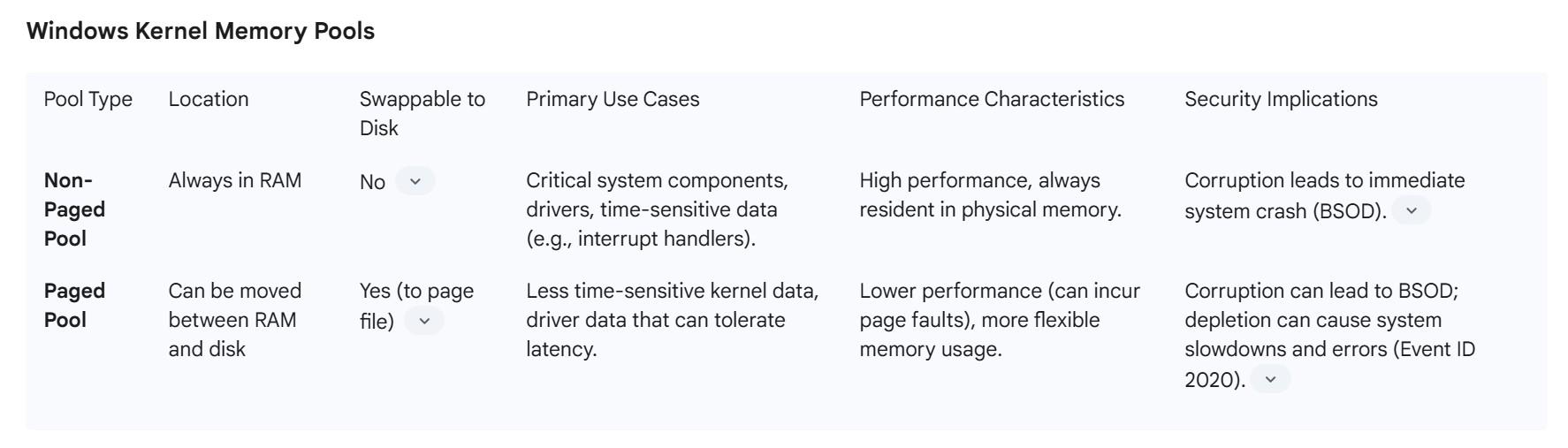
The Windows Kernel Pool is a dedicated memory region utilized by the Windows kernel and its drivers for storing system-critical data structures. It functions as the kernel-land equivalent of the user-mode heap. A crucial distinction is that, unlike user-mode memory, the kernel pool is a global resource shared across all processes in the system. Consequently, any corruption within the kernel pool can lead to severe system instability, often resulting in a Blue Screen of Death (BSOD).
Kernel memory allocations are categorized into two primary global resource pools:
- Non-Paged Pool: This pool always resides in physical RAM and is never swapped out to disk. It is reserved for critical system components and drivers that necessitate immediate and uninterrupted access to their data, such as interrupt service routines or page table entries. The data in this pool must remain resident in memory to ensure system responsiveness and stability.
- Paged Pool: This pool can be moved (paged out) between physical RAM and the disk’s page file when necessary. It is used for less time-sensitive kernel data that can tolerate the latency associated with disk I/O. While more flexible, excessive paging from this pool can still impact system performance.
The primary Application Programming Interface (API) for kernel-mode pool allocations is ExAllocatePoolWithTag. Although ExAllocatePool2 is now the preferred API, ExAllocatePoolWithTag remains widely used in existing drivers. A key feature of this API is the “Pool Tag,” a four-character identifier assigned to each allocation. Pool tags are invaluable for tracking the origin of memory allocations, which is crucial for debugging memory leaks and analyzing kernel memory usage. Debugging tools like WinDbg utilize commands such as !vm 1, !vm 2, and !pool <address> to inspect pool memory usage and identify specific pool tags. For instance, a pool type denoted numerically as ‘1’ corresponds to the paged pool, while ‘0’ represents the non-paged pool.
The Memory Manager proactively attempts to trim allocated paged pool memory when its usage reaches 80% of the total paged pool capacity. This default threshold can be adjusted through registry settings, such as PoolUsageMaximum (e.g., to 60%) and PagedPoolSize (e.g., 0xFFFFFFFF for maximum allocation), to prevent depletion during peak usage and avoid issues like Event ID 2020 errors. The global nature of kernel pools makes them a single point of failure for system stability. A vulnerability leading to memory corruption in the kernel pool, such as a use-after-free issue, has far more severe consequences than a user-mode heap corruption, often resulting in an immediate Blue Screen of Death (BSOD) or system compromise. This underscores why kernel-mode drivers and their memory management practices are under intense scrutiny in cybersecurity. The ability to distinguish between Paged and Non-Paged Pool corruption is crucial for exploit developers and incident responders, as it dictates the type of objects that can be placed in those regions and thus the exploit primitives available. The registry tuning for Paged Pool trimming indicates a proactive OS mechanism to prevent such critical resource exhaustion.

V. Working Set Management and Trimming
Definition and Types of Working Sets (Process, System, Session)
In the context of Windows memory management, a “Working Set” refers to the amount of physical memory (RAM) currently occupied by a process. This includes the set of memory pages that have been recently accessed or “touched” by the threads belonging to that process. The concept of a working set is crucial for managing the physical memory footprint of active programs.
Beyond individual process working sets, Windows also maintains system-wide working sets:
- Process Working Set: The physical memory pages actively used by a single process. While processes can theoretically specify minimum and maximum working set sizes, these limits are often disregarded in practice, with default minimums and maximums typically set to 50 and 345 pages, respectively. “Total WS” (Working Set) denotes memory residing in physical memory that can be accessed without incurring a page fault. This can be further categorized into “Private WS,” which is memory allocated solely for a process, and “Shared WS,” which is memory shared among multiple processes.
- System Working Set: This encompasses pageable code and data that are globally accessible and used by the operating system itself.
- Session Working Set: In multi-session environments (like Remote Desktop Services), each user session has its own working set for session-specific pageable code and data.
Page States and the Page Frame Number Database
Windows maintains a sophisticated system for tracking the state of every physical page of memory within its “Page Frame Number (PFN) database”. This database is a kernel-internal structure that provides a detailed view of how physical memory is being utilized and managed. Pages within the system can exist in one of nine distinct states, each indicating its current status and readiness for use or reuse:

This granular tracking of page states within the PFN database enables a highly sophisticated, state-machine-driven memory lifecycle management system at the kernel level. It allows the WMM to go beyond a simple binary of “allocated” or “free,” meticulously categorizing pages based on their content, modification status, and readiness for reuse. This level of detail enables intelligent caching (via the Standby list), efficient security (through Zeroed pages preventing data remnants), and optimized write-back operations (for Modified pages). This complexity is a testament to the WMM’s role in maximizing RAM utilization and system responsiveness, particularly in dynamic, multi-tasking environments.
Working Set Trimming Policies and their Performance Implications
Working Set Trimming is a memory management operation where the Memory Manager reduces the amount of physical memory pages (the working set) allocated to processes, potentially flushing them to disk (the page file). This process is typically initiated when the system’s available physical memory is low, and a new request for resources exceeds the currently free capacity. The working set manager considers various factors, including minimum working set sizes and the last time pages were accessed, when deciding which pages to trim.
While working set trimming is a normal and necessary function of the Memory Manager to ensure overall system stability and resource availability, it can have significant performance implications, especially for memory-intensive applications. When a process’s working set is trimmed, its pages are moved from RAM to the page file on disk. If these pages are subsequently needed, a page fault occurs, and the pages must be read back from the slower disk into RAM, leading to increased latency and reduced application responsiveness.
This phenomenon is particularly noticeable in server environments running applications like SQL Server or Microsoft Exchange, which are designed to keep large amounts of data in memory for optimal performance. If SQL Server’s working set is frequently trimmed, its query performance can degrade, potentially increasing the use of temporary database worktables. Symptoms of aggressive working set trimming can include sluggish system response, Event ID 333 in the System log (indicating I/O operation failures by the Registry), and Event ID 17890 or similar errors in SQL Server logs.
Although a server will eventually recover as processes reacquire their necessary resources, this recovery can take minutes to hours depending on the system’s physical RAM and workload. To mitigate the adverse effects of trimming, particularly for critical applications, specific configurations can be applied. For instance, SQL Server Enterprise Edition offers a “Lock Pages in Memory” (LPIM) feature, which prevents the buffer pool from being paged out to disk, ensuring its critical data remains in physical memory. This policy can be enabled via Group Policy settings. Monitoring tools like Performance Monitor (PerfMon) and Pool Monitor (PoolMon) are essential for identifying and diagnosing working set trimming issues, allowing administrators to observe changes in available bytes, private bytes, working set size, and cache bytes over time. Analyzing these metrics can reveal patterns of trimming and help pinpoint the processes or events (e.g., backup jobs) that trigger them.
VI. Memory Protection and Security Features
Windows incorporates a comprehensive suite of memory protection and security features designed to safeguard the operating system and applications from malicious attacks and unauthorized memory access. These mechanisms operate at various levels, from hardware-enforced controls to software-based randomization.
Data Execution Prevention (DEP)
Data Execution Prevention (DEP) is a critical security technology in Windows that prevents malicious code from executing from memory locations designated for data storage. It functions by marking specific memory regions as “non-executable,” thereby thwarting attacks that attempt to inject and run code from these protected areas.
DEP is primarily implemented in two forms:
- Hardware-enforced DEP: This relies on processor capabilities, often referred to as NX (No-Execute) or XD (Execute Disable) technology. It marks memory pages as non-executable by setting a specific bit in the page table entry. If a program attempts to execute code from such a marked page, the processor generates an exception, which the operating system then handles, typically by terminating the offending process. Hardware-enforced DEP requires processor support and must be enabled in the system’s BIOS/UEFI settings. For 64-bit Windows, hardware-enforced DEP is always enabled for 64-bit native programs, while its status for 32-bit programs may vary based on configuration.
- Software-enforced DEP: This provides additional security checks, primarily designed to mitigate exploits targeting exception handling mechanisms in Windows. It can run on any processor capable of running Windows XP SP2 and above.
DEP is enabled by default for essential Windows programs and services, and it is generally not recommended to disable it due to the significant security risks involved. Disabling DEP for a specific program makes it vulnerable to attacks that could then spread to other parts of the system. System administrators can configure DEP settings via Advanced System Settings in the Control Panel or check its status using command-line tools like wmic OS Get DataExecutionPrevention_Available. DEP is a fundamental protection, and its continuous activity is vital for system security, especially against viruses and exploits that leverage memory weaknesses.
Address Space Layout Randomization (ASLR)
Address Space Layout Randomization (ASLR) is a computer security technique designed to prevent the reliable exploitation of memory corruption vulnerabilities, such as buffer overflows. ASLR achieves this by randomly arranging the address space positions of key data areas within a process. These randomized elements include the base address of the executable, and the positions of the stack, heap, and libraries.
The core principle behind ASLR is to introduce artificial diversity into the memory layout, making it unpredictable for an attacker. By randomizing these memory locations each time a program runs, ASLR makes it significantly more difficult for attackers to predict target addresses for malicious code execution (e.g., return-to-libc attacks or shellcode injection). Attackers must guess these randomized addresses, and an incorrect guess typically results in the application crashing, making brute-force attacks challenging.
The effectiveness of ASLR is directly proportional to the amount of “entropy” present in the random offsets. Greater entropy, achieved by increasing the virtual memory area space over which randomization occurs, enhances security. While ASLR is implemented in most modern operating systems, including Windows, it is not foolproof. Attackers can employ various methods, such as information leaks or heap spraying, to reduce the entropy and potentially bypass ASLR. Despite these limitations, ASLR remains a crucial defense mechanism that significantly raises the bar for exploiting memory corruption vulnerabilities.
Core Isolation and Memory Integrity (Hypervisor-protected Code Integrity – HVCI)
Windows employs advanced security features collectively known as “Core Isolation” to protect critical operating system processes from malicious software. Core Isolation achieves this by isolating these core processes within a virtualized environment in memory. This virtualization creates a secure boundary that prevents attackers from tampering with essential Windows components.
A key feature within Core Isolation is Memory Integrity, also known as Hypervisor-protected Code Integrity (HVCI). HVCI makes it considerably more difficult for malicious programs to exploit low-level drivers to hijack a PC. It operates by establishing an isolated environment using hardware virtualization, akin to a security guard within a locked booth. Any code that needs to run, especially potentially dangerous code, must be submitted to Memory Integrity within this secure virtualized booth for verification. If the code is deemed safe, Memory Integrity permits Windows to execute it. This verification process typically occurs very quickly. Without HVCI, the security mechanisms are more exposed, making it easier for an attacker to interfere with or sabotage them, allowing malicious code to bypass defenses. To utilize Memory Integrity, hardware virtualization must be enabled in the system’s UEFI or BIOS settings. Incompatible drivers can prevent HVCI from being enabled, necessitating driver updates or removal of problematic devices/applications.
Another related feature is Kernel-mode Hardware-enforced Stack Protection, which specifically prevents attacks that modify return addresses in kernel-mode memory to launch malicious code. This feature requires a CPU capable of verifying return addresses and maintains a read-only “shadow stack” that drivers cannot modify. Discrepancies between the regular stack and the shadow stack trigger a stop error (BSOD), preventing malicious execution.
Kernel Direct Memory Access (DMA) Protection
Kernel Direct Memory Access (DMA) Protection is a Windows security feature designed to safeguard against unauthorized memory access by external peripherals. This protection is particularly relevant for PCIe hot-plug devices, such as Thunderbolt, USB4, and CFexpress, which possess DMA capabilities, allowing them to directly access system memory for read and write operations without involving the system processor. While this direct access capability contributes to their high performance, it also exposes them to “drive-by DMA attacks”. These attacks can occur rapidly, often within minutes, and may involve affordable, off-the-shelf hardware, enabling data theft or malware injection that bypasses the lock screen.
Windows mitigates these attacks by leveraging the system’s Input/Output Memory Management Unit (IOMMU). The IOMMU blocks external peripherals from initiating and performing DMA unless their drivers explicitly support memory isolation, specifically “DMA-remapping”.
- DMA Remapping Compatible Drivers: Peripherals with drivers that support DMA Remapping are automatically recognized, started, and permitted to perform DMA to their designated, isolated memory regions.
- DMA Remapping Incompatible Drivers: By default, peripherals with drivers lacking DMA Remapping compatibility are blocked from starting and performing DMA. This block remains in effect until an authorized user logs into the system or unlocks the screen. Once unlocked, the peripheral functions normally until reboot or unplugging. IT administrators can modify this default behavior via Mobile Device Management (MDM) or group policies.
Kernel DMA Protection requires UEFI firmware support and enabling Hyper-V virtualization (IOMMU) in the firmware. It is automatically enabled on supporting systems, and its status can be verified through Windows Security settings or msinfo32.exe. This protection primarily safeguards against DMA attacks after the OS is loaded; system firmware/BIOS is responsible for protection during boot. Microsoft inbox drivers for USB XHCI, Storage AHCI/SATA, and Storage NVMe controllers support DMA Remapping.
Summary of Windows Memory Protection Mechanisms
| Mechanism | Description | Primary Purpose | Key Technologies/Components | Effectiveness |
| Data Execution Prevention (DEP) | Prevents execution of code from data-only memory regions. | Prevent buffer overflow exploits and code injection. | Hardware-enforced (NX/XD bit in PTE), Software-enforced (exception handling). | Highly effective against common code injection attacks. |
| Address Space Layout Randomization (ASLR) | Randomizes the base addresses of executables, libraries, stack, and heap. | Make memory layout unpredictable to hinder exploit development. | Random offsets applied to virtual addresses. | Increases difficulty of exploits by requiring address guessing; can be bypassed by information leaks. |
| Core Isolation / Memory Integrity (HVCI) | Isolates core Windows processes in a virtualized environment and verifies code integrity. | Protect critical OS components from malicious drivers and software. | Hardware virtualization (Hypervisor), Code Integrity checks. | Strong defense against low-level malware and driver exploits. |
| Kernel Direct Memory Access (DMA) Protection | Blocks unauthorized direct memory access by external peripherals. | Safeguard against “drive-by DMA attacks” via PCIe ports (e.g., Thunderbolt). | Input/Output Memory Management Unit (IOMMU), DMA-remapping compatible drivers. | Protects against unauthorized memory access by malicious external devices post-boot. |
VII. Performance Optimization and Troubleshooting
Effective memory management is paramount for maintaining the overall performance, stability, and responsiveness of a Windows system. The Memory Manager’s ability to efficiently allocate, deallocate, and protect memory directly impacts how smoothly multiple programs can run concurrently, preventing conflicts and crashes. It also addresses fragmentation by compacting memory blocks to optimize usage.
Memory Leaks
A memory leak occurs when a program or process allocates memory but fails to release it back to the operating system when it is no longer needed. Over time, these unreleased memory blocks accumulate, leading to a gradual depletion of available memory pools, both paged and nonpaged.
Causes and Consequences: Memory leaks can stem from incorrect memory management practices within applications or drivers, such as failing to call a corresponding free function after an allocation. Consequences vary: for client applications, a leak might lead to system slowdowns, unresponsiveness, random crashes, or the inability to launch new programs. For server applications, which often run continuously without frequent restarts, memory leaks can cause severe performance degradation over extended periods, eventually leading to the server stopping or crashing. In kernel mode, memory leaks, particularly in the nonpaged pool, can deplete critical system resources, causing Windows to slow down and potentially leading to system failures.
Detection Tools and Techniques: Windows provides several built-in tools for detecting and diagnosing memory leaks:
- Task Manager: A primary tool for initial detection. Users can monitor the “Memory” tab to identify processes consuming excessive or continuously growing amounts of RAM. Ending a problematic process can temporarily alleviate the issue.
- Resource Monitor: Offers real-time tracking of memory usage, allowing for more detailed monitoring of memory consumption by various processes and helping to pinpoint potential leaks.
- Performance Monitor (PerfMon): A powerful tool for long-term monitoring. By adding counters such as “Memory > Pool Nonpaged Bytes,” “Memory > Pool Paged Bytes,” and “Paging File > % Usage,” users can observe trends in memory pool usage over time. A steady increase in these counters, particularly “Pool Paged Bytes” for user-mode leaks and “Pool Nonpaged Bytes” for kernel-mode leaks, can indicate a leak. PerfMon does not identify the source but indicates the presence and type of leak.
- WinDbg: For in-depth kernel-mode debugging, WinDbg can be used to analyze pool allocations and identify the source of leaks. Commands like
!vm 1,!vm 2, and!pool <address>provide detailed summaries of system memory usage and specific pool allocation details, including thePoolTagwhich helps identify the driver or component responsible. Breakpoints can be set on allocation APIs likeExAllocatePoolWithTagto track memory in real-time. - Windows Memory Diagnostic Tool: A built-in tool that scans the system’s RAM for errors, which can sometimes be a cause of memory management issues.
Mitigation Strategies:
- Close Problematic Applications: Identify and close applications that are consuming excessive memory or exhibiting leak behavior. Restarting the computer can temporarily clear RAM and alleviate immediate leak issues.
- Disable Startup Programs and Background Apps: Reduce memory consumption by preventing unnecessary programs from launching at startup or running in the background.
- Update Device Drivers: Outdated or incompatible device drivers are a common cause of memory leaks, especially in kernel mode. Regularly updating drivers to their latest versions is crucial.
- System File Checks: Corrupted system files can lead to memory management errors. Tools like System File Checker (SFC) (
sfc /scannow) and DISM (DISM /Online /Cleanup-Image /RestoreHealth) can repair such files. - Adjust Performance Settings: Windows allows adjusting visual effects for “best performance,” which can reduce memory usage.
- Defragment Hard Drives: While primarily for disk performance, defragmenting hard drives can optimize storage and indirectly aid memory management by improving paging file efficiency.
- Antivirus Scans: Malware can cause memory leaks; running regular antivirus scans can help identify and remove such threats.
- Disable Unnecessary Windows Features/Services: Features like Windows Tips and Tricks or services like Sysmain (Superfetch) can be disabled to reduce memory overhead.
Memory Fragmentation
Memory fragmentation occurs when available memory is divided into small, non-contiguous blocks, making it difficult to allocate large contiguous spaces for processes, even if the total free memory is sufficient. This issue primarily arises in dynamic memory allocation processes.
Internal vs. External Fragmentation:
- Internal Fragmentation: Occurs when a memory block allocated to a process is larger than the actual memory requested by that process, resulting in unused space within the allocated block. For example, if a process needs 2MB but is allocated a 3MB block, 1MB is wasted internally. This is common in fixed-partition memory allocation schemes or due to allocation granularity (e.g.,
VirtualAllocallocating in 64KB chunks for small requests). - External Fragmentation: Occurs when there is enough total free memory to satisfy a request, but this free memory is scattered in many small, non-contiguous blocks across the system. This prevents the allocation of a single large contiguous block, even if the sum of free blocks is sufficient.
Causes and Effects: Frequent allocation and deallocation of variable-sized memory blocks are primary causes of fragmentation. A lack of compaction mechanisms can exacerbate the issue by leaving free blocks scattered. Effects include reduced system performance due to increased time for memory allocation/deallocation, wasted memory space, and potential allocation failures for large processes, leading to errors or crashes. In systems using virtual memory, fragmentation can lead to excessive paging activity, further degrading performance.
Mitigation Strategies:
- Memory Compaction: This technique rearranges memory contents to consolidate scattered free blocks into one or more larger, contiguous chunks. Compaction directly addresses external fragmentation. While effective, it can be a time-consuming process that temporarily idles the CPU, reducing system efficiency. Compaction is feasible only when memory relocation is dynamic and performed at execution time.
- Low Fragmentation Heap (LFH): Microsoft introduced LFH in Windows XP/2003 to specifically combat fragmentation in user-mode heaps. LFH allocates similarly-sized blocks from larger, pre-allocated blocks, preventing the mixing of small and large allocations that often leads to fragmentation. While it may incur slightly higher memory usage due to “slack” within its fixed-size buckets, it significantly improves fragmentation characteristics for memory-intensive applications.
- Paging and Segmentation: These memory management techniques inherently help mitigate external fragmentation by allowing processes to be stored in non-contiguous physical memory frames/segments. Paging, by dividing memory into fixed-size pages, avoids external fragmentation but can cause internal fragmentation within pages.
- Optimized Allocation Strategies: Choosing appropriate allocation strategies (e.g., best-fit, worst-fit, next-fit) can influence fragmentation levels.
- Memory Pooling: Allocating memory from pre-defined pools of fixed-size blocks can reduce fragmentation and improve allocation/deallocation speed for specific use cases.
- Active Defragmentation (Application-level): Some applications, particularly those managing large datasets (e.g., Redis), implement their own active defragmentation mechanisms to reduce fragmentation within their allocated memory regions.
- Tuning Memory Manager Behavior: It is possible to adjust the Memory Manager’s decommit behavior to reduce fragmentation, for instance, by delaying decommit operations until a larger contiguous block can be freed. This can introduce memory overhead but may be beneficial for systems with ample RAM experiencing virtual memory fragmentation. Monitoring tools like PerfMon can help detect virtual memory fragmentation if “Virtual Bytes” grows significantly larger than “Private Bytes” over time.
Out-of-Memory (OOM) Errors
An Out-of-Memory (OOM) error occurs when a program or process attempts to allocate more memory than is currently available, either physically (RAM) or virtually (including the page file). These errors are a common cause of unexpected application crashes and system instability.
Causes: OOM errors can arise from various factors:
- Memory Leaks: As discussed, unreleased memory accumulates, gradually depleting available resources until no more can be allocated.
- Inefficient Memory Management: Poorly optimized code that makes excessive use of temporary variables or large data structures can lead to high memory consumption.
- Excessive Memory Consumption: Certain applications, especially those handling large datasets or performing complex computations, may inherently require significant amounts of memory, potentially exceeding system capacity.
- Faulty Hardware: Defective RAM modules can lead to memory management issues and OOM errors.
- Corrupted System Files or Drivers: Damaged essential Windows files or outdated/incompatible device drivers can disrupt the WMM’s ability to allocate memory correctly.
- Overclocking/Overheating: Pushing hardware beyond its limits without adequate cooling can cause memory errors.
- Disk Errors: Problems with the hard drive or SSD (e.g., bad sectors) can interfere with how memory is swapped between RAM and the paging file, contributing to OOM errors.
- Windows Updates/Bugs: Occasionally, a flawed Windows update or an unresolved bug in the OS can introduce memory management glitches.
System Handling Mechanisms: When physical memory is less than the combined demand of all processes, the Virtual Memory Manager employs paging techniques like Disc Paging and Demand Paging to manage the limited physical memory. It may sequentially load processes, wait for one to finish, and then load another, or move data between RAM and the page file. The system commit limit, which is the sum of physical memory and all page files, represents the maximum “committed memory” the system can support. If this limit is reached, memory allocations will fail. In severe cases, OOM conditions can manifest as a Blue Screen of Death (BSOD) with stop codes like “VIDEO_MEMORY_MANAGEMENT_INTERNAL”.
Troubleshooting and Prevention:
- Identify and Close Problematic Apps: Use Task Manager or Resource Monitor to pinpoint and terminate memory-intensive applications or those with leaks.
- Update Drivers and System: Ensure all device drivers and the Windows operating system are up-to-date to resolve known compatibility or bug-related memory issues.
- Run Memory Diagnostics: Use the Windows Memory Diagnostic tool (
mdsched.exe) to check for physical RAM errors. - System File Integrity Checks: Regularly run
sfc /scannowand DISM commands to repair corrupted system files. - Adjust Virtual Memory (Page File) Size: While often best left to system management, users can manually configure the page file size via System Properties, which can help extend the system commit limit.
- Increase Physical RAM: The most direct solution for persistent memory scarcity is to install more physical RAM.
- Optimize Applications: Developers should employ efficient memory management practices, avoid memory leaks, and optimize data structures to minimize memory footprint. For critical applications, reserving a block of memory in advance can provide a buffer for graceful recovery during low-memory situations.
- Clean Boot: Performing a clean boot can help diagnose if third-party services or startup programs are causing conflicts or excessive memory usage.
VIII. Advanced Memory Management Concepts
Non-Uniform Memory Access (NUMA) Support and Optimization
Non-Uniform Memory Access (NUMA) is an architectural design employed in multi-processor systems to enhance processor speed without overburdening the processor bus. In a NUMA architecture, processors have faster access to some parts of memory (local memory) than to others (remote memory), creating a “non-uniform” access pattern. Each processor is associated with a specific memory “node,” which contains local memory and potentially I/O devices.
The Windows Memory Manager, along with the scheduler, attempts to optimize performance in NUMA systems by scheduling threads on processors that reside in the same node as the memory they are actively using. When a memory allocation request is made, the system first attempts to satisfy it from within the local node. If the local node’s memory is exhausted, the Memory Manager will allocate memory from other nodes. If memory is paged out, the same NUMA-aware process is used when it is brought back in.
Windows provides a comprehensive API for applications to query and optimize their behavior in NUMA environments:
- Topology Discovery: Functions like
GetNumaHighestNodeNumber,GetNumaProcessorNode, andGetNumaNodeProcessorMaskallow applications to determine the layout of nodes and the processors associated with each node. Extended functions (e.g.,GetNumaHighestNodeNumberEx) support systems with more than 64 logical processors. - Thread and Process Affinity: Applications can use functions like
SetProcessAffinityMaskorSetThreadAffinityMaskto bind threads or processes to specific processors within a NUMA node. This increases efficiency for applications where threads frequently access shared memory, as it minimizes costly remote memory access. For group-aware applications,SetThreadGroupAffinityis used. - NUMA-aware Memory Allocation: The
VirtualAllocExNumafunction enables applications to specify a preferred NUMA node for memory allocation. While this function does not immediately allocate physical pages (they are allocated on demand), it guides the Memory Manager to prioritize the specified node. If the preferred node runs out of pages, the Memory Manager will still use pages from other nodes. Other functions likeAllocateUserPhysicalPagesNumaandCreateFileMappingNumaalso support NUMA-specific allocations.
Optimizing applications for NUMA can significantly improve performance for memory-intensive workloads, especially in high-end server environments and virtualization platforms. By aligning memory allocations and thread execution with local NUMA nodes, the system minimizes memory latency and maximizes throughput.
Large Pages (Huge Pages): Implementation, Benefits, and Transparent HugePages (THP)
Large Pages, often referred to as Huge Pages, are a memory management technique that utilizes memory blocks larger than the standard 4 KB page size (e.g., 2 MB or 1 GB). This approach is designed to improve performance for memory-intensive applications and systems with large amounts of RAM by reducing the overhead associated with managing traditional small pages.
Implementation and Benefits:
- Reduced TLB Pressure: The Translation Lookaside Buffer (TLB) is a cache for virtual-to-physical address translations. With standard 4 KB pages, managing large amounts of memory requires a vast number of TLB entries, increasing the likelihood of TLB misses (where the translation is not found in the cache), which are costly as they require a full page table walk. Large pages allow a single TLB entry to map a much larger memory region, leading to fewer TLB misses and improved performance for applications that frequently access large memory areas.
- Lower Memory Management Overhead: With fewer pages to manage overall, the operating system spends less time updating and maintaining page tables, reducing CPU overhead for memory management.
- Reduced Memory Fragmentation: Large memory allocations are more likely to be contiguous when using huge pages, which can help reduce both internal and external fragmentation, leading to more efficient memory utilization.
In Windows, applications can explicitly request large page support when allocating memory using functions like VirtualAlloc with the MEM_LARGE_PAGES flag. This requires the allocated size and alignment to be a multiple of the system’s large-page minimum size, which can be retrieved using GetLargePageMinimum. Both MEM_RESERVE and MEM_COMMIT flags must also be specified.
Transparent HugePages (THP): While the provided snippets primarily discuss explicit large page allocation, some operating systems (e.g., Linux) implement Transparent HugePages (THP). THP aims to provide the benefits of huge pages with minimal effort from developers and system administrators by automatically managing the promotion of smaller pages to huge pages when beneficial, and their demotion back to smaller pages when not. This automatic management simplifies the use of huge pages but can sometimes lead to suboptimal memory usage if pages are promoted unnecessarily. Windows also implicitly uses large pages for certain internal structures and system components, further optimizing its memory management.
IX. Conclusion
The Windows Memory Manager stands as a cornerstone of the operating system’s architecture, orchestrating the complex interplay between physical and virtual memory to enable multitasking, ensure process isolation, and facilitate efficient resource utilization. Its evolution from simple 16-bit addressing to the expansive 64-bit virtual address spaces underscores a continuous commitment to scalability and robust application support.
The WMM’s reliance on virtual memory, coupled with fundamental mechanisms like paging, the Memory Management Unit (MMU), and Translation Lookaside Buffers (TLBs), represents a sophisticated engineering feat. This layered approach, balancing space efficiency with performance through hardware acceleration, is crucial for modern computing. Furthermore, the WMM’s support for memory-mapped files, shared memory, and copy-on-write mechanisms highlights its role not just as a memory allocator but as a fundamental enabler of efficient inter-process communication and I/O operations. The granular tracking of page states within the Page Frame Number database exemplifies the meticulous, state-machine-driven approach to maximizing RAM utilization and system responsiveness.
Windows provides a rich set of memory allocation strategies, from high-level heap functions to low-level virtual memory APIs, each tailored for distinct programming paradigms and performance requirements. The introduction of the Segment Heap in Windows 10 marks a significant advancement, demonstrating a proactive approach to enhancing both performance and security in modern applications. Concurrently, the meticulous management of kernel pools, segregated into paged and non-paged categories, is critical for system stability, with any corruption posing a direct threat of system-wide failure.
Beyond core management, the WMM integrates powerful security features. Data Execution Prevention (DEP) and Address Space Layout Randomization (ASLR) serve as primary defenses against memory corruption exploits, while Core Isolation, Memory Integrity (HVCI), and Kernel Direct Memory Access (DMA) Protection offer advanced safeguards against malicious code and unauthorized hardware access, often leveraging hardware virtualization for enhanced isolation.
Despite these sophisticated mechanisms, challenges such as memory leaks and fragmentation persist. Windows provides an array of diagnostic tools, including Task Manager, Resource Monitor, PerfMon, and WinDbg, to identify and troubleshoot these issues. Mitigation strategies range from application-level best practices to system-wide tuning, such as working set trimming policies and the Low Fragmentation Heap. The WMM’s support for advanced concepts like Non-Uniform Memory Access (NUMA) and Large Pages further underscores its adaptability to high-performance computing environments, enabling specialized optimizations for demanding workloads.
In essence, the Windows Memory Manager is a dynamic and continuously evolving system. Its ongoing development is critical for addressing the ever-increasing demands of modern software, adapting to new hardware architectures, and countering emerging security threats. A deep understanding of its intricacies remains indispensable for system administrators, developers, and security researchers seeking to optimize performance, ensure stability, and maintain the integrity of Windows environments.
end