The bandwidth-delay product (BDP) is a fundamental concept in computer networking that quantifies the amount of data that can be “in flight” or unacknowledged in a network at any given time. It represents the maximum amount of data that can be sent over a network link before the sender needs to wait for an acknowledgment from the receiver to ensure efficient utilization of the network’s capacity. Understanding BDP is critical for optimizing network performance, particularly in protocols like TCP, which rely on window-based flow control to manage data transmission.
1. Definition of Bandwidth-Delay Product
The bandwidth-delay product is the product of a network link’s bandwidth (the data rate, typically measured in bits per second) and its round-trip time (RTT) (the time it takes for a packet to travel from the sender to the receiver and for an acknowledgment to return, measured in seconds). The result, typically in bits or bytes, represents the amount of data that can be in transit (or “in the pipe”) at any moment to fully utilize the network’s capacity.
In essence, BDP indicates the capacity of the network pipe—the maximum amount of data that can be in transit at any moment to fully utilize the available bandwidth.
2. Formula for Bandwidth-Delay Product
The bandwidth-delay product is calculated as the product of a network’s bandwidth and its round-trip time (RTT):
Bandwidth-Delay Product = Bandwidth × Round-Trip Time (RTT)
Where:
- Bandwidth: The maximum data rate of the network link, in bits per second (bps), kilobits per second (kbps), megabits per second (Mbps), or gigabits per second (Gbps).
- RTT: The round-trip time, in seconds, which includes the propagation delay, transmission delay, queuing delay, and processing delay for a packet to travel to the receiver and for an acknowledgment to return.
- BDP: Typically expressed in bits. To convert to bytes, divide by 8 (since 1 byte = 8 bits).
Conceptual Significance
The BDP essentially measures the capacity of the network pipe. It indicates how much data the sender must transmit to keep the link fully utilized while waiting for acknowledgments. In a network, data is sent in packets, and protocols like TCP use a sliding window mechanism to control how much data is sent before receiving an acknowledgment. If the sender’s window size is smaller than the BDP, the network is underutilized because the sender stops transmitting and waits for acknowledgments, leaving the link idle. If the window size is too large, it may overwhelm the receiver or intermediate routers, leading to congestion or packet loss.
Imagine a network connection as a “pipe” between two endpoints:
- The bandwidth determines the width of the pipe (how much data can flow through per second).
- The delay (RTT) represents the length of the pipe (how long it takes for data to travel from one end to the other and back).
- The BDP is the total volume of the pipe, i.e., the amount of data that can fill the pipe while the sender waits for an acknowledgment.
The BDP is particularly important in:
- High-bandwidth, high-latency networks (e.g., satellite links, transcontinental connections), where the BDP can be very large.
- Optimizing TCP performance, as the TCP window size should ideally match or exceed the BDP to maximize throughput.
- Network design, as routers and endpoints need sufficient buffer space to handle the data in flight.
Key Components of BDP
- Bandwidth:
- Bandwidth is the maximum rate at which data can be transmitted over the network link. It depends on the physical medium (e.g., fiber, copper Faulkner, wireless), hardware limitations, and network conditions.
- Example: A 1 Gbps fiber link has a much higher bandwidth than a 10 Mbps DSL link, resulting in a larger BDP for the same RTT.
- Round-Trip Time (RTT):
- RTT is the total time for a packet to travel from sender to receiver and back. It includes:
- Propagation delay: Time for signals to travel through the medium (limited by the speed of light or electrical signals).
- Transmission delay: Time to push bits onto the link (depends on bandwidth).
- Queuing delay: Time spent in router queues.
- Processing delay: Time for devices to process packets.
- RTT is influenced by physical distance, network congestion, and routing paths. For example, transatlantic links have higher RTTs (e.g., 80–100 ms) than local LANs (e.g., 1–10 ms).
- RTT is the total time for a packet to travel from sender to receiver and back. It includes:
- Units:
- BDP is calculated in bits but often converted to bytes for practical use (e.g., configuring TCP buffers). The conversion factor is 1 byte=8 bits.
TCP Window Size
The TCP Window Size is the amount of unacknowledged data (in bytes) that a sender can transmit at any given time. It is part of TCP’s flow control mechanism, which ensures that the sender does not overwhelm the receiver or the network with more data than they can handle. The window size is advertised by the receiver in the TCP header of each ACK packet, indicating how much buffer space it has available to accept new data.
- Receiver’s Perspective: The receiver advertises its window size based on its available buffer space, which can change dynamically due to application processing speed or system resources.
- Sender’s Perspective: The sender maintains a congestion window (cwnd), which is the amount of data it believes it can safely send based on network conditions. The actual amount of data sent is the minimum of the receiver’s advertised window and the sender’s congestion window.
For optimal throughput, the TCP window size should be at least equal to the BDP. This ensures that the sender can keep sending data while waiting for ACKs, avoiding idle time on the link.
If the sender transmits less than the BDP, the link is underutilized, and if it sends more, it may lead to congestion or packet loss.
Practical Implications in Networking
The BDP has significant implications for network performance and configuration, especially in TCP-based communications:
- TCP Window Size:
- TCP uses a sliding window to control the amount of unacknowledged data in flight. For optimal throughput, the TCP window size should be at least equal to the BDP.
- If the window size is too small, the sender pauses after sending the window’s worth of data, waiting for an acknowledgment, which underutilizes the link.
- Example: For a 100 Mbps link with an 80 ms RTT (BDP = 1 MB), a TCP window of 64 KB (65,536 bytes) would result in a throughput of:
-

- This is far below the 100 Mbps capacity, illustrating underutilization.
- Buffer Management:
- The sender and receiver must have sufficient buffer space to handle the BDP. If the receiver’s buffer is smaller than the BDP, it advertises a smaller window, limiting throughput.
- Routers along the path also need buffers to handle queuing, especially in high-BDP networks.
- Window Scaling:
- Older TCP implementations had a maximum window size of 65,535 bytes (due to a 16-bit field in the TCP header). For high-BDP networks (e.g., BDP > 65 KB), this is insufficient.
- TCP window scaling (RFC 7323) allows much larger window sizes by scaling the advertised window, enabling support for high-BDP networks like modern fiber or satellite links.
- Impact of Packet Loss:
- Packet loss in TCP triggers congestion control mechanisms (e.g., reducing the window size), which can significantly reduce throughput in high-BDP networks because it takes longer to recover the window size when more data is in flight.
- Modern protocols like Google’s BBR (Bottleneck Bandwidth and RTT) or QUIC are designed to better handle high-BDP networks by estimating bandwidth and delay more accurately.
- High-BDP Networks:
- Networks with high bandwidth and high latency (e.g., satellite links, long-distance fiber) have large BDPs, requiring careful tuning.
- Example: A 1 Gbps satellite link with a 600 ms RTT has a BDP of:

- This requires very large TCP windows and significant buffer space.
Practical Example
Example 1
To make the concept concrete, let’s revisit the practical example from your previous query with a focus on its conceptual relevance:
Scenario:
- Link: Between servers in New York and London.
- Bandwidth: 100 Mbps (100 × 10^6 bits/second).
- RTT: 80 ms (0.08 seconds).
BDP Calculation:

Conceptual Insights:
- Network Utilization: The 1 MB BDP means the sender must transmit 1 MB of data before pausing to wait for an acknowledgment to fully utilize the 100 Mbps link. If the TCP window is only 64 KB, the throughput drops to ~6.55 Mbps, wasting most of the link’s capacity.
- Tuning: To achieve 100 Mbps, the TCP window size must be at least 1 MB, and both sender and receiver need buffers of at least 1 MB. Window scaling must be enabled for such large windows.
- Real-World Context: File transfers (e.g., via FTP, HTTP) over this link would be slow without proper TCP tuning. Tools like iperf can measure the actual BDP and help configure systems (e.g., adjusting tcp_rmem and tcp_wmem in Linux).
Example_2

Suppose a link between Sender and Receiver host has bandwidth of 10 Mbps in both direction.
The propagation delay from Sender to Receiver is 50 ms and the propagation delay from Receiver to Sender is 50 ms.
The data that needs to be sent will be divided into small data packets. The sender will start sending the data packets to the receiver. The first data packet sent by the sender will take 50 ms time to reach the receiver. After receiving the first data packet, the receiver host will immediately send the acknowledgment packet back to the sender host .The acknowledgment packet will take 50 ms time to reach the Sender host.
This gives a Round-Trip Time (RTT) of 100 ms ( 50 ms + 50 ms).
- RTT = 100 ms (0.1 seconds)
- Bandwidth = 10 Mbps (10,000,000 bits per second)
Bandwidth-Delay Product = 10,000,000 bps × 0.1 sec =1,000,000 bits = 1,000,000 ÷8 bytes = 125,000 bytes = 125KB
This means the sender host can have up to 125 KB of unacknowledged data in flight to fully utilize the link.
The sender Send_buffer(transmit_window_size) must be 125 KB and the receiver Receive_buffer(receive_window_size) must be 125 KB, to fully utilize the bandwidth of the link.
Scenario 1
- Bandwidth-delay Product of 125 KB
- Forward propagation delay = 50 ms
- Backward propagation delay = 50 ms
- Sender host windows size(send buffer) = 125 KB = 1000 Kbits
- Receiver host windows size(receive buffer) = 125 KB
- Total size of data to be sent = 5 MB = 5000 KB
- Data packet size = 1 KB = 1000 bits
- total number of data packets = (Total size of data to be sent/Data packet size) = 5000KB/1KB = 5000 packets
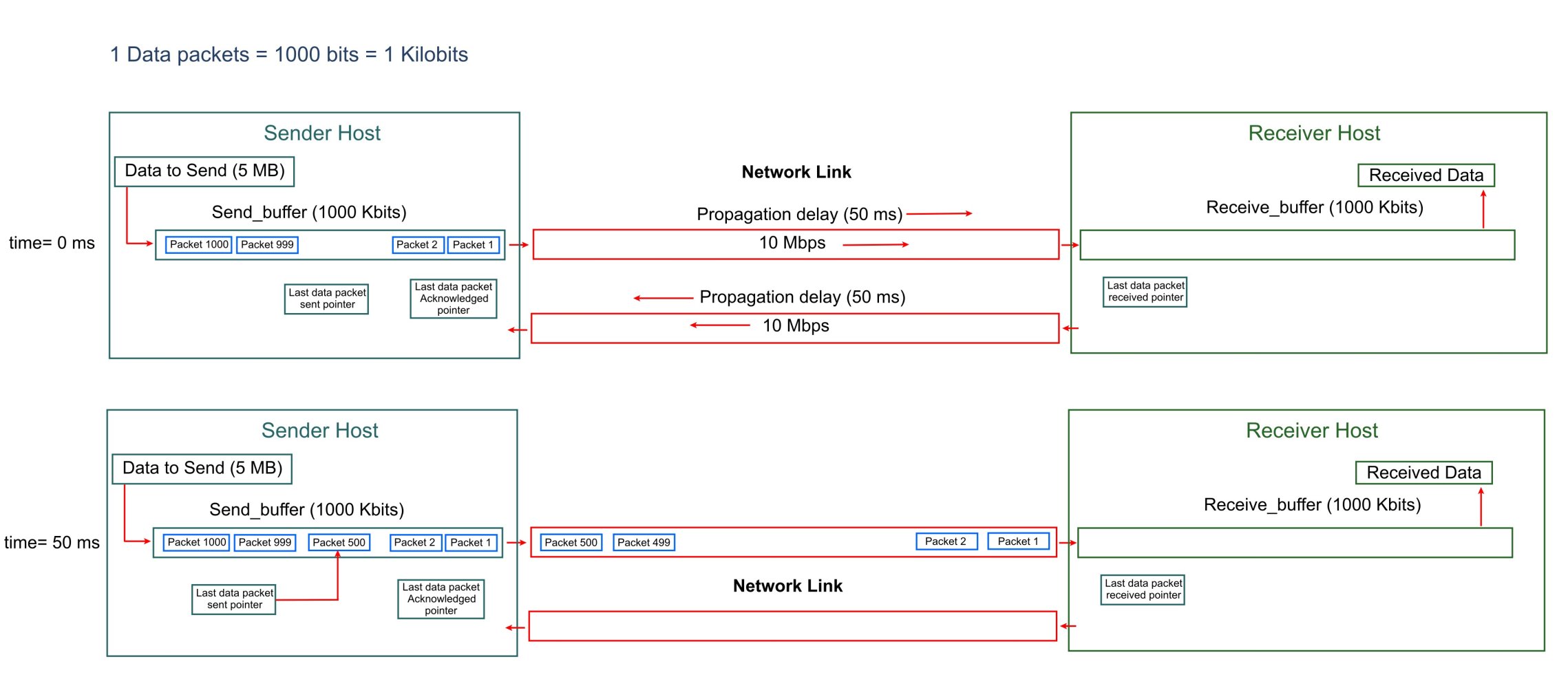
At ( time = 0 ms) the Sender host starts sending data to the Receiver host.
The first packet will reach the receiver host at time= 50 ms (0.05 sec). By this time the sender would have sent (10,000,000 bps * 0.05 sec = 500000 bits = 62.5 KB = 500 Kbits = 500 data packets ).
After receiving first packet, the receiver host will send the the corresponding ACK packet back to the sender host.
This ACK packet will take 50 ms time to reach the sender host. Total time elapsed when the ACK packet reaches the sender host is ( 50 ms + 50 ms = 100 ms = 0.1 sec).
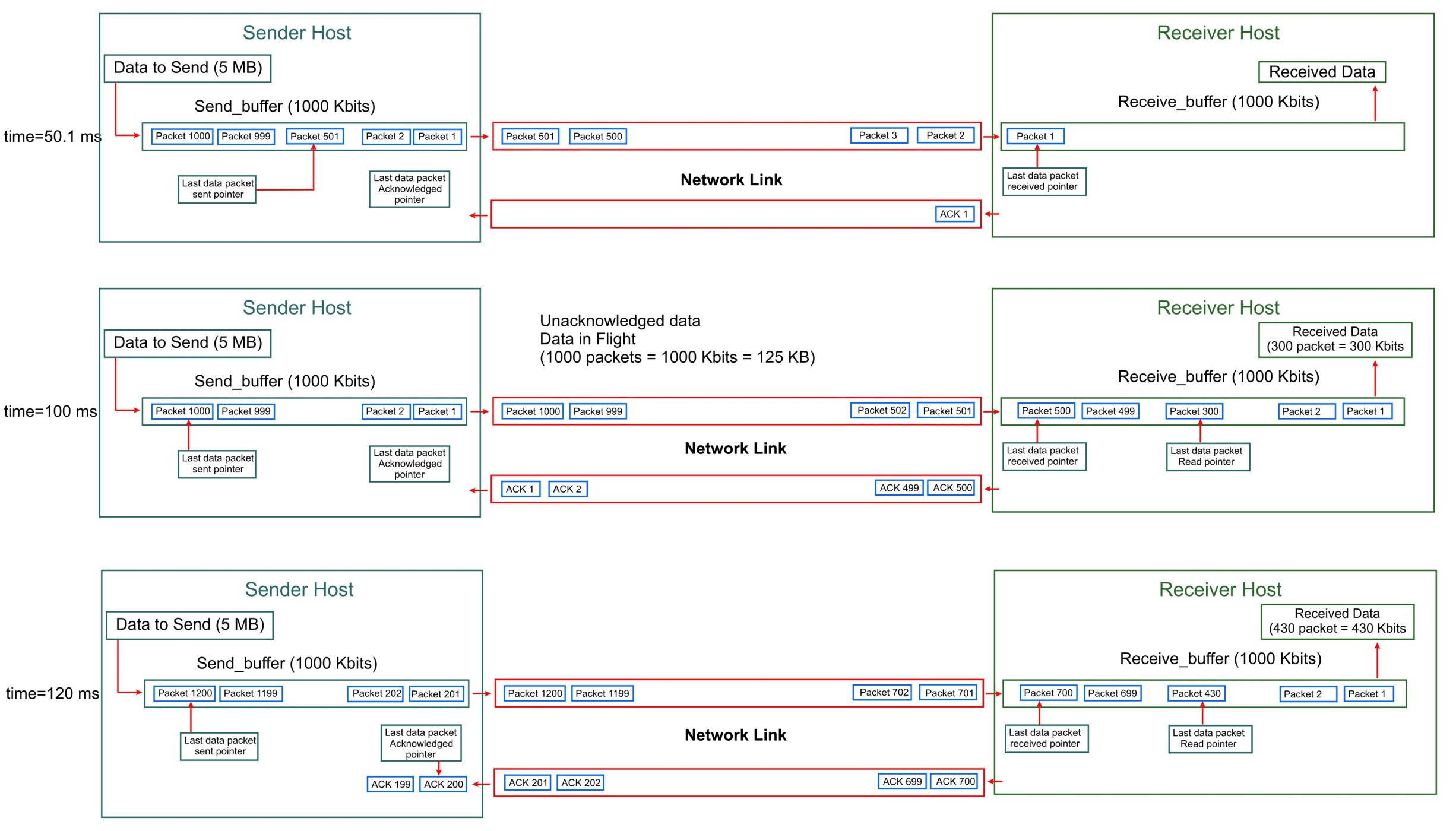
By the time this ACK packet reaches the sender host, a total of ( 10,000,000 bps * 0.1 sec = 1,000,000 bits = 125 KB = 1000 Kbits = 1000 data packets) will already have been sent by the sender host. So 125 KB of unacknowledged data will be in flight.
By keeping the Transmit Window Size of 125 KB, the Sender host can fully utilize bandwidth of the link.
Scenario_2
- Bandwidth-delay Product of 125 KB
- Forward propagation delay = 50 ms
- Backward propagation delay = 50 ms
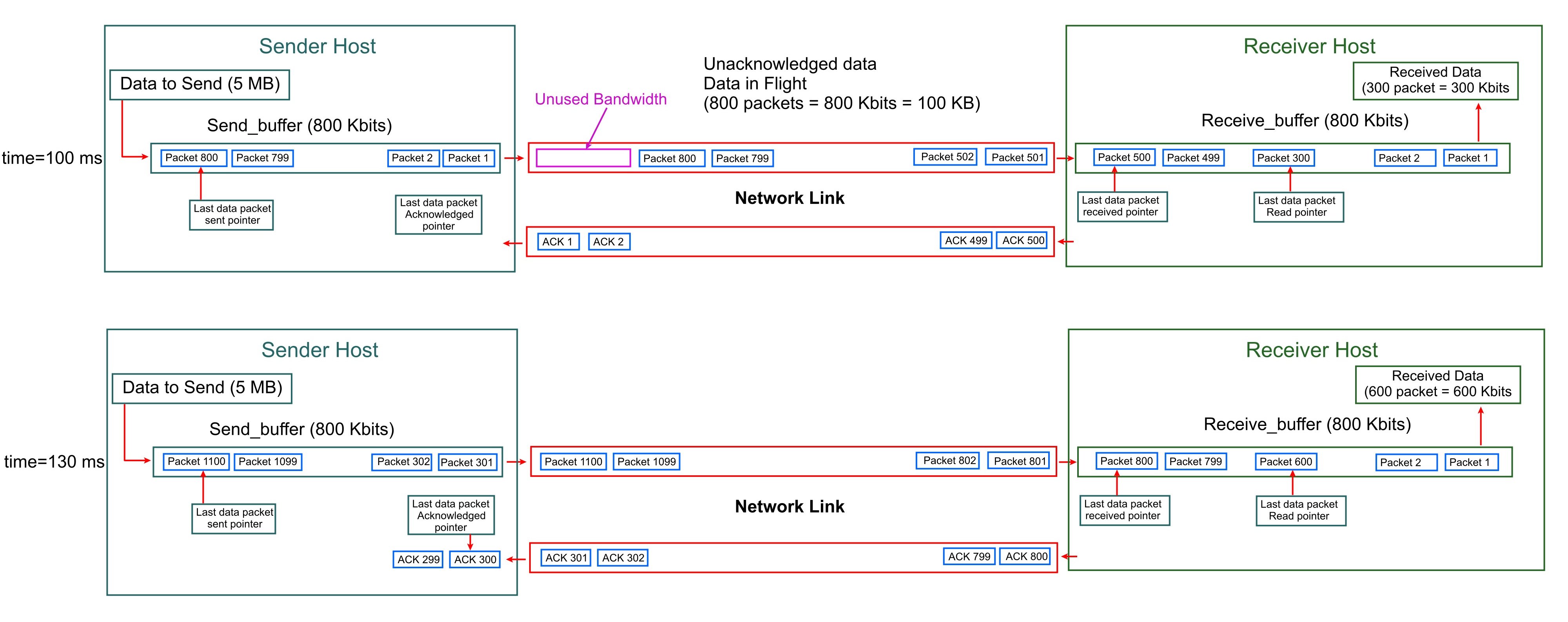
- Sender host windows size(send buffer) = 100 KB = 800 Kbits
- Receiver host windows size(receive buffer) = 100 KB = 800 Kbits
- Total size of data to be sent = 5 MB = 5000 KB
- Data packet size = 1 KB = 1000 bits
- Total number of data packets = (Total size of data to be sent/Data packet size) = 5000KB/1KB = 5000 packets
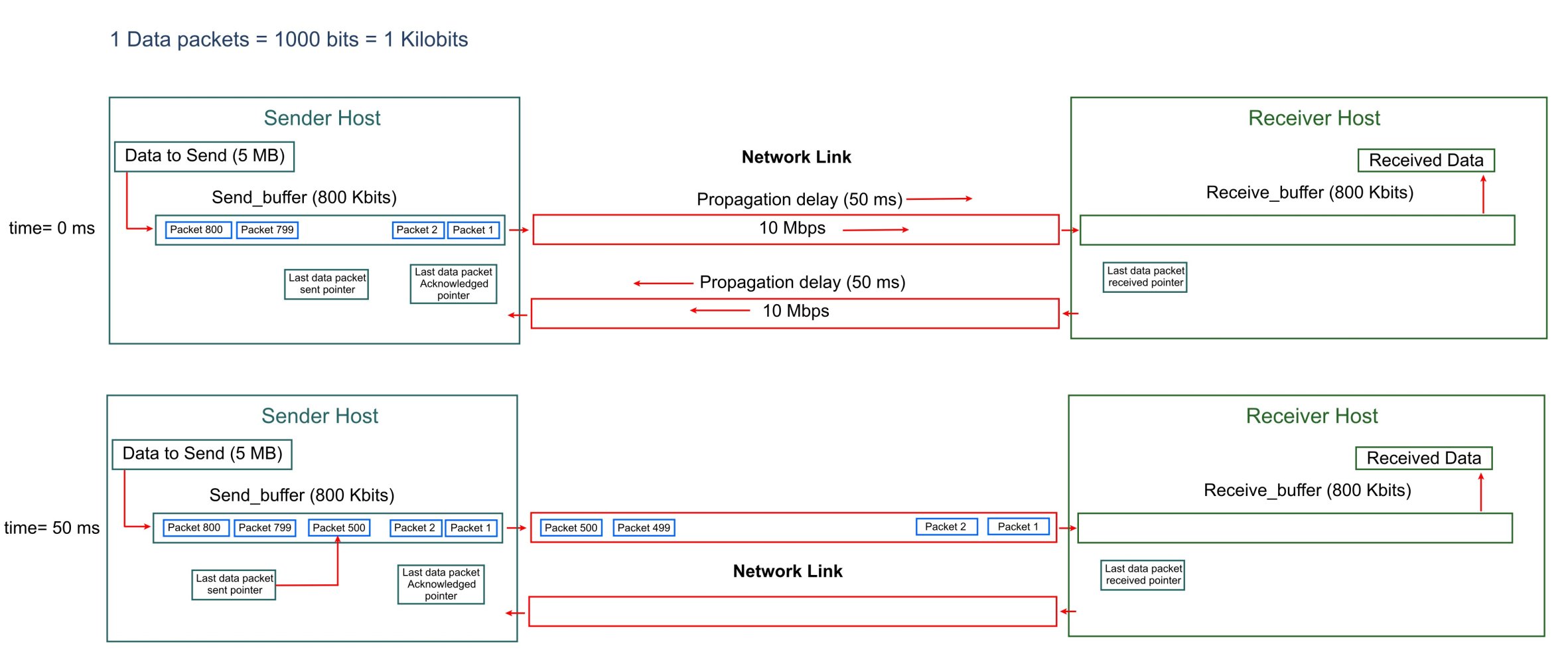
- At ( time = 0 ms) the Sender host starts sending data to the Receiver host.
- The first packet will reach the receiver host at time= 50 ms (0.05 sec). By this time the sender would have sent (10,000,000 bps * 0.05 sec = 500000 bits = 62.5 KB = 500 Kbits = 500 data packets ).
- After receiving first packet, the receiver host will send the the ACK packet back to the sender host. This ACK packet will take 50 ms time to reach the sender host.
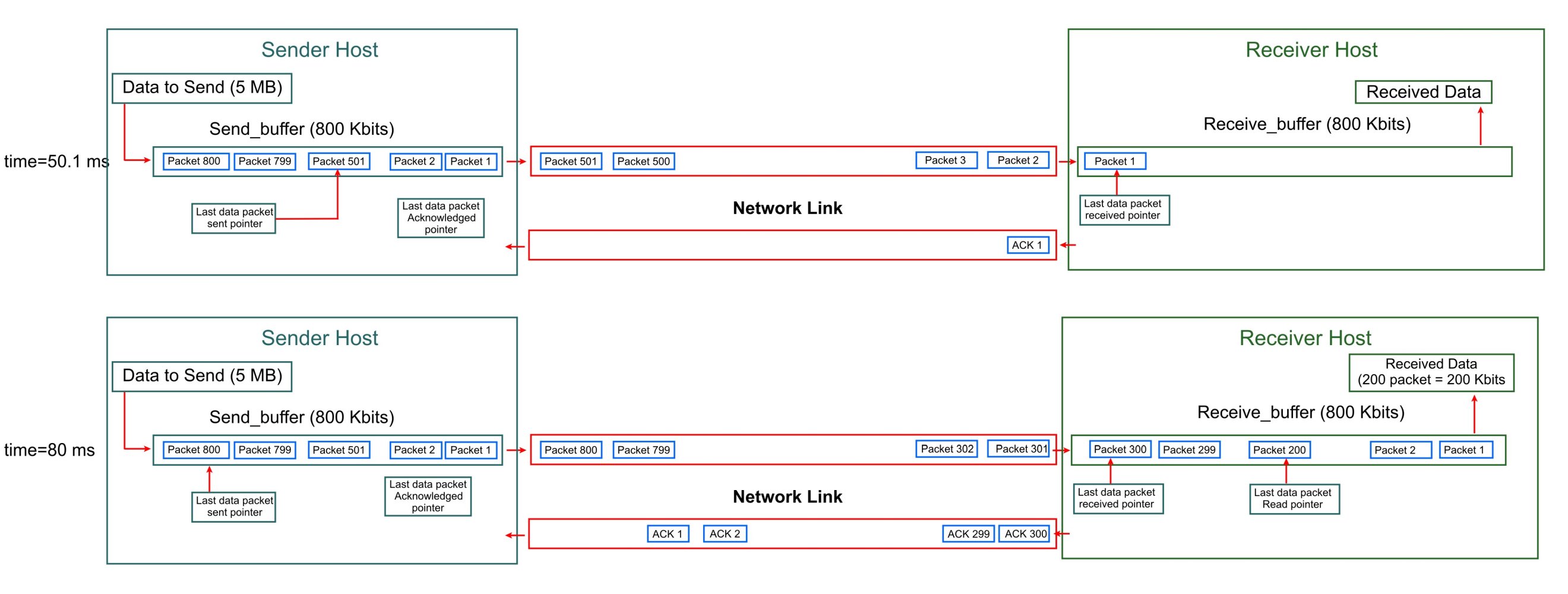
- By ( time = 80 ms), the Sender host will have sent all of the (800 data packets = 800 Knits = 100 KB) from the Send_buffer. The Sender host will not send any data further and wait for the Acknowledgment packet for the first data packet.
- Total time elapsed when the first ACK packet reaches the sender host is ( 50 ms + 50 ms = 100 ms = 0.1 sec).
- Since the Transmit windows size(Send_buffer) is 100 KB, the Sender host can send a maximum of 100 KB unacknowledged data. The sender host remain idle for (100 ms – 80 ms = 20 ms = 0.02 sec). Thus by using Trasnmit windows size(send buffer) of 100 KB, the bandwidth of the network link remains underutilized.
Example 3
- Bandwidth: 100 Mbps (100 × 10^6 bits per second)
- RTT: 50 ms (0.05 seconds)
- BDP = (100×106)×0.05 = 5,000,000 bits = 625,000 bytes = 625 KB
Scenario 1
TCP window size = 64 KB
The Sender host can transmit maximum of 64 KB unacknowledged data, and will wait to receive ACK sent by the Receiver host.
The time taken by the Sender host to send 64 KB of data is ((64 ×103 x 8 bits)/(100 × 106 bits per second) = 0.00512 sec).
Since the ACK for the transmitted data sent by the sender host will start arriving after 0.05 sec, the sender host will not be able to send data for ( 0.05 sec – 0.00512 sec = 0.04488 sec).
So with the TCP windows size of 64 KB that is lower than BDP of 625 KB, the sender host remains idle for 0.04488 sec waiting for ACK. This significantly underutilizes the link.
Example_4
Consider a high-speed network:
- Link Bandwidth = 1 Gbps ( 1000,000,000 bits per second) = 10 ^9 bps
- Propagation delay between the Sender host and receiver host is 80 ms.
- Round-Trip Time (RTT) = 80 ms + 80 ms = 160 ms (0.160 seconds)
- Bandwidth-Delay Product = 10 ^9 bps × 0.16 s = 160,000,000 bits = 20 KB
Here, the TCP window size would need to be at least 20KB to fully utilize the link. In modern networks with high bandwidth or high latency (e.g., satellite links), the bandwidth-delay product can become quite large, necessitating mechanisms like TCP window scaling to support larger window sizes (up to millions of bytes).
Example_5
Suppose you’re transferring a file over a 1 Gbps link with a 100 ms RTT:
- BDP = (1×10^9)×0.1 = 100,000,000 bits = 12.5 MB
- Default Window Size: Many systems default to 64 KB, leading to:
- Throughput limited to:

This is only 0.5% of the link’s 1 Gbps capacity.
Factors Influencing BDP
- Network Congestion:
- Congestion increases RTT due to queuing delays, increasing the BDP. This requires dynamic adjustment of TCP windows or buffers.
- Physical Distance:
- Longer distances increase propagation delay, increasing RTT and thus BDP. For example, a transcontinental link has a higher RTT than a local link.
- Link Quality:
- Packet loss or jitter can affect RTT measurements and TCP performance, complicating BDP-based optimizations.
- Protocol Limitations:
- Older protocols or misconfigured systems may not support large enough windows or buffers for high-BDP networks.
- Hardware Constraints:
- Endpoints and routers need sufficient memory to handle large BDPs. Low-memory devices may struggle with high-BDP networks.
Challenges in High-BDP Networks
- Bufferbloat:
- Large buffers to accommodate high BDPs can lead to excessive queuing delays, increasing latency for interactive applications (e.g., gaming, VoIP). Modern congestion control algorithms like BBR or active queue management (AQM) techniques mitigate this.
- Packet Loss Sensitivity:
- In high-BDP networks, packet loss has a larger impact because more data is in flight. Recovery mechanisms must be robust.
- Tuning Complexity:
- Calculating and configuring for BDP requires accurate measurements of bandwidth and RTT, which can vary due to network conditions. Tools like ping (for RTT) and iperf (for bandwidth) are commonly used.
Modern Relevance
- Content Delivery Networks (CDNs): CDNs reduce RTT by placing servers closer to users, lowering the BDP and improving performance.
- High-Speed Internet: Modern 1 Gbps+ consumer links and low-latency 5G networks still require BDP considerations for optimal performance, especially for large file transfers or streaming.
- Satellite Internet (e.g., Starlink): Despite lower orbits, satellite links have high RTTs (20–50 ms), leading to larger BDPs than terrestrial links.
- Advanced Protocols: Protocols like QUIC and TCP BBR estimate bandwidth and RTT dynamically, adapting to changing BDP conditions more effectively than traditional TCP.
BDP is critical for:
- Maximizing Throughput: To fully utilize the available bandwidth of a network connection, the sender needs to transmit enough data to fill the “pipeline” represented by the BDP. If the sender sends data in smaller increments and waits for acknowledgments before sending more, the link can become idle during the waiting periods, leading to suboptimal throughput.
- TCP Window Sizing:
- In the context of the Transmission Control Protocol (TCP), the bandwidth-delay product is critical for optimizing performance. TCP uses a window size to control how much data can be sent before requiring an acknowledgment.
- To achieve maximum throughput and fully utilize the network link, the TCP window size should ideally be at least as large as the bandwidth-delay product.
- If the window size is too small, the sender will frequently pause to wait for acknowledgments, underutilizing the network capacity.
- A sufficiently large window size allows the sender to “keep the pipe full,” continuously sending data.
- If the window size is too large, it may lead to congestion or buffer overflow at the receiver.
- Buffer Requirements: The BDP also influences the amount of buffer space required at the network devices (routers, switches) and the end hosts. To accommodate the data in transit, these buffers need to be large enough to hold the BDP worth of data to prevent packet loss and maintain smooth data flow.
- Congestion Control:
- TCP’s congestion control algorithms (e.g., slow start, congestion avoidance) adjust the window size dynamically. The bandwidth-delay product sets an upper bound on the ideal window size, assuming no congestion.
Practical Implications
- Performance Tuning: Network engineers use the delay × bandwidth product to configure TCP parameters, such as buffer sizes and window scaling, to optimize performance for specific network conditions.
- Impact of Latency: Even high-bandwidth networks can suffer from low throughput if latency is high, as the product dictates how much data must be in flight.
- TCP Extensions:
- Window Scaling: Increases the effective window size beyond the 16-bit limit (65,535 bytes) in the TCP header to support LFNs.
- Selective Acknowledgments (SACK): Improves efficiency by acknowledging non-contiguous data, reducing retransmissions in high-delay networks.
- Timestamp Options: Helps measure RTT accurately, aiding in congestion control.
TCP Header Fields that control TCP flow control
The Transmission Control Protocol (TCP) header includes several critical fields that ensure reliable, ordered, and efficient data transfer over a network. The user query highlights three key components: Window Size (16 bits), Sequence and Acknowledgment Numbers, and Options (Window Scaling).
The TCP Window Size (16-bit field):
- In the standard TCP header, there is a 16-bit field dedicated to the “Window Size“.
- This field is controlled by the receiver.
- Definition: The Window Size field advertises the amount of data (in bytes) the receiver can accept without sending an acknowledgment back to the sender. Essentially, it tells the sender how much buffer space is available at the receiver.
- The sender is not allowed to send more data than the most recently advertised window size by the receiver before receiving an acknowledgment that advances the window.
- This mechanism prevents the receiver’s buffer from overflowing, which would lead to dropped packets and retransmissions.
- Purpose:
- It enables flow control, ensuring the sender does not overwhelm the receiver by sending more data than the receiver can handle.
- The maximum value of this field is 65,535 bytes (since 216−1=65,535).
- Role in TCP:
- TCP uses a sliding window mechanism, where the Window Size determines how many bytes the sender can transmit before needing an acknowledgment.
- A larger window size allows more data to be in transit, improving throughput, while a smaller window size limits the data flow to prevent buffer overflow.
Sequence and Acknowledgment Numbers
- Sequence Number (32 bits):
- Definition: This field identifies the position of the data in the byte stream being sent. For each TCP segment, it indicates the byte number of the first byte in that segment.
- Purpose: Ensures that data is reassembled in the correct order at the receiver, even if segments arrive out of sequence due to network conditions.
- Acknowledgment Number (32 bits):
- Definition: When the ACK flag is set, this field specifies the next byte the receiver expects to receive. It implicitly acknowledges the successful receipt of all bytes prior to that number.
- Example: If the Acknowledgment Number is 2000, the receiver has received all bytes up to 1999 and is now expecting byte 2000.
- Role in TCP:
- Together, these numbers track data in flight and confirm receipt, enabling reliable delivery.
- They detect lost or duplicate segments: if a segment’s Sequence Number is missing, the receiver won’t advance the Acknowledgment Number accordingly, prompting retransmission by the sender.
- Within the sliding window (defined by the Window Size), they ensure that data is sent and received in an organized, error-free manner.
The TCP Window Scale Option
- Definition: The Options field in the TCP header provides flexibility by allowing additional features. One key option is Window Scaling, which enhances the Window Size field.
- Purpose:
- The 16-bit Window Size limits the buffer to 65,535 bytes, which can be insufficient in high-bandwidth or high-latency networks (where the bandwidth-delay product is large).
- Window Scaling, defined in RFC 7323, introduces a scaling factor (up to 214) that multiplies the Window Size, effectively supporting window sizes up to approximately 1 GB.
- How It Works:
- Negotiated during the TCP handshake (in SYN packets), both sender and receiver agree on a shift count (0 to 14).
- If both the sender and receiver support and agree to use this option, a scaling factor is exchanged. This scaling factor is an 8-bit value.
- This scaling factor represents the number of bits to left-shift the 16-bit Window Size value received in the TCP header.
- The effective window size is calculated as:
- Effective Window Size=Window Size Field×2shift count
- For example, a Window Size of 65,535 with a shift count of 7 results in an effective window of 65,535×128 = 8,388,480 bytes.
- Role in TCP:
- It ensures TCP remains efficient in modern networks (e.g., fiber-optic or satellite links) by allowing larger amounts of data to be in flight, maximizing throughput.
- The combination of the effective window size and the network’s Round-Trip Time (RTT) dictates the maximum amount of data that can be “in flight” (sent but not yet acknowledged) at any given moment. This, in turn, puts an upper limit on the transmission speed for that connection.
How They Work Together
- Sliding Window Mechanism:
- The Window Size defines the number of bytes that can be sent without acknowledgment, while Sequence and Acknowledgment Numbers track which bytes are sent and received within this window. As acknowledgments arrive, the window “slides” forward, allowing more data to be transmitted.
- Reliability: Sequence Numbers ensure data order, and Acknowledgment Numbers confirm receipt, making TCP reliable within the window’s bounds.
- Adaptability: Window Scaling extends the Window Size’s capacity, enabling TCP to handle diverse network conditions efficiently.
TCP Sliding Window Mechanism
The sliding window is TCP’s core mechanism for managing data transmission, combining flow control, reliability, and efficiency. It allows the sender to transmit multiple segments before receiving acknowledgments, keeping the network “pipe” full, while ensuring the receiver’s buffer is not overwhelmed.
Key Concepts
- Sliding Window: The sliding window represents the range of bytes the sender is allowed to transmit without waiting for an acknowledgment. Its size is determined by the Window Size field advertised by the receiver.
- Sliding Mechanism: As the receiver acknowledges received data, the window “slides” forward, allowing the sender to transmit new data within the updated window.
- Byte-Oriented: TCP’s window is defined in terms of byte sequences, not segments, using Sequence Numbers to track data and Acknowledgment Numbers to confirm receipt.
How It Works
The sliding window operates as follows:
- Window Initialization:
- During the TCP three-way handshake (SYN, SYN-ACK, ACK), the receiver advertises its initial Window Size.
- The sender uses this to determine how many bytes it can send starting from the initial Sequence Number.
- Data Transmission:
- The sender transmits data bytes up to the Window Size limit, tracked by Sequence Numbers.
- For example, if the Window Size is 10,000 bytes and the initial Sequence Number is 1000, the sender can send bytes 1000 to 10,999.
- Acknowledgments:
- The receiver sends ACK packets with an Acknowledgment Number indicating the next byte it expects (confirming all prior bytes were received).
- The receiver also updates the Window Size in the ACK to reflect its current buffer capacity.
- Window Sliding:
- Upon receiving an ACK, the sender advances the window based on the Acknowledgment Number and the new Window Size.
- For example, if the receiver acknowledges byte 3000 with a Window Size of 8000, the sender can now send bytes 3000 to 10,999.
- Dynamic Adjustment:
- The Window Size changes dynamically based on the receiver’s buffer availability. If the buffer fills, the receiver advertises a smaller window (or zero, pausing transmission). If the buffer frees up, a larger window is advertised.
Window Components
The sliding window can be visualized as a range of byte Sequence Numbers, divided into four regions:
- Bytes Sent and Acknowledged: Data already transmitted and confirmed by the receiver.
- Bytes Sent but Not Acknowledged: Data in flight, awaiting acknowledgment.
- Bytes Allowed to Send: Data the sender can transmit immediately, within the current Window Size.
- Bytes Not Yet Allowed: Data beyond the current window, which the sender cannot send until the window slides forward.
The effective window is the number of bytes the sender can currently transmit, calculated as:
Effective Window = Advertised Window Size − (Next Byte to Send − Next Byte Acknowledged)
Interaction Between Window Size and Sliding Window
- Window Size as the Control Knob: The Window Size field directly defines the size of the sliding window. It is the receiver’s way of telling the sender, “This is how much data I can handle right now.”
- Sequence and Acknowledgment Numbers: These fields (32 bits each) work with the Window Size to manage the sliding window:
- Sequence Numbers identify the bytes being sent, marking the start and end of the current window.
- Acknowledgment Numbers confirm which bytes have been received, allowing the window to slide forward.
- Flow Control: The sliding window ensures the sender respects the receiver’s Window Size, preventing buffer overflow. If the receiver’s buffer is full, it advertises a Window Size of zero, halting transmission until buffer space is available.
- Reliability: The sliding window, combined with Sequence and Acknowledgment Numbers, ensures reliable delivery by tracking which bytes are in flight and retransmitting any that are lost.
Practical Implications
- Maximizing Throughput:
- The Window Size must be at least as large as the delay × bandwidth product (bandwidth × RTT) to fully utilize the network link. The sliding window ensures continuous data flow within this constraint.
- Example: For a 1 Gbps link with 100 ms RTT, the delay × bandwidth product is 12.5 MB, requiring Window Scaling to support a window larger than 65,535 bytes.
- Buffer Management:
- The receiver’s buffer must be large enough to handle the advertised Window Size. Operating systems (e.g., Linux, Windows) allow configuration of buffer sizes to match network conditions.
- Example: Linux uses sysctl settings like net.ipv4.tcp_rmem to adjust receive buffer sizes.
- Dynamic Adaptation:
- The sliding window adapts to changing network conditions. If the receiver’s application is slow to process data, the Window Size shrinks, slowing transmission. If the buffer clears, the Window Size increases, accelerating data flow.
- Congestion Control:
- While the Window Size governs flow control (receiver-imposed), TCP also uses a congestion window (sender-imposed) to avoid network congestion. The effective transmission window is the minimum of the advertised Window Size and the congestion window.
Example Scenario
- Setup: A sender wants to transmit data to a receiver. The receiver advertises a Window Size of 10,000 bytes, with an initial Sequence Number of 1000.
- Transmission: The sender sends segments covering bytes 1000–4999 (4,000 bytes). These are in flight, within the window (1000–10,999).
- Acknowledgment: The receiver processes bytes 1000–2999, sends an ACK with Acknowledgment Number 3000 and Window Size 8,000 (due to reduced buffer space).
- Window Slide: The sender slides the window to cover bytes 3000–10,999 (8,000 bytes) and can send new data starting from byte 5000.
- Outcome: The sliding window ensures the sender respects the receiver’s capacity while maintaining efficient data transfer.
Example 2
During a TCP data transmission,
- The Sequence Number field in the TCP header tells how much data has been already transferred or sent during a session.
- The TCP payload length tells the how much data is being sent in this TCP segment.
The Sequence Number = 518
TCP payload = 64
Calculated Next Sequence Number = 518 + 64 =582

In the next TCP segment,
The Sequence Number = 582 , indicating that 582 bytes has been sent.
TCP payload = 136 , indicating 136 bytes ins being sent in this TCP segment.
Calculated Next Sequence Number = 582 + 137 = 718

In the next TCP segment,
The Sequence Number = 718 , indicating that 718 bytes has been sent.
TCP payload = 521 , indicating 521 bytes ins being sent in this TCP segment.
Calculated Next Sequence Number = 718 + 521 = 1239

Example 3
A TCP transmission between remote host(web server) and local host(computer) is going on and the local host is sending the Acknowledgment of the previously received data from the remote host.
- The application process in the local host has port number: 51688
- The web server process in the remote host has port number: 433
The TCP segment sent from the local host, has fields:
- The Sequence Number = 1270 , indicating that 1270 bytes has been sent by the local host to the remote host.
- TCP payload = 0 , indicating 0 bytes of app data is being sent in this TCP segment.
- Calculated Next Sequence Number = 1270 + 0 = 1270
- Acknowledgment number = 99561, indicates that the local host acknowledges that the 99561 bytes has already been received by the local host.
- Calculated advertised windows size: 64256. It indicates the the local host can receive maximum of 64256 bytes of TCP payload data without acknowledging the received data.
- This set the new receive window buffer size of 64256 bytes in the local host.

After receiving the ACK from the local host, the remote host has enough information to continue sending data to the local host. The remote host sends multiple TCP packets to the local host.
The remote host Calculates the advertised windows size: 64256 bytes of the local host. The remote host knows that the local host has allotted a buffer of 64256 bytes to receive the data from remote host. So the remote host can send a maximum of 64256 bytes of data without receiving acknowledgment for it.
During a TCP transmission between remote host(web server) and local host(computer), the remote host is sending data.
The TCP segment sent from the remote host, has fields:
- The Sequence Number = 161061 , indicating that 161061 bytes has been sent by the remote host to the local host.
- TCP payload = 1230 , indicating 1230 bytes is being sent in this TCP segment.
- Calculated Next Sequence Number = 161061 + 1230 = 162291
- Acknowledgment number = 1270, indicating that the remote host acknowledges that the 1270 bytes has already been received by the remote host.
- Bytes in flight = 62730. This calculated value estimates that 62730 bytes has been sent by the remote host and has not been acknowledged by the local host. Bytes Sent but Not Acknowledged.
- Bytes Sent and Acknowledged: 99561 bytes
- Bytes Allowed to Send: Advertised Window size of the local host – ( Current Sequence Number – last Acknowledgment number by the local host) = 64256 bytes – (161061 – 99651) bytes = (64256 – 61500) bytes = 2756 bytes. So currently the remote host can send a maximum of 2756 bytes. TCP payload of 1230 bytes is within the limit.

The next TCP segment is the remote host(web server) is sending data to local host(computer).
The TCP segment sent from the remote host, has fields:
- The Sequence Number = 162291 , indicating that 162291 bytes has been sent by the remote host to the local host.
- TCP payload = 1230 , indicating 1230 bytes is being sent in this TCP segment.
- Calculated Next Sequence Number = 162291 + 1230 = 16521
- Acknowledgment number = 1270, indicating that the remote host acknowledges that the 1270 bytes has already been received by the remote host.
- Bytes in flight = 63960.
- Since 62730 bytes was already in flight in previous TCP segment and 1230 bytes is being sent as TCP payload by the remote host and the local host has not sent the Acknowledgment. The newly calculated value of Bytes in flight is (62730+1230 = 63960) bytes that has been sent by the remote host and has not been acknowledged by the local host.
- Note that the Bytes in flight (63960 bytes) is large enough to fill the Calculated windows size ( 64256 bytes) of the local host. Now the remote host will wait for acknowledgement from the local host before sending the next TCP packet.

The next TCP segment is the local host(computer) sending the Acknowledgment packet to the remote host(web server).
The TCP segment sent from the local host, has fields:
- The Sequence Number = 1270 , indicating that 1270 bytes has been sent by the local host to the remote host.
- TCP payload = 0 , indicating 0 bytes is being sent in this TCP segment.
- Calculated Next Sequence Number = 1270 + 0 = 1270
- Acknowledgment number = 163521, indicates that the local host acknowledges that the 163521 bytes has already been received by the local host.
- Note that the previous Acknowledgment number sent by the local host was 99561. So by acknowledging 163521 bytes , the local host acknowledges the (16521-99561 = 63,960) bytes sent by the remote host between these two ACK packet. The Bytes in flight (63960 bytes) has been acknowledged by the local host.
- Calculated windows size: 65280. It indicates the local host can receive maximum of 65280 bytes without acknowledging the received data. Now the remote host will send upto 65280 bytes of unacknowledged data then wait for acknowledgment packet from the local host.
- This set the new receive window buffer size of 65280 bytes in the local host.

The next TCP segment is the remote host(web server) is sending data to local host(computer).
The TCP segment sent from the remote host, has fields:
- The Sequence Number = 163521 , indicating that 163521 bytes has been sent by the remote host to the local host.
- TCP payload = 7380 , indicating 7380 bytes is being sent in this TCP segment.
- Calculated Next Sequence Number = 163521 + 7380 = 170901
- Acknowledgment number = 1270, indicating that the remote host acknowledges that the 1270 bytes has already been received by the remote host.
- Bytes in flight = 7380. Since 63960 bytes that was already in flight in previous TCP segment, sent by the remote host and the local host did sent the Acknowledgment for all the data that has been sent by the remote host . So the previous bytes in flight becomes 0 bytes and the TCP payload size is 7380 bytes. this makes the new calculated bytes in flight (0+7389 = 7380) bytes.

TCP Window Scale Option
the TCP Window Scale Option is a TCP extension that allows the receive window size to exceed the original maximum of 65,535 bytes specified in the standard TCP header. This option is critical for optimizing performance in modern high-bandwidth, high-latency networks (often called Long Fat Networks, LFNs), where the bandwidth-delay product can demand much larger window sizes to fully utilize the network link. In the early days of the internet, with lower bandwidth and higher latency being more common, this limit was often sufficient to match or exceed the BDP of most connections.
However, with the advent of high-bandwidth networks (like Gigabit Ethernet) and connections with significant latency (like long-distance links or satellite connections), the Bandwidth-Delay Product can easily exceed 64 KB.
Consider a high-speed network with a bandwidth of 1 Gbps (109 bps) and a modest Round-Trip Time (RTT) of 50 milliseconds (0.05 seconds). The BDP for this connection would be:
BDP =109 bps × 0.05 s = 5 × 107 bits = 6.25 MB
In this scenario, the BDP is approximately 6.25 MB, which is significantly larger than the 64 KB limit of the original TCP window size. If the receiver can only advertise a window of 64 KB, the sender will be forced to stop sending data after every 64 KB and wait for an acknowledgment, even though the network has the capacity to handle much more data in flight. This severely limits the achievable throughput to well below the link’s potential.
Background: TCP Window Size Limitation
- In the standard TCP header (as defined in RFC 9293), the Window Size field is 16 bits, allowing a maximum advertised window of 2^16 – 1 = 65,535 bytes.
- The window size determines how much unacknowledged data the sender can transmit before waiting for an acknowledgment, directly affecting throughput.
- In networks with a large bandwidth-delay product (e.g., high-bandwidth links like fiber or high-latency links like satellite), the 65,535-byte limit is often insufficient to keep the network “pipe” full, leading to underutilization and reduced throughput.
What is the TCP Window Scale Option?
The TCP Window Scale Option, introduced in RFC 1323 (now part of RFC 7323, which updates TCP extensions), addresses this limitation by allowing the window size to be scaled up to a maximum of 2^30 bytes (approximately 1 GB). It introduces a scaling factor that is applied to the 16-bit window size field in the TCP header. This scaling factor is negotiated during the TCP connection setup phase (within the SYN and SYN-ACK packets). It does this by introducing a scaling factor that effectively multiplies the value in the Advertised Window Size field.
Key Features:
- Option Kind: 3 (as per TCP option numbering).
- Length: 3 bytes (1 byte for Kind, 1 byte for Length, 1 byte for Shift Count).
- Shift Count: A value between 0 and 14, indicating how many bits the Window Size field should be left-shifted (multiplied by 2^shift count).
- Maximum Window Size: With a shift count of 14, the effective window size becomes:
- 65,535 × 214 = 65,535 × 16,384 = 1,073,725,440 bytes ≈ 1GB
How It Works
- Negotiation During TCP Connection Setup:
- The Window Scale Option is only sent in SYN segments during the TCP three-way handshake (SYN, SYN-ACK, ACK).
- Both the sender and receiver must include the option in their SYN packets to enable window scaling for the connection.
- If either side does not support or include the option, scaling is disabled, and the standard 65,535-byte limit applies.
2. Scaling Factor:
- The scaling factor is an 8-bit value, allowing for a shift count from 0 to 14.
- The Shift Count specifies how many bits to shift the Advertised Window Size field left.
- For example, a Shift Count of 7 means the Advertised Window Size value is multiplied by 2^7 = 128.
- The actual window size is:
- Effective Window Size = Advertised Window Size × 2Shift Count
- This means the receive window size can be scaled up to 65,535×214, which is approximately 1 GB.
3. Runtime Behavior:
- Once negotiated, the scaling factor applies for the duration of the connection.
- The Window Size field in subsequent TCP segments (e.g., data or ACK packets) is interpreted as a scaled value.
- Both sides maintain separate scaling factors (one for sending, one for receiving), as each direction may advertise different shift counts.
4. Backward Compatibility:
- The option is designed to be ignored by older TCP implementations that do not recognize it, ensuring compatibility.
- If window scaling is not negotiated, TCP falls back to the unscaled 16-bit window size.
Example 1
The TCP unicast transmission occurs between two hosts, a local host(computer, mobile device) and a remote host( file server, web server).
During the TCP transmission negotiation, the TCP header of the local host advertises fields :
- Shift Count data in the Option field (12 bytes). In this case, the Shift Count = 8.
- Advertised TCP Windows size = 65535 bytes
Effective TCP receive Window Size for the next data communication = 65535 bytes

In a TCP data transmission, the maximum bandwidth supported by the local host with RTT=100 ms and the Effective TCP Window Size of 65535 bytes = (65535 bytes/100 ms) = (65535 * 8 bits)/(100 * 10-3 seconds) = 52,42,800 bits/sec = (52,42,800 / (1024 * 1024) Megabits/sec = 4.9999 Megabits/sec
The local host has TCP receive buffer size of 65535 bytes that is the maximum amount of data(in bytes) it can receive from the remote host without sending acknowledgment.
Example 2
The TCP unicast transmission occurs between two hosts, a local host(computer, mobile device) and a remote host( file server, web server).
During the TCP transmission negotiation, the TCP header of the remote host has the fields :
- Shift Count = 7.
- TCP Windows size = 33120 bytes
Effective TCP receive Window Size of the remote host = 33120 bytes. The maximum length of unacknowledged data that can be is the network link.

In a TCP data transmission, the maximum bandwidth supported by the remote host with RTT=100 ms and the Effective TCP Window Size of 33120 bytes = (33120 bytes/100 ms) = (33120 * 8 bits)/(100 * 10-3 seconds) = 26,49,600 bits/sec = (26,49,600 / (1024 * 1024) Megabits/sec = 2.52685 Megabits/sec
The remote host has advertised TCP receive buffer size of 33120 bytes that is the maximum amount of data(in bytes) it can receive from the local host without sending acknowledgment.
Example 3
During the downloading of a large file from remote host using the TCP , the receiver(local host) TCP header has the advertised TCP Window size = 65535 bytes
Since the Shift Count is already negotiated, the sender or receiver keeps this data for the rest of data transmission. In this case advertised receiver Windows Scale Shift count is 8. So the Windows size scaling factor of 28= 256 will be used for rest of the transmission.
Calculated Effective TCP receive Window Size of the local host = 65535 bytes * 256 = 1,67,76,960 bytes = (1,67,76,960/1024) kilobytes = 16,383.75 kilobytes = 16,383.75/1024 Megabytes = 15.999 Megabytes.

In best case, the RTT between the local and remote host is 20 ms, the maximum download bandwidth supported by the TCP transmission = (Effective TCP Window Size/Round Trip Time) = (1,67,76,960 bytes/20 ms) = ((1,67,76,960 * 8 bits) / (20 * 10-3 sec) = 6,71,07,84,000 bits/sec = 65,53,500 Kilobits/sec = 6,399.9023 Megabits/sec. This download speed in best case scenario is fast enough for downloading a large file.
In worst case the RTT between the sender and receiver is 400 ms, the maximum download bandwidth supported by the TCP transmission = (Effective TCP Window Size/Round Trip Time) = (1,67,76,960 bytes/400 ms) = ((1,67,76,960 * 8 bits) / (400 * 10-3 sec) = 33,55,39,200 bits/sec = 3,27,675 Kilobits/sec = 319.995 Megabits/sec
The RTT between the sender(remote host) and receiver(local host) during the download of a large file keeps changing. This affects the maximum download bandwidth during the download of the file. The receiver may also change their respective TCP Windows size during the transmission . The changing value of RTT and TCP Windows size of receiver affects the overall maximum download bandwidth during the transmission.
Example 4
With maximum Shift Count of 14, the Windows size scaling factor is (214 = 16384). The maximum advertised TCP window size is 65,535 bytes.
So the maximum Effective TCP window size = advertised TCP window size * Windows size scaling factor = 65535 bytes * 16384 = 1,07,37,25,440 bytes.
The maximum bandwidth supported by this maximum Effective TCP window size in a network link with RTT of 10 millisecond = (Effective TCP window size / RTT ) = (1,07,37,25,440 bytes / 10 ms) = ((1,07,37,25,440 * 8 bits) / (10 * 10-3 sec)) = 8,58,98,03,52,000 bits/sec = 83,88,48,000 kilobits/sec = 8,19,187.5 megabits/sec = 799.98779 gigabits/sec = 99.99847 gigabyte/sec.
The maximum bandwidth supported by this maximum Effective TCP window size in a network link with RTT of 100 millisecond = (Effective TCP window size / RTT ) = (1,07,37,25,440 bytes / 100 ms) = ((1,07,37,25,440 * 8 bits) / (100 * 10-3 sec)) = 8,58,98,03,52,00 bits/sec = 83,88,48,00 kilobits/sec = 8,19,18.75 megabits/sec = 79.998779 gigabits/sec = 9.999847 gigabyte/sec.
The maximum bandwidth supported by this maximum Effective TCP window size in a network link with RTT of 500 millisecond = (Effective TCP window size / RTT ) = (1,07,37,25,440 bytes / 500 ms) = ((1,07,37,25,440 * 8 bits) / (500 * 10-3 sec)) = 17,17,96,07,040 bits/sec = 1,67,76,960 kilobits/sec = 16,383.75 megabits/sec = 15.999 gigabits/sec = 1.999969 gigabyte/sec.
These transfer speeds are more than enough for individuals.
How the Receiver Calculates the Advertised Window Size
The Window Size field (16 bits) in the TCP header represents the number of bytes the receiver is willing to accept at any given time, based on its available buffer space. The receiver calculates this value dynamically, primarily based on local resource availability rather than network conditions like bandwidth or RTT. Here’s how it works:
- Receiver’s Buffer Space:
- The receiver maintains a receive buffer, a memory region allocated to hold incoming TCP segments before they are processed by the application (e.g., a web browser or email client).
- The buffer size is configured by the operating system.
- The total buffer size is typically fixed or has a maximum limit, but the available buffer space fluctuates based on how quickly the application reads data from the buffer.
- Calculating Available Buffer Space:
- The receiver calculates the advertised Window Size as the amount of free space in the receive buffer at the time it sends a TCP segment (usually an ACK).
- Formula: Advertised Window Size = Total Buffer Size − Data in Buffer
- Total Buffer Size: The maximum capacity of the receive buffer.
- Data in Buffer: The amount of unprocessed data (received but not yet read by the application).
- For example, if the receive buffer is 100,000 bytes and 30,000 bytes are occupied by unprocessed data, the advertised Window Size is: 100,000−30,000 = 70,000 bytes
- Dynamic Adjustment:
- The Window Size is recalculated each time the receiver sends a TCP segment (e.g., an ACK or data packet). It reflects the current buffer state, which changes as:
- The application reads data, freeing up buffer space (increasing the Window Size).
- New data arrives, occupying buffer space (decreasing the Window Size).
- If the buffer is full, the receiver advertises a Window Size of zero, signaling the sender to pause transmission until space becomes available (a state called zero window).
- The Window Size is recalculated each time the receiver sends a TCP segment (e.g., an ACK or data packet). It reflects the current buffer state, which changes as:
- Window Scaling Consideration:
- If the Window Scaling option is negotiated during the TCP handshake (as per RFC 7323), the receiver applies a scaling factor to the Window Size field.
- The advertised Window Size is the unscaled value (0–65,535 bytes) in the 16-bit field, but the sender interprets it as: Effective Window Size = Advertised Window Size Field × 2shift count
- The receiver determines the shift count based on its maximum buffer size. For example, a 1 MB(10,48,576 bytes) buffer requires a shift count of at least 4 (24= 16, so 65,535 × 16 = 1,048,560 bytes).
- The receiver’s operating system typically sets the shift count to support the largest possible buffer, constrained by memory and configuration.
- Operating System Role:
- Modern TCP stacks (e.g., in Linux, Windows, macOS) use auto-tuning to optimize buffer sizes and Window Size calculations. They dynamically adjust the receive buffer based on:
- Application behavior (how quickly it reads data).
- System memory availability.
- Historical network performance (though not directly bandwidth or RTT, as explained below).
- For example, Linux’s TCP stack adjusts tcp_rmem (receive buffer size) within a configured range, ensuring the Window Size aligns with available resources.
- Modern TCP stacks (e.g., in Linux, Windows, macOS) use auto-tuning to optimize buffer sizes and Window Size calculations. They dynamically adjust the receive buffer based on:
- Constraints:
- The Window Size is capped by the receiver’s maximum buffer size and the 16-bit field limit (65,535 bytes, or ~1 GB with Window Scaling).
- The receiver may advertise a smaller window than its actual buffer capacity to account for system resources or to throttle the sender deliberately.
How the Receiver Knows the Bandwidth and RTT of the Network Link in TCP Transmission
The key point is that the receiver does not directly calculate or use bandwidth and RTT to determine the advertised Window Size. Instead, these parameters are indirectly inferred or managed by the TCP stack, primarily on the sender’s side, with some receiver involvement.
Here’s a detailed explanation:
- Receiver’s Role in Bandwidth and RTT:
- The receiver’s primary responsibility is to advertise its buffer capacity via the Window Size, independent of network conditions like bandwidth or RTT.
- The receiver does not actively measure bandwidth or RTT to set the Window Size. Instead, it relies on the sender to optimize transmission based on network conditions, using the Window Size as a constraint.
- RTT Estimation:
- RTT is the time for a packet to travel from sender to receiver and for an acknowledgment to return. It is typically measured by the sender, not the receiver, because the sender observes the time between sending a segment and receiving its ACK.
- However, the receiver indirectly contributes to RTT estimation through the Timestamps option (RFC 7323):
- If enabled, the sender includes a timestamp in each segment, and the receiver echoes it back in the ACK.
- The sender calculates RTT as the difference between the current time and the echoed timestamp.
- The receiver does not compute RTT itself but facilitates the sender’s measurement by returning timestamps.
- Modern TCP stacks use smoothed RTT estimates (e.g., via Karn’s algorithm) to account for variability.
- Bandwidth Estimation:
- Bandwidth (the link’s data rate) is not explicitly measured by the receiver or sender in standard TCP. Instead, it is inferred indirectly through TCP’s congestion control mechanisms (e.g., slow start, congestion avoidance).
- The receiver does not need to know the link’s bandwidth to set the Window Size, as its role is to advertise buffer capacity.
- The sender estimates effective bandwidth by observing the rate at which data is acknowledged, adjusting its congestion window (cwnd) to match the network’s capacity. This is independent of the receiver’s advertised Window Size but constrained by it.
- Bandwidth-Delay product:
- The Bandwidth-Delay product (RTT × bandwidth) indicates the amount of data that must be in flight to fully utilize the network link. It is primarily relevant to the sender, which adjusts its sending rate and window size to match this product.
- The receiver’s Window Size should ideally be at least as large as the Bandwidth-Delay product to avoid limiting throughput. However, the receiver does not calculate this product itself—it simply advertises a Window Size based on buffer availability.
- Example:
- Bandwidth = 1 Gbps, RTT = 100 ms
- Bandwidth-Delay product = 1,000,000,000 bps × 0.1 s = 100,000,000 bits = 12.5 MB
- The receiver’s buffer and Window Size should be ≥ 12.5 MB to maximize throughput, but the receiver sets this based on local resources, not by measuring bandwidth or RTT.
- Receiver’s Indirect Influence:
- While the receiver does not measure bandwidth or RTT, its advertised Window Size affects how the sender utilizes the network:
- If the Window Size is too small (less than the delay × bandwidth product), the sender cannot fully utilize the link, even if bandwidth and RTT are favorable.
- Modern receivers use auto-tuning to set large enough buffers (and thus Window Sizes) to accommodate typical network conditions, relying on operating system defaults or configurations optimized for high-speed networks.
- The Window Scaling option, negotiated during the handshake, allows the receiver to support large windows (up to ~1 GB), ensuring it can advertise sufficient capacity for high-bandwidth, high-latency links.
- While the receiver does not measure bandwidth or RTT, its advertised Window Size affects how the sender utilizes the network:
- Operating System and TCP Stack Behavior:
- Modern TCP stacks (e.g., Linux, Windows) use heuristics to optimize buffer sizes and Window Sizes without requiring explicit bandwidth or RTT measurements:
- Linux: The tcp_rmem parameter defines minimum, default, and maximum receive buffer sizes. The stack dynamically adjusts the buffer based on memory pressure and application behavior, indirectly accounting for network needs.
- Windows: Uses dynamic receive window auto-tuning, adjusting buffer sizes based on observed throughput and latency trends.
- These mechanisms ensure the receiver’s Window Size is generally large enough for common network scenarios, but they do not involve direct bandwidth or RTT calculations by the receiver.
- Modern TCP stacks (e.g., Linux, Windows) use heuristics to optimize buffer sizes and Window Sizes without requiring explicit bandwidth or RTT measurements:
- Sender’s Role in Network Awareness:
- The sender is primarily responsible for adapting to bandwidth and RTT through:
- Congestion Control: Algorithms like CUBIC or Reno adjust the congestion window based on packet loss or delay, indirectly estimating bandwidth.
- RTT Measurement: Using timestamps or ACK timing to compute RTT.
- The receiver’s Window Size acts as an upper bound on the sender’s effective window, ensuring flow control respects the receiver’s capacity.
- The sender is primarily responsible for adapting to bandwidth and RTT through:
Clarifications and Misconceptions
- Does the Receiver Need Bandwidth and RTT?: No, the receiver calculates the Window Size based solely on its buffer availability. Bandwidth and RTT are relevant to the sender for optimizing throughput and matching the delay × bandwidth product.
- Window Scaling and Network Conditions: The receiver’s choice of scaling factor (shift count) is based on its maximum buffer size, not on direct knowledge of bandwidth or RTT. However, the scaling factor is chosen to support large windows suitable for high-speed or high-latency networks.
- Dynamic Feedback: The receiver’s Window Size indirectly influences sender behavior. If the Window Size is too small, it limits throughput, prompting the sender to adjust its rate, but this is a feedback mechanism, not a direct calculation of network parameters by the receiver.
Example Scenario
- Setup: A receiver has a 1 MB (1,048,576 bytes) receive buffer, with 300,000 bytes occupied by unprocessed data. Window Scaling is enabled with a shift count of 4 (24=162^4 = 1624=16).
- Window Size Calculation:
- Available buffer space = 1,048,576 − 300,000 = 748,576 bytes
- Unscaled Window Size = 748,576 ÷ 16 = 46,786 (rounded down to fit the 16-bit field).
- Advertised Window Size = 46,786 (in the TCP header).
- Effective Window Size (as interpreted by the sender) = 46,786 × 16 = 748,576 bytes