Introduction to 802.11 Wi-Fi and Multicast Communication
Wi-Fi networks, built upon the IEEE 802.11 standard, have become ubiquitous in modern environments, connecting a vast array of devices from laptops to smart home gadgets. This standard defines the fundamental Medium Access Control (MAC) and Physical Layer (PHY) protocols that enable wireless local area network (WLAN) communication, serving as the foundation for all Wi-Fi branded products worldwide. A core principle of 802.11 is Carrier-Sense Multiple Access with Collision Avoidance (CSMA/CA), where devices actively listen to the wireless channel before transmitting to minimize interference and ensure orderly communication. Over time, the 802.11 family has evolved through various amendments, including 802.11b, a, g, n, ac, and ax, each introducing advancements in throughput and efficiency across different frequency bands such as 2.4 GHz, 5 GHz, 6 GHz, and 60 GHz.
Understanding how data is transmitted across these networks requires differentiating between the primary communication types: unicast, broadcast, and multicast. Each type serves a distinct purpose and carries specific implications for network performance, particularly concerning the data rates at which they operate.
1.1. Defining Unicast, Broadcast, and Multicast in Wi-Fi
Unicast communication represents a one-to-one transmission, where data flows from a single source to a single, designated destination. This is achieved by routing packets directly to the intended recipient using unique IP and MAC addresses. Unicast is the most prevalent form of network communication, underpinning common activities such as web browsing (HTTP), email (SMTP), and file transfers (FTP). A key characteristic of unicast transmissions is their inherent reliability, as they typically incorporate link-layer acknowledgements (ACKs) and automatic retransmission mechanisms. This ensures that lost packets are detected and resent, guaranteeing successful delivery.
Broadcast communication involves a one-to-all transmission, where data originating from a single source is sent to every device residing on a local network segment. Packets are addressed to a reserved broadcast address (e.g., FF:FF:FF:FF:FF:FF for MAC addresses), ensuring all devices on that local network receive the data. While all devices receive broadcast frames, only those that require the information will process it. This method is commonly employed for network discovery protocols like Address Resolution Protocol (ARP) and DHCP discovery. Although simple to implement, broadcasting can lead to significant network congestion if not carefully managed, as it forces many devices to receive and potentially process data that is irrelevant to them, consuming valuable network resources.
Multicast communication offers a one-to-group transmission model, allowing a single source to send data simultaneously to a specific group of multiple recipients. This method is highly efficient for distributing the same data to several stations that require it, as the network infrastructure, such as routers and switches, can replicate packets and forward them only to the interested group members. This contrasts sharply with unicast, which would necessitate sending individual copies to each recipient, and broadcast, which would indiscriminately flood the entire network.
A critical distinction emerges when considering the reliability of these communication types in a Wi-Fi environment. Unicast transmissions are designed with explicit feedback mechanisms like ACKs and retransmissions, ensuring data integrity. Multicast, by its very nature as a point-to-multipoint communication, generally lacks a direct feedback process such as individual ACKs. This absence means that the transmitting Access Point (AP) cannot confirm successful reception by all recipients or automatically initiate retransmissions for lost packets. This fundamental design choice, prioritizing simultaneous delivery to a group over individual reliability guarantees, is a primary technical factor compelling multicast traffic to be handled differently and often at lower, more robust data rates. It necessitates that the AP operate under a “worst-case” assumption to maximize the likelihood of reception for all group members, which directly influences the achievable multicast rate.

IP Multicast addressing
IP Multicast addressing is a method of sending Internet Protocol (IP) datagrams to a group of interested receivers in a single transmission. It’s an efficient way to deliver data (like streaming video, real-time financial data, or online gaming information) to multiple recipients without sending individual copies to each one.
Here’s a breakdown to help you understand it:
Key Concepts
- One-to-Many or Many-to-Many Communication: Unlike unicast (one-to-one) or broadcast (one-to-all on a local network), multicast allows a source to send a single stream of data that is then replicated and delivered to a specific group of recipients.
- Efficiency: Multicast conserves network bandwidth and resources. The source sends the packet only once, and the network infrastructure (routers and switches) handles replicating the packet only where paths diverge to reach multiple receivers. This means data only traverses a network link once, even if many devices on that segment need it.
- Receiver-Driven: Receivers explicitly “join” a multicast group to indicate their interest in receiving data sent to that group. The sender doesn’t need to know who the individual receivers are or how many there are.
- Multicast Group Address: Data is sent to a special IP multicast address, which acts as a logical identifier for the group of interested hosts.
How IP Multicast Addressing Works
- Multicast IP Addresses:
- IPv4: IP multicast addresses are in the Class D range, from
224.0.0.0to239.255.255.255. These addresses are identified by the first four bits being1110.- Some addresses within this range are reserved for special purposes (e.g.,
224.0.0.1for “All Hosts,”224.0.0.2for “All Multicast Routers”). - The
239.0.0.0/8range is reserved for administratively scoped multicast, meaning it’s for private use within an organization and packets using these addresses won’t cross organizational boundaries.
- Some addresses within this range are reserved for special purposes (e.g.,
- IPv6: IPv6 multicast addresses begin with
FF00::/8.
- IPv4: IP multicast addresses are in the Class D range, from
- Joining a Multicast Group (IGMP):
- Hosts interested in receiving multicast traffic for a particular group use the Internet Group Management Protocol (IGMP) to inform their local router that they want to join that multicast group.
- IGMP messages allow routers to build a “membership” table, knowing which hosts on their directly connected subnets are interested in which multicast groups.
- There are different versions of IGMP (v1, v2, v3) with evolving capabilities, such as allowing hosts to leave groups (
IGMPv2) or request specific sources within a group (IGMPv3).
- Multicast Routing (PIM):
- Protocol Independent Multicast (PIM) is a common multicast routing protocol. Routers running PIM use the information gathered from IGMP (and other PIM routers) to build and maintain multicast distribution trees.
- These trees ensure that multicast traffic flows efficiently from the source to all interested receivers, replicating packets only where necessary.
- PIM has different modes (e.g., Dense Mode, Sparse Mode) that determine how the distribution tree is built and managed.
- Data Transmission:
- When a source sends a multicast packet, it uses the multicast group address as the destination IP address.
- Multicast-enabled routers inspect the destination IP address and use their multicast routing table (built by PIM) to forward the packet only to interfaces that have interested group members downstream.
- Multicast traffic typically uses User Datagram Protocol (UDP) as its transport layer protocol because UDP is connectionless and doesn’t require acknowledgments from every receiver, making it suitable for one-to-many communication where some packet loss might be acceptable (e.g., live video).
Multicast vs. Unicast vs. Broadcast
| Feature | Unicast | Multicast | Broadcast |
| Communication | One-to-one | One-to-many | One-to-all (within a broadcast domain/LAN) |
| Destination | Single, specific IP address | Multicast group IP address (e.g., Class D) | Broadcast IP address (e.g., 255.255.255.255) |
| Efficiency | Efficient for single destination | Highly efficient for multiple interested destinations | Inefficient for large networks (floods all devices) |
| Bandwidth | Increases with more receivers | Conserves bandwidth by sending once | High bandwidth consumption (every device receives) |
| Scalability | Poor for many recipients | Scales well to large numbers of receivers | Limited scalability (restricted to local network) |
| Use Cases | Web Browse, email, file transfers | Streaming media, online gaming, stock tickers | ARP, DHCP discovery, routing protocol updates |
2. Understanding Data Rates in 802.11 Networks
The concept of “data rate” in 802.11 Wi-Fi networks is more nuanced than in wired Ethernet. Unlike wired connections where the data rate for each frame is typically consistent, Wi-Fi transmission rates are dynamic and can vary significantly from one frame to the next. This variability is influenced by a multitude of environmental and network factors, including the Signal-to-Noise Ratio (SNR), ambient noise levels, interference from other devices, the configured channel width, and the number of spatial streams utilized in MIMO (Multiple Input, Multiple Output) systems.
2.1. Dynamic Nature of Wi-Fi Data Rates
The wireless medium is inherently shared and susceptible to environmental fluctuations. An Access Point (AP) continuously assesses the channel conditions for each connected client and dynamically adjusts the transmission rate to optimize performance and reliability. This adaptive behavior means that a device closer to the AP with a strong, clean signal may receive data at a much higher rate than a device farther away or experiencing significant interference, even if both are connected to the same AP.
2.2. Types of Data Rates and Their Application
Different types of Wi-Fi frames serve distinct functions within the network, and consequently, they utilize different categories of data rates. This differentiation is fundamental to how 802.11 networks manage their wireless spectrum.
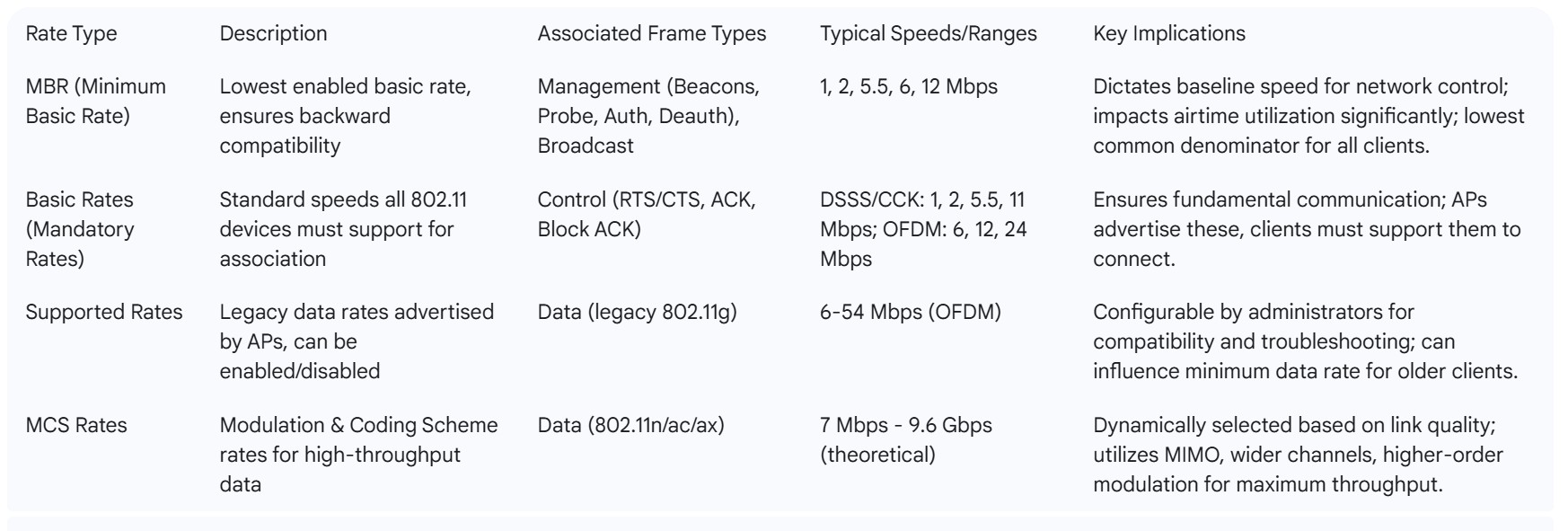
- Management Frames: These frames are essential for the basic operation and control of a Wi-Fi network. They include functions such as Association Requests and Responses (for clients to join a network), Probe Requests and Responses (for discovery), Beacon frames (advertisements from the AP), Authentication, and Deauthentication messages. Management frames are consistently transmitted at the Minimum Basic Rate (MBR).
- Control Frames: These frames facilitate the orderly exchange of data and manage access to the shared wireless medium. Examples include Request To Send (RTS), Clear To Send (CTS), Acknowledgement (ACK), and Block Acknowledgement (Block ACK) frames. Control frames typically utilize the Basic Rates.
- Data Frames: These frames are responsible for carrying the actual user payload, such as web traffic, video streams, or file transfers. Data frames primarily leverage Modulation and Coding Scheme (MCS) Rates to achieve the highest possible throughput based on current link conditions.
2.3. Detailed Explanation of Key Rate Types
Understanding the specific characteristics of each rate type is crucial for comprehending the behavior of multicast traffic.
- Supported Rates: These are legacy data rates that originated with the 802.11g standard. Even with the advent of newer standards and MCS rates, Access Points (APs) continue to advertise supported rates within their beacon frames. Unlike MCS rates, which are dynamically chosen by the AP, supported rates can often be manually enabled or disabled by network administrators. This configurability allows for fine-tuning the minimum speed supported by each radio and can be a valuable tool for troubleshooting Wi-Fi performance issues.
- Basic Rates (Mandatory Rates): These represent a set of standard speeds that every 802.11 device, regardless of its generation (from older 802.11b to modern Wi-Fi 6), must be capable of supporting to establish and maintain a connection. APs advertise their support for these rates in beacons and probe responses, and clients must support all basic rates listed by an AP to successfully associate with it. Basic rates are categorized by their underlying modulation technique:
- DSSS/CCK (used in 802.11b): Common basic rates include 1, 2, 5.5, and 11 Mbps.
- OFDM (used in 802.11a/g and later): Basic rates typically start from 6, 12, and 24 Mbps.
- Minimum Basic Rate (MBR): The MBR is the lowest value among the enabled basic rates. This rate holds particular significance because the AP transmits all management frames (such as beacons) and broadcast frames at the MBR. The rationale behind this design is to ensure backward compatibility across different generations of 802.11 devices. The 802.11 standard mandates that every AP generation (with the exception of 6E) must support older clients from the earliest eras (802.11a and 802.11b). To achieve this universal compatibility, APs send management and broadcast frames at the lowest possible speed. Consequently, most current APs are factory-default set with an MBR of 1 Mbps in the 2.4 GHz band, guaranteeing that even the oldest clients can communicate and connect.
- This requirement for backward compatibility, a fundamental design principle of the 802.11 standard, directly imposes the use of the lowest possible data rates (MBR/Basic Rates) for management and broadcast traffic. Since 802.11 multicast traffic behaves similarly to broadcast in its need to reach all potential recipients and its lack of individual acknowledgements, it is inherently transmitted at this same lowest common denominator rate. This is not merely a configuration preference but a core constraint imposed by the standard to ensure universal client connectivity, which significantly compromises multicast performance.
- The issue extends beyond just the speed of the multicast stream itself; it directly impacts how long the multicast frame occupies the shared wireless medium. A lower multicast rate means the frame remains on the air for a disproportionately longer duration, effectively monopolizing the airtime. This reduces the available bandwidth for all other traffic (unicast, other broadcasts) on that channel, leading to overall network slowdown, increased latency, and reduced aggregate throughput, even for high-speed clients. This “airtime utilization” is a critical, often overlooked, performance bottleneck.
- Modulation and Coding Scheme (MCS) Rates: Introduced with 802.11n and further advanced in 802.11ac and 802.11ax, MCS rates define the actual data throughput for data frames. These rates are determined by a combination of factors, including the number of spatial streams (MIMO), the channel width (e.g., 20, 40, 80, 160 MHz), the modulation type (e.g., BPSK, QPSK, 16-QAM, 64-QAM, 256-QAM, 1024-QAM), and the coding rate. For instance, 802.11n can theoretically achieve speeds up to 600 Mbps, 802.11ac up to 6.933 Gbps, and 802.11ax up to 9.608 Gbps.
3. The Inherent Challenges of Multicast in Wi-Fi
Multicast traffic in 802.11 Wi-Fi networks faces unique challenges that distinguish its behavior and performance from unicast transmissions. These challenges stem from fundamental design choices within the 802.11 standard, primarily aimed at ensuring broad compatibility and reach in a shared wireless medium.
3.1. Why Multicast Traffic is Transmitted at Lower Rates
The 802.11 standard stipulates that broadcast and multicast frames must be transmitted at the lowest possible data rate, often referred to as the “basic rate” or the “most robust MCS”. This mandate is primarily driven by the need to ensure that these frames successfully reach all potential receivers within the Basic Service Set (BSS). This includes devices that are physically distant from the Access Point (AP), those operating with weak signal strengths, or older legacy clients that may not support higher data rates. The overarching objective is to maximize the probability that every intended recipient correctly receives the multicast packet.
This means that the AP is compelled to use a much lower data rate at a power level sufficient for even the farthest station to receive the packet. Consequently, the data rate for a multicast stream, such as a video feed, becomes constrained by the environmental conditions and capabilities of the least-reliable receiver associated with the AP. This effectively means that a single client with poor signal quality or an older Wi-Fi standard can become the “weakest link,” dictating the multicast rate for the entire network. This creates a significant bottleneck, limiting the practical throughput of all multicast streams, regardless of the capabilities of other, faster clients.
3.2. Lack of Acknowledgements and Retransmissions
A fundamental difference between unicast and multicast in 802.11 is the absence of link-layer acknowledgements (ACKs) for multicast transmissions. Unlike unicast, where the receiving device sends an ACK to confirm successful reception and trigger retransmission if needed, multicast operates without this direct feedback mechanism.
Without ACKs, the AP has no way of knowing whether a multicast packet was successfully received by all intended recipients. This also means the AP cannot initiate automatic retransmissions for lost packets. This lack of reliability at the link layer can lead to a potentially high Packet Error Rate (PER), which is often reported at 5% or more. Such a high PER is particularly problematic for applications that demand high reliability and consistent data rates, such as real-time video streaming or voice communications.
3.3. Impact of Modulation and Coding Schemes (MCS) on Multicast
Modern Wi-Fi standards (802.11n, ac, ax) leverage advanced Modulation and Coding Schemes (MCS) to achieve significantly higher data rates for unicast traffic. These advancements include spatial multiplexing in Multiple Input Multiple Output (MIMO) systems, wider channel bandwidths (e.g., 40, 80, 160 MHz), and higher-order modulation types (e.g., 256-QAM, 1024-QAM). While these techniques enable unicast speeds to reach gigabits per second, they are generally not available or effective for multicast traffic. The reason is that multicast must reach multiple, potentially diverse, receivers simultaneously, making it impractical to optimize for individual client conditions or leverage spatial streams for a group transmission.
This disparity results in a substantial performance gap: unicast rates can be “more than 3 orders of magnitude difference” higher than typical multicast/broadcast rates. This stark contrast highlights a core limitation in how multicast is handled within the 802.11 framework.

3.4. Interaction with Power Save Mechanisms
Multicast traffic can also interact poorly with power-save mechanisms defined in IEEE 802.11e. Clients in power-save mode often remain in a low-power state to conserve battery life. However, multicast control packets can frequently wake them up, negating the intended power savings.
Alternatively, to ensure all power-saving clients receive multicast traffic, the Access Point (AP) may buffer the multicast data until all associated power-saving stations are awake at a predetermined time. This buffering can introduce delays and, if buffers overflow, lead to packet discards, further impacting the reliability and timeliness of multicast delivery.
4. Impact of Multicast Rate on Overall Network Performance
The chosen multicast rate in an 802.11 Wi-Fi network extends its influence far beyond the multicast stream itself, significantly affecting the entire network’s performance. The inherent characteristics of Wi-Fi as a half-duplex, shared medium mean that any traffic, especially slow traffic, can consume disproportionate amounts of airtime, impacting all other communications.
4.1. Airtime Consumption and Network Congestion
Transmitting multicast and broadcast data at lower rates consumes a significantly larger portion of the shared wireless spectrum’s airtime. This prolonged occupancy of the airwaves by multicast traffic directly reduces the available airtime for all other data, including high-speed unicast transmissions. The consequence is overall network congestion and a reduction in performance for every device connected to the network, irrespective of their individual capabilities.
To illustrate, a typical beacon frame, which is a management frame transmitted at the Minimum Basic Rate (MBR), is about 300 bytes in size, and an AP sends approximately 10 beacons every second. If the MBR is set to 1 Mbps, this single set of beacons consumes 2.4% of the airtime (24 Kbps / 1 Mbps). If an AP advertises five SSIDs, beacons alone can consume 12% of the airtime. This demonstrates how even small, frequent frames transmitted at low rates can disproportionately impact network efficiency. Increasing the MBR, for instance, by disabling older 802.11b rates (1, 2, 5.5, 11 Mbps) and forcing the AP to use OFDM rates starting at 6 Mbps, can significantly reduce this airtime consumption. In the beacon example, moving to a 6 Mbps MBR reduces airtime usage to just 2% for five SSIDs (120 Kbps / 6 Mbps).
The issue is not just that multicast is slow; its slowness monopolizes the shared wireless medium, effectively reducing the total available bandwidth for all devices, even those not participating in the multicast stream. This “airtime hogging” can be a silent killer of Wi-Fi performance, especially in dense environments or with many IoT devices generating multicast traffic (such as mDNS or UPnP). It is a fundamental constraint of the half-duplex, shared-medium nature of Wi-Fi, making careful management of multicast rates paramount. Moreover, 2.4 GHz networks are particularly vulnerable to congestion due to their limited number of non-overlapping channels and the higher proportion of administrative traffic overhead.
4.2. Effects on Specific Applications
The choice of multicast rate and the inherent limitations of multicast in Wi-Fi have pronounced effects on various applications:
- IPTV and Video Streaming: Applications like IPTV and video conferencing demand high data rates and consistent reliability. The high Packet Error Rate (PER) associated with multicast, primarily due to the lack of acknowledgements and retransmissions, is particularly detrimental to these real-time services. High-bandwidth multicast streams are significantly degraded when transmitted at low rates, leading to buffering, pixelation, and dropped frames. For environments where multiple media streaming devices operate simultaneously, optimizing multicast rate settings becomes critical to ensure a smooth user experience.
- mDNS (multicast DNS), UPnP (Universal Plug and Play), and Smart Home Devices: These protocols heavily rely on multicast for service discovery and inter-device communication. Examples include Apple AirPlay, Google Chromecast, and various Internet of Things (IoT) sensors. Issues stemming from inappropriate multicast rates or misconfigured network optimizations can cause smart home devices to appear offline, fail to pair, or exhibit intermittent connectivity. It is important to note that mDNS typically operates within the local subnet and generally does not traverse subnet boundaries without specific multicast relays or gateways.
4.3. Trade-offs: Reliability vs. Throughput
The selection of a multicast rate involves a fundamental engineering trade-off between maximizing reliability and compatibility versus optimizing overall network throughput.
- Lower Multicast Rate: Setting a lower multicast rate offers greater resilience to signal degradation over distance. This ensures that devices with weaker signals, such as older devices or those positioned far from the AP, can maintain a connection and reliably receive multicast traffic. However, this comes at a significant cost: lower rates consume excessive airtime, which can slow down the overall Wi-Fi throughput for all devices on the network, even those capable of much higher speeds.
- Higher Multicast Rate: Conversely, a higher multicast rate consumes less airtime, which can improve the overall throughput for faster devices by reducing congestion on the wireless medium. The drawback is that a higher rate can lead to increased packet loss for devices with weaker signals or those located at the fringes of the AP’s coverage area. In some cases, it may even force slower devices to disconnect from the network entirely if they cannot reliably support the higher rate.
There is no universally “best” number for the multicast rate; the optimal setting depends entirely on the specific network environment, the mix of connected clients, and the primary usage patterns. Network administrators must carefully balance the need for broad compatibility and reliability for all devices against the desire for maximum network performance.
5. Strategies for Optimizing Multicast Performance
Given the inherent challenges of multicast in 802.11 Wi-Fi, various strategies and technologies have been developed to mitigate limitations and improve efficiency and reliability. These approaches range from fundamental protocol enhancements to practical configuration adjustments.
5.1. Multicast-to-Unicast Conversion
Multicast-to-unicast conversion is a proprietary mechanism often implemented by Access Point (AP) vendors to enhance the reliability of multicast delivery over a wireless link. Instead of transmitting a single multicast frame to a group, the AP converts it into multiple unicast copies, sending one to each intended receiver.
This conversion offers several significant advantages:
- Improved Reliability: Unlike standard Wi-Fi multicast, which typically lacks link-layer acknowledgements (ACKs) and automatic retransmission, each unicast copy benefits from these features. This allows for individual acknowledgements and retransmissions if packets are lost, dramatically improving reliability.
- Higher Data Rates: Standard multicast traffic is often transmitted at a mandatory basic rate, which is the lowest common denominator to ensure broad reception. Multicast-to-unicast conversion allows the AP to send each unicast copy at a data rate optimized for that specific client’s signal conditions and capabilities. This means faster clients can receive the data at much higher speeds, improving overall performance.
- Better Airtime Efficiency: While sending multiple unicast copies might intuitively seem less efficient than a single multicast, it can paradoxically be more efficient in environments where the native multicast rate is forced very low due to a few distant or older devices. By transmitting unicast copies at higher, client-specific rates, the total airtime consumed to deliver the data to all interested clients can be reduced compared to a very slow multicast transmission that occupies the channel for a longer duration.
- Enhanced Performance for Real-Time Applications: For applications such as IPTV or video conferencing that rely on stable and timely delivery, multicast-to-unicast conversion can provide a more consistent and higher-quality experience by ensuring reliable reception at optimal speeds for each client.
However, this mechanism has limitations. It typically depends on IGMP snooping or MLD snooping to accurately identify the interested clients to whom unicast copies should be sent. Furthermore, it may not be suitable for certain protocol packets (e.g., ARP, ND, DHCP, mDNS) or for virtual machines and bridge devices, where its implementation could inadvertently cause communication issues.
5.2. Leveraging IGMP Snooping for Efficient Multicast Delivery
Internet Group Management Protocol (IGMP) snooping is a crucial optimization technique that allows network switches and Access Points (APs) to monitor IGMP traffic (join and leave messages) and intelligently forward multicast traffic only to the downstream interfaces or clients that are actively interested in receiving it. This mechanism prevents the unnecessary flooding of multicast packets across the entire VLAN or Wi-Fi network, which would otherwise consume excessive bandwidth.
The benefits of IGMP snooping are substantial:
- Optimized Bandwidth Utilization: By selectively forwarding multicast data only to interested recipients, IGMP snooping significantly reduces unnecessary network traffic and prevents network congestion, leading to improved overall network performance.
- Improved Security: It helps prevent unauthorized access to multicast traffic by ensuring that data is only delivered to devices that are part of the intended multicast group.
- Better Scalability: By reducing the amount of unnecessary traffic, IGMP snooping enables more efficient scaling of multicast-reliant services across larger networks.
Proper configuration of IGMP snooping is essential. It should be enabled on all relevant switches and APs within the network to ensure effective multicast traffic management. Additionally, an IGMP snooping Querier must be correctly configured to manage group memberships by sending periodic queries. The feature can also be configured on a per-VLAN basis to further contain multicast domains.
It is important to note a potential caution: while highly beneficial for applications like IPTV, IGMP snooping can sometimes negatively affect mDNS/DNS-SD related traffic, especially in environments with multiple APs. In smaller home networks, if multicast traffic is minimal or if mDNS issues arise, it might be more beneficial to disable IGMP snooping.
5.3. 802.11ax (Wi-Fi 6) Enhancements
The IEEE 802.11ax standard, also known as Wi-Fi 6, represents a significant evolution in wireless technology, with a primary focus on improving overall wireless efficiency rather than just peak throughput. While many of its features are designed to enhance unicast performance, they indirectly provide substantial benefits to multicast by fundamentally improving the efficiency of the underlying medium access and reducing overall network congestion.
Wi-Fi 6 introduces several key enhancements:
- Orthogonal Frequency Division Multiple Access (OFDMA): This is a cornerstone feature of 802.11ax. OFDMA allows an AP to divide a single Wi-Fi channel into multiple smaller sub-channels or Resource Units (RUs). These RUs can then be allotted to different devices within a single transmission opportunity (TXOP), enabling parallel communication. This significantly improves airtime efficiency, especially for scenarios involving many clients sending small packets, by allowing multiple clients to transmit or receive simultaneously within the same channel.
- Downlink and Uplink Multi-User MIMO (MU-MIMO): Building on previous MIMO capabilities, 802.11ax extends MU-MIMO to both downlink (AP to client) and uplink (client to AP) transmissions. This enables simultaneous data transmissions between the AP and multiple clients. By handling unicast traffic more efficiently through parallel spatial streams, MU-MIMO reduces overall network congestion, thereby creating a less contended environment for multicast transmissions.
- Higher-Order Modulation (1024-QAM): 802.11ax supports denser modulation schemes, including 1024-QAM. This allows for the transmission of more data bits within the same bandwidth, leading to increased data rates for all traffic types, including multicast, provided that the signal quality at the receiving devices is sufficient to support this higher modulation.
- Longer Guard Intervals: The standard introduces options for longer guard intervals, up to 3200 ns. These extended guard intervals are crucial for enhancing the reliability of transmissions, including multicast, particularly in challenging radio frequency environments characterized by significant multipath propagation or interference.
- Target Wake Time (TWT): TWT is a power-saving feature that allows devices to negotiate with the AP about specific times they will wake up to receive or send data. This is particularly beneficial for multicast clients that receive intermittent updates or streams, as it enables them to remain in a low-power sleep state for longer periods, significantly improving battery life.
Wi-Fi 6 represents a fundamental shift in how multicast performance is indirectly improved. Instead of directly altering the multicast protocol’s acknowledgement behavior, it fundamentally improves the efficiency of the underlying medium access. By enabling multiple clients to transmit and receive concurrently (MU-MIMO) and by segmenting the channel into Resource Units (OFDMA) for parallel data flow, it significantly reduces the “airtime hogging” effect of slow legacy traffic and control frames. This creates a less congested and more orderly environment where multicast, even if still transmitted at a basic rate, faces less competition for airtime, thereby indirectly improving its effective performance and reliability by minimizing collisions and retransmissions for other traffic types.

5.4. Configuring and Adjusting Basic Rates/MBR for Performance
The configuration of the Minimum Basic Rate (MBR) and other Basic Rates on Access Points (APs) directly influences airtime utilization and the overall performance of a Wi-Fi network. A lower MBR results in higher airtime utilization and consequently slower network performance, as frames transmitted at this rate occupy the medium for longer durations.
Several recommendations can guide the configuration of these rates:
- Disable 802.11b rates (1, 2, 5.5, 11 Mbps): This forces the AP to utilize OFDM rates, typically starting at 6 Mbps. This simple adjustment can significantly reduce airtime consumption, as frames transmit much faster, freeing up the medium for other traffic.
- Recommended Starting MBR: For modern networks with contemporary client devices, a starting MBR of 12 Mbps is often recommended, as most current clients are capable of supporting this data rate.
- Client-Dependent Configuration: The optimal MBR setting is highly dependent on the specific mix of clients present in the network. An office environment with primarily modern devices may support a higher MBR (e.g., 24 Mbps), whereas a public venue (BYOD) or a facility with many IoT sensors might necessitate a lower MBR to ensure all devices can associate and communicate.
- Avoid Non-Standard Rates: It is generally not advisable to set the MBR to rates other than the standard 6, 12, and 24 Mbps OFDM rates, as many clients may not reliably support non-standard speeds.
- Home Use Considerations: For typical home internet use involving general web browsing and occasional media streaming, setting the multicast rate to “auto” and/or enabling IGMP snooping is often the best approach. If the primary use is web browsing and file loading, setting a fixed multicast rate to the lowest possible value (e.g., 1, 2, or 5 Mbps, depending on the router) with IGMP snooping disabled might be beneficial. Conversely, for homes with multiple simultaneous media streaming devices (e.g., IPTV, AirPlay speakers), testing higher multicast rate settings is recommended. The rate can be increased if streaming issues are observed and lowered if general web surfing performance deteriorates.
5.5. Other Optimization Techniques
Beyond the primary strategies, other techniques can contribute to optimizing multicast performance:
- IEEE 802.11aa (Group Addressed Transmission Service – GATS): This is a specialized standard designed to efficiently support video multicasting. It introduces mechanisms aimed at improving the reliability and performance of group-addressed transmissions. While promising, widespread adoption of 802.11aa in both Wireless Access Points (WAPs) and client devices is still an ongoing process.
- Proxy ARP: Implementing Proxy ARP at the AP can significantly reduce broadcast traffic on the wireless medium, which is typically transmitted at low MCS rates. With Proxy ARP, the AP responds to ARP requests for client IP addresses on behalf of the clients. This allows client stations (STAs) to remain in power-save (sleep) mode for longer durations and prevents unnecessary ARP frames from being transmitted over the wireless medium, thereby conserving airtime.
6. Troubleshooting Common Multicast-Related Issues
Despite optimization efforts, multicast traffic can sometimes lead to network performance problems. Identifying and resolving these issues requires a systematic approach, understanding the common causes and their manifestations.
6.1. Identifying and Mitigating Excessive Multicast Traffic
An abnormally high volume of multicast or broadcast packets within a short period can trigger what is known as a “broadcast storm.” These storms can overwhelm network switches and endpoints, effectively locking up network traffic and rendering the network unusable. Broadcast storms are frequently caused by Layer 2 loops (e.g., a network device inadvertently plugged into itself), poor hardware configurations (such as using hubs instead of switches in enterprise environments), or inexperienced network management. Additionally, a large number of devices utilizing multicast/broadcast protocols for service discovery (e.g., Bonjour, mDNS) can also bog down the network, even without a full-blown storm.
The impact of a broadcast storm can be severe, causing network functionality to cease across all layers of the OSI model, from Layer 2 up to Layer 7, akin to an accidental Distributed Denial of Service (DDoS) attack on one’s own network.
Troubleshooting and mitigation strategies include:
- Monitor Channel Utilization: Regularly check the utilization levels of Wi-Fi channels. If they are consistently high (e.g., above 40-50% for 2.4 GHz or 20-40% for 5 GHz), consider adjusting channels to less congested ones.
- Check Multicast/Broadcast Statistics: Utilize network controllers (e.g., Omada Controller 5.14 and above) to monitor multicast and broadcast message statistics. An unusually high volume of these messages in a short period indicates a potential problem.
- Enable Rate Limits: If available on the AP, enable Multicast/Broadcast Rate Limit features to cap the amount of such traffic.
- Implement Spanning Tree Protocol (STP): On wired infrastructure, ensure STP is enabled and properly configured to prevent Layer 2 loops, which are a common cause of broadcast storms.
- Validate Multicast Routing: For complex networks with multicast routing protocols, ensure the unicast routing table is accurate for Reverse Path Forwarding (RPF) checks. Misconfigurations can lead to discarded multicast packets.
- Adjust Time To Live (TTL): If multicast packets are being discarded prematurely, adjust the TTL value to ensure it is sufficiently high for packets to reach all group members across the network topology.
- Ensure Protocol Consistency: Maintain consistency in multicast routing protocols (e.g., PIM-SM) and verify Rendezvous Point (RP) configurations to prevent issues with distribution tree formation.
- Minimize Unnecessary Traffic: As a general principle, actively strive to keep the amount of multicast/broadcast traffic on a wireless network to a minimum to preserve airtime and overall performance.
6.2. Addressing mDNS/UPnP Communication Problems
Multicast DNS (mDNS) and Universal Plug and Play (UPnP) are critical for service discovery and communication among devices, particularly prevalent in smart home ecosystems (e.g., Apple HomeKit, Google Home, Sonos). Problems with these protocols often manifest as devices appearing offline, an inability to pair, or intermittent connectivity issues.
Common causes for mDNS/UPnP communication problems include:
- Subnet Boundaries: mDNS relies on multicast, which typically does not traverse subnet boundaries. All relevant devices must reside on the same local network and subnet to discover each other.
- Wi-Fi Isolation/Client Isolation: If enabled on the router or AP, this security setting prevents devices on the Wi-Fi network from communicating with each other, thereby blocking mDNS traffic.
- Router/AP Multicast Settings: The router or AP may not be correctly configured to allow multicast traffic, or it may have multicast filtering enabled that inadvertently blocks mDNS.
- IGMP Snooping Misconfiguration: While beneficial for IPTV, IGMP snooping can negatively impact mDNS/DNS-SD related traffic, especially in setups with multiple APs. It can lead to “black holes” where traffic is blocked.
- DHCP Domain Name: Setting the DHCP domain name to
.localcan interfere with mDNS, as.localis a reserved domain for mDNS discovery. - Multicast “Optimizations”: A significant challenge arises from features marketed as “optimizations” by Wi-Fi equipment manufacturers. These features, often intended to improve performance for IPTV (e.g., “Multicast Enhancement,” “Multicast and Broadcast Control”), can paradoxically and negatively impact DNS-SD over mDNS, affecting services like Apple AirPlay and Google Chromecast. This highlights a crucial point: features designed to optimize one type of multicast traffic can be detrimental to other common multicast-reliant services. This underscores the critical need for administrators to understand the specific type of multicast traffic on their network and tailor “optimizations” accordingly, rather than blindly enabling features that might create new problems.
Troubleshooting steps for mDNS/UPnP issues:
- Verify Network Segment: Ensure all relevant devices (e.g., smartphone, smart home hub, server) are on the same local network and subnet.
- Disable Wi-Fi Isolation: Check and disable “Wi-Fi isolation” or “client isolation” settings on the router/AP.
- Allow Multicast Traffic: Confirm that the router/AP is configured to permit multicast traffic.
- Adjust IGMP Snooping: Consider disabling IGMP snooping if it is not strictly necessary for other services (like IPTV) or if it is causing mDNS issues, especially in smaller home networks.
- Review DHCP Domain Name: Ensure the DHCP domain name is explicitly not set to
.local. - Disable Multicast “Optimizations”: If not using IPTV, disable features like “Multicast Enhancement” and “Multicast and Broadcast Control” in router/AP settings, as they can negatively affect mDNS.
- Reboot Network Devices: After making configuration changes, reboot all switches and routers to ensure settings are applied correctly and caches are cleared.
- Guest Network Access: For guest networks, specific pre-authorization access rules might be required to allow mDNS communication.
To optimize multicast performance and ensure a robust Wi-Fi network, the following recommendations are provided:
- Strategic Rate Configuration: Carefully review and adjust the Minimum Basic Rate (MBR) and other Basic Rates on Access Points (APs). Consider disabling legacy 802.11b rates (1, 2, 5.5, 11 Mbps) to force higher OFDM basic rates (e.g., starting at 6 or 12 Mbps). This reduces airtime consumption and improves overall network efficiency, especially in environments predominantly populated by modern clients. Any changes should always be tested rigorously with the specific client mix present in the network.
- Judicious Use of IGMP Snooping: Enable IGMP snooping on APs and switches to intelligently forward multicast traffic only to interested clients, thereby reducing network flooding and conserving bandwidth. However, network administrators must be aware of potential conflicts with mDNS/DNS-SD services. If mDNS issues arise, it may be necessary to disable certain “optimizations” or IGMP snooping itself, particularly in smaller home networks where the benefits might not outweigh the complications.
- Leverage Multicast-to-Unicast Conversion: Where supported by the AP hardware, enabling multicast-to-unicast conversion can significantly enhance reliability and allow for higher, client-specific data rates for high-bandwidth applications like IPTV. This feature requires IGMP snooping to be correctly enabled to identify the target clients.
- Embrace Wi-Fi 6 (802.11ax): While Wi-Fi 6 does not fundamentally alter multicast’s lack of ACKs, its features such as OFDMA, MU-MIMO, 1024-QAM, and Target Wake Time (TWT) dramatically improve overall network efficiency and airtime management. By creating a less congested and more orderly wireless environment, Wi-Fi 6 indirectly benefits multicast performance by minimizing collisions and retransmissions for other traffic types.
- Minimize Unnecessary Multicast/Broadcast Traffic: Proactively identify and mitigate sources of excessive multicast or broadcast traffic, such as misconfigured devices or Layer 2 loops that can lead to broadcast storms. Implement rate limits on APs where available to prevent network degradation.
- Consider Network Segmentation: For complex network environments, implementing VLANs can segment traffic and contain multicast domains, preventing unnecessary flooding across the entire network. If cross-VLAN multicast communication is required, deploy mDNS or other multicast relays.
- Regular Monitoring: Continuous monitoring of network performance metrics, including channel utilization and multicast/broadcast traffic statistics, is essential. This proactive approach helps in identifying and addressing multicast-related issues before they significantly impact user experience.
Uses of IP Multicast Traffic
Multicast finds its utility in various applications within home and small office environments. Streaming media, such as audio and video, is a common use case, where multicast allows services to efficiently deliver content to multiple devices like smart televisions, wireless speakers, and tablets simultaneously . Internet Protocol Television (IPTV) providers often rely on multicast to distribute live television channels to their subscribers’ set-top boxes or other compatible devices . Some online games utilize multicast for the real-time dissemination of game state updates to all participants in a gaming session. Network discovery protocols, such as Bonjour (used by Apple devices) and UPnP, leverage multicast to enable devices to automatically discover services and other devices on the local network . Furthermore, network administrators may employ multicast for tasks like simultaneously deploying firmware updates or configuration changes to multiple devices . These examples illustrate the broad applicability and efficiency benefits of multicast in modern networking.
Here are some common examples:
- Live Video and Audio Streaming:
- Broadcasting live events.
- IPTV (Internet Protocol Television) services.
- Video conferencing.
- Online radio broadcasts.
- Financial Market Data Distribution:
- Real-time stock market data feeds to traders.
- Online Gaming:
- Massively multiplayer online games (MMOGs) where game servers send updates to multiple players.
- Software and Operating System Updates:
- Distributing patches and updates to multiple devices simultaneously.
- Telecommunications:
- Video conferencing involving multiple participants.
- Educational Content Delivery:
- E-learning and distance education where instructors broadcast to many students.
- Real-Time Data Feeds:
- Weather and traffic updates distributed to numerous users.
- Network Protocols:
- Routing protocols like OSPF and EIGRP use multicast for exchanging routing information.
- IoT and Sensor Networks:
- Data collection and distribution from multiple sensors to a central server.
Key characteristics of multicast:
- It efficiently uses network bandwidth by sending a single stream of data to multiple receivers.
- Receivers must “join” a multicast group to receive the data.
- Multicast uses a special range of IP addresses (Class D).
Benefits of Multicast over Unicast and Broadcast
Multicast is a network communication method that allows a single source to send data to a specific group of recipients simultaneously . This is achieved by the source transmitting traffic to a designated multicast IP address, and only the network interfaces of devices that have registered as members of the corresponding multicast group will process this traffic . This approach stands in contrast to unicast, which involves communication between a single sender and a single receiver, and broadcast, where data is transmitted from one sender to every endpoint within the network . Unicast is the standard form of communication for most internet activities, where a direct connection is established between two points. Broadcast, on the other hand, is useful for sending information that is intended for all devices on a local network segment, such as network discovery protocols. Multicast offers a significant advantage in terms of efficiency by reducing network congestion and optimizing bandwidth utilization . Instead of the source having to send multiple individual copies of the same data stream (as would be the case with unicast to multiple recipients), or flooding the entire network with data (as in broadcast), multicast allows the network infrastructure, such as routers and switches, to replicate packets and forward them along optimized distribution paths only to those network segments where members of the multicast group are present . This targeted delivery mechanism makes multicast particularly well-suited for a variety of applications, including audio and video streaming services like IPTV and video conferencing, online gaming where real-time data needs to be distributed to multiple players, the efficient distribution of software updates to a large number of devices, and the dissemination of real-time data feeds, such as stock market information, to subscribers
Multicast Rate setting implications: Low vs High
The Multicast Rate setting, functioning as the Basic Rate, carries significant implications for the overall performance and compatibility of a wireless network . Setting this rate too low or too high can lead to various challenges.
A lower basic rate, such as those offered by the CCK modulation scheme (e.g., 1 Mbps), provides the advantage of improved wireless range and coverage . Lower data rates are generally more resilient to signal degradation over distance, allowing devices with weaker signals, like older devices or those far from the router, to maintain a connection. Furthermore, a low basic rate ensures maximum compatibility with older wireless standards and devices that might not support higher speeds . However, a significant drawback of a low basic rate is that it can potentially slow down the overall Wi-Fi throughput for all devices on the network . This is because the basic rate dictates the minimum speed for certain types of communication, and even faster devices might be limited by this lower speed for some traffic. Additionally, transmitting multicast and broadcast data at lower rates takes longer, consuming more airtime on the wireless spectrum, which can lead to congestion and reduced performance, especially with high-bandwidth multicast streams or a large number of connected devices . The fundamental trade-off with a lower basic rate is between broader connectivity and compatibility versus potential performance limitations for the entire network.
Conversely, a higher basic rate, such as those offered by OFDM or HTMIX at higher speeds, can force slower devices to disconnect from the network . This can potentially improve the throughput for the remaining, faster devices by reducing congestion and airtime consumed by slower transmissions . Transmitting multicast and broadcast data at higher speeds also reduces the amount of airtime they consume, leading to a more efficient use of the wireless spectrum . However, setting a higher basic rate can reduce the effective coverage area of the wireless network, as devices with weaker signals might not be able to maintain a connection at the higher required speed . The trade-off here is between potentially better performance for newer devices and the risk of excluding older devices and reducing wireless coverage.
Challenges of Multicast in Wireless Environments
While multicast offers numerous benefits, its implementation in wireless environments, particularly WiFi networks, presents several unique challenges. The wireless medium is inherently more prone to unreliability compared to wired networks, with a higher potential for packet loss due to factors such as radio frequency interference from other devices, signal attenuation over distance, and physical obstructions. In WiFi networks, where multiple devices share the same airwaves as a collision domain, the likelihood of interference and frame corruption is further increased. Unlike unicast transmissions in WiFi, which typically benefit from link-layer acknowledgements (ACKs) and automatic retransmission mechanisms to ensure reliable delivery, standard WiFi multicast transmissions often lack these features. The reason for this is that acknowledging a multicast frame would theoretically require acknowledgements from every wireless client that is part of the multicast group, which could be impractical and lead to significant network overhead.
Consequently, multicast over WiFi is often considered an unreliable service at the link layer, requiring higher-layer protocols to implement their own reliability mechanisms if guaranteed delivery is needed. Another significant challenge is that multicast traffic in WiFi is typically transmitted at a mandatory data rate, which is often set to the lowest common denominator supported by all potential receiving devices on the network. This ensures that even clients with older or slower WiFi adapters, or those located at the fringes of the wireless coverage area with weaker signal strengths, have a reasonable chance of receiving the multicast transmission. However, this necessity to accommodate the least capable receivers can lead to inefficient use of the available airtime, especially if many clients on the network are capable of supporting much higher data rates.
Transmitting at a lower data rate means that it takes longer to send the same amount of data, thus consuming more of the shared wireless medium and potentially impacting the performance of other devices on the network. Furthermore, multicast traffic in WiFi can have implications for the battery life of mobile devices connected to the network. Many battery-powered devices operate in a power-save mode, periodically waking up to check for incoming traffic. Multicast and broadcast traffic are often transmitted at specific intervals known as the Delivery Traffic Indication Message (DTIM) interval. When a multicast frame is sent, all wireless stations on the network, regardless of whether they are members of the intended multicast group, must wake up to listen to the frame and then discard it if it is not relevant to them. This process can result in battery-powered devices waking up more frequently and for longer durations than necessary, leading to increased power consumption.
Multicast Rate Options
Wireless routers often provide several options for the Multicast Rate setting, categorized under different modulation schemes. Understanding these schemes is crucial for making informed configuration choices.
- CCK (Complementary Code Keying) is a modulation technique primarily associated with the IEEE 802.11b standard . It supports data rates of 1 Mbps, 2 Mbps, 5.5 Mbps, and 11 Mbps . While CCK allowed for higher data rates compared to earlier modulation techniques like the Barker code used in the original 802.11 standard, it is more susceptible to narrowband interference and generally has a shorter transmission range compared to OFDM at higher speeds . Selecting CCK as the multicast rate option will limit the basic/multicast rate to one of these lower speeds, primarily intended for ensuring compatibility with very old 802.11b-only devices . In modern networks where most devices support newer standards, using CCK for the basic rate can significantly hinder overall performance.
- OFDM (Orthogonal Frequency-Division Multiplexing) is a more advanced modulation technique used in the 802.11a, 802.11g, 802.11n, 802.11ac, and 802.11ax standards . It offers significantly higher data rates compared to CCK, with rates ranging from 6 Mbps to 54 Mbps in the 802.11a/g standards, and even higher in later iterations . OFDM is more resilient to RF interference and multipath distortion, and it provides better spectral efficiency by dividing the signal into multiple subcarriers . Selecting OFDM as the multicast rate option allows for setting a higher basic/multicast rate, which is generally beneficial for networks with modern devices . However, setting a very high OFDM rate might exclude older devices that do not support those speeds, particularly 802.11b-only clients.
- HTMIX (High Throughput Mixed Mode) typically refers to the operating mode used in 802.11n networks that is designed to ensure coexistence and backward compatibility with older 802.11a/b/g devices . HTMIX utilizes OFDM as its underlying modulation but incorporates enhancements like wider channel bandwidths and MIMO (Multiple-Input Multiple-Output) technology to achieve higher throughput . This mode supports a wide range of data rates, often expressed using MCS (Modulation and Coding Scheme) indices, which translate to specific Mbps values. For example, a router might list HTMIX rates ranging from 6.5/15 Mbps up to 130/144 Mbps . Selecting HTMIX provides the most flexibility in setting the basic/multicast rate in 802.11n environments, allowing for optimization based on the capabilities of the connected devices . Higher HTMIX rates can significantly improve multicast performance in networks with 802.11n or later devices.
Configuring the multicast rate properly involves accessing the router’s web-based configuration interface. This is usually done by typing the router’s IP address into a web browser and logging in with the appropriate credentials . Once logged in, navigate to the wireless settings section, often found under a tab labeled “Wireless,” “Wi-Fi,” or “Advanced Wireless.” Within these settings, look for an option labeled “Multicast Rate” or “Basic Rate,” which is often located in an advanced or professional settings area . The available options will typically be presented in a dropdown menu, listing the modulation types (CCK, OFDM, HTMIX) followed by the supported data rates in Mbps . For HTMIX, the rates might be shown as a range or as specific MCS indices with their corresponding speeds. Some routers might use terms like “Low,” “Medium,” and “High” instead of specific Mbps values, and the data rates associated with these terms can vary depending on the frequency band (2.4 GHz or 5 GHz) . For instance, on Apple AirPort devices, “Low” might correspond to 2 Mbps in the 2.4 GHz band and 6 Mbps in the 5 GHz band, while “High” could mean 11 Mbps in 2.4 GHz and 24 Mbps in 5 GHz .
Exploring HTMIX, OFDM, and CCK Multicast Rate Options
Many WiFi routers offer configuration options for the multicast rate, often presenting choices based on different modulation schemes: HTMIX, OFDM, and CCK.
HTMIX typically refers to a mixed mode that supports the high-throughput capabilities introduced with the 802.11n standard and the very-high-throughput of 802.11ac and 802.11ax. The data rates associated with HTMIX are often expressed as a range, such as 6.5/15 to 130/144 Mbps, and these values likely correspond to the theoretical minimum and maximum data rates achievable under various configurations of Modulation and Coding Scheme (MCS) indices, channel bandwidth, and guard intervals as defined by the 802.11n standard. The first number in the range might represent a lower configuration (e.g., 20MHz channel, short guard interval, fewer spatial streams), while the second number could indicate a higher configuration (e.g., 40MHz channel, short guard interval, more spatial streams).
OFDM (Orthogonal Frequency Division Multiplexing) is a modulation technique used in 802.11a/g/n/ac/ax and typically supports multicast rates up to 54 Mbps. It is generally recommended for modern networks due to its higher efficiency and compatibility with newer devices, offering faster data rates compared to legacy schemes.
CCK (Complementary Code Keying) is a modulation scheme used in the older 802.11b standard, with typical multicast rates of 5.5 and 11 Mbps. While using CCK might be necessary to ensure compatibility with very old 802.11b devices, it will limit the achievable multicast rate significantly.
Impact of Multicast Rate Settings on Network Performance and Device Compatibility
The setting of the multicast rate on a WiFi router can have a notable impact on both the overall performance of the network and the compatibility with various client devices.
A higher multicast rate has the potential to improve the throughput for devices that are actively receiving multicast streams, such as those used for media streaming. By transmitting multicast data at a faster rate, the amount of airtime consumed by this traffic is reduced, which can lead to better overall network efficiency and more bandwidth available for other uses. However, a higher multicast rate also requires a stronger and more stable Wi-Fi connection. As a result, setting the multicast rate too high might reduce the effective coverage area of the wireless network and could potentially lead to dropped packets or disconnections for client devices that are located farther away from the router or are experiencing interference.
Conversely, setting a lower multicast rate can improve the range and compatibility of the wireless network, allowing devices with weaker signal strengths or older WiFi adapters to remain connected and reliably receive multicast traffic. However, the trade-off is that a lower multicast rate will result in slower transmission speeds for multicast data, which can potentially slow down the overall WiFi throughput for other devices on the network as well, due to the increased airtime consumption by the multicast traffic. It is important to note that the multicast rate setting primarily affects multicast and broadcast packets transmitted over the WiFi network, and it typically has a limited direct impact on the data transfer rates experienced by unicast traffic, such as regular internet browsing or file downloads.
Best Practices for Multicast Rate Configuration
When configuring the multicast rate on a WiFi router, several best practices should be considered to achieve optimal performance and compatibility. A general recommendation is to start with a lower multicast rate, as this typically offers better compatibility with a wider range of devices, especially older ones or those with weaker connections. If issues are observed with media streaming or other multicast applications, such as buffering or dropped connections, the multicast rate can be incrementally increased while carefully monitoring the impact on other devices connected to the network.
Enabling IGMP snooping on the router is highly recommended as it allows the router to intelligently forward multicast traffic only to the specific devices that have joined the multicast group, thus reducing unnecessary traffic on the wireless network and improving overall efficiency.
If backward compatibility with very old 802.11b devices is not a requirement, it is advisable to disable support for these older standards on the router’s 2.4 GHz band. This can allow the router to use more efficient modulation schemes like OFDM for multicast at higher rates, as 802.11b devices might force the network to use the slower CCK modulation.
For networks that handle a significant amount of multicast traffic, especially high-bandwidth streams, utilizing the 5 GHz frequency band is generally preferable due to its lower levels of interference compared to the 2.4 GHz band and its support for wider channels and higher OFDM rates. Finally, it is essential to test the compatibility of all client devices that are intended to receive multicast traffic to ensure that they can reliably do so at the configured multicast rate. Some older or less capable devices might struggle with higher rates, leading to a need to adjust the setting accordingly.
Why Multicast Rate Matters
- Compatibility: Older/slower devices (e.g., IoT sensors, legacy gadgets) might not support high data rates.
- Reliability: A high multicast rate can cause packet loss for weak-signal devices.
- Network Efficiency: Too low a rate consumes excessive airtime, reducing overall bandwidth.
The following table illustrates example multicast rate options and their meanings:

Understanding CCK (Complementary Code Keying) Multicast Rates in WiFi Networks
Complementary Code Keying (CCK) is a modulation scheme that was adopted in 1999 as part of the IEEE 802.11b specification for wireless networks (WLANs) . It was introduced to allow for higher data rates than the earlier Barker code, specifically to achieve speeds above 2 Mbit/s . CCK is used when 802.11b operates at 5.5 Mbps and 11 Mbps . The 802.11b standard also supports lower data rates of 1 Mbps and 2 Mbps using Direct Sequence Spread Spectrum (DSSS) . Networks using the 802.11g specification may also employ CCK when operating at 802.11b speeds .
When configuring the multicast rate on a WiFi router, you might see CCK listed as an option with data rates ranging from 1 to 11 Mbps . This setting dictates the speed at which multicast and broadcast packets are transmitted and also acts as the basic rate, which is the minimum data rate that all connected wireless clients must support .
Benefits of Using CCK for Multicast Rates
- Improved Wireless Range and Coverage: Lower data rates, such as those offered by CCK (especially 1 and 2 Mbps), generally provide better wireless range and coverage . This is because lower data rate signals are more resilient to signal degradation over distance and can penetrate obstacles more effectively .
- Maximum Compatibility with Older Devices: Selecting CCK ensures maximum compatibility with older wireless standards and devices that only support 802.11b . If you have legacy devices that do not support newer modulation techniques like OFDM, using a CCK rate will allow them to connect to your network .
Drawbacks of Using CCK for Multicast Rates
- Lower Data Rates and Slower Throughput: The maximum data rate offered by CCK is 11 Mbps, which is significantly lower than the rates achievable with OFDM (up to 54 Mbps in 802.11a/g) or HTMIX (up to hundreds of Mbps in 802.11n) . Setting a CCK rate will limit the speed of multicast and broadcast transmissions, potentially causing slower throughput for applications that rely on these types of traffic .
- Potential Bottleneck for Network Performance: When the basic rate is set to a low CCK speed, it can slow down the overall Wi-Fi throughput for all devices on the network . Even newer devices capable of higher speeds might be limited by this lower mandatory rate for certain types of communication .
- Increased Airtime Consumption and Congestion: Transmitting multicast and broadcast data at lower CCK rates takes longer, consuming more airtime on the wireless spectrum . This can lead to network congestion and reduced performance, especially in environments with high multicast traffic or a large number of connected devices .
- Less Efficient for Modern Applications: Modern applications like high-definition video streaming or online gaming benefit from higher data rates. Using CCK for multicast in such scenarios can result in buffering, lag, or poor quality due to the limited bandwidth .
Comparison with OFDM and HTMIX
- OFDM (Orthogonal Frequency-Division Multiplexing): Used in 802.11a, 802.11g, 802.11n, 802.11ac, and 802.11ax, OFDM offers much higher data rates (starting from 6 Mbps and going up to hundreds or even gigabits per second in newer standards) and is more resilient to interference . Choosing an OFDM multicast rate is generally recommended for modern networks with devices supporting these standards to achieve better performance and efficiency .
- HTMIX (High Throughput Mixed Mode): Specific to 802.11n, HTMIX also uses OFDM as its foundation but with enhancements for higher throughput . It supports a wide range of data rates and is designed for networks with a mix of 802.11n and older devices . HTMIX generally offers better performance than CCK while still providing backward compatibility .
Conclusion
While using a CCK multicast rate ensures maximum compatibility with older 802.11b devices and can provide better range, it comes with significant drawbacks in terms of data rate and overall network performance . In most modern home and small office networks where newer devices are prevalent, it is generally advisable to choose an OFDM or HTMIX multicast rate to take advantage of higher speeds and better efficiency . Unless there is a specific need to support very old 802.11b-only devices, using CCK for the basic/multicast rate can create a bottleneck and hinder the performance of the entire wireless network .
Understanding OFDM Multicast Rates in WiFi Networks
Introduction: The Role of OFDM Multicast in Modern WiFi Networks
The escalating demand for efficient data distribution within wireless networks has become increasingly pronounced due to the widespread adoption of multimedia applications and the proliferation of interconnected devices . In this landscape, multicast emerges as a pivotal method for enabling one-to-many and many-to-many communication, offering a streamlined approach to deliver content to multiple recipients simultaneously . At the core of modern high-speed WiFi technology lies Orthogonal Frequency-Division Multiplexing (OFDM), a sophisticated modulation technique that plays a crucial role in facilitating efficient data transmission, including multicast . This report aims to provide a comprehensive understanding of OFDM multicast rates in WiFi networks, encompassing the fundamental principles of OFDM, the advantages and disadvantages of its use in multicast scenarios, its specific applications and significance within the 802.11ac and 802.11ax wireless network standards, the intricacies of multicast rate configuration, the impact of these configurations on network performance and device compatibility, established best practices for optimal setup, and effective strategies for troubleshooting common issues.
Understanding Orthogonal Frequency-Division Multiplexing (OFDM) – Core Principles of OFDM
At its essence, OFDM is a digital modulation technique that operates by dividing a high-speed serial data stream into a multitude of lower-speed sub-signals. These sub-signals are then transmitted concurrently on different orthogonal subcarriers within the available frequency spectrum . The concept of orthogonality between these subcarriers is fundamental to OFDM’s efficiency. This mathematical property ensures that despite the overlapping spectra of the subchannels, inter-carrier interference (ICI) is effectively prevented . The carrier spacing is precisely the reciprocal of the symbol period, a design that guarantees that at the peak amplitude of one subcarrier’s waveform, all other subcarriers are at a zero-crossing point . This allows for a denser packing of frequencies compared to traditional Frequency Division Multiplexing (FDM), thereby maximizing the utilization of the available bandwidth. The implementation of OFDM relies heavily on digital signal processing techniques, particularly the Fast Fourier Transform (FFT) and the Inverse Fast Fourier Transform (IFFT) . At the transmitter, the IFFT algorithm converts the frequency-domain representation of the data into a time-domain OFDM symbol, while at the receiver, the FFT algorithm performs the reverse process, demodulating the received signal back into the original data streams .
Advantages of OFDM in Wireless Communication
OFDM offers several key advantages that make it well-suited for wireless communication, including high spectral efficiency, which allows for the transmission of more data within a given bandwidth .
It exhibits significant resilience to various forms of RF interference, such as narrowband interference that affects only a small portion of the subcarriers, and frequency-selective fading, where different frequency components of the signal experience varying levels of attenuation. By distributing the data across numerous narrowband subcarriers, OFDM minimizes the impact of such fading on the overall transmission.
Furthermore, OFDM demonstrates lower multi-path distortion, also known as delay spread, which occurs when signals arrive at the receiver via multiple paths with different delays.
To combat the inter-symbol interference (ISI) caused by these delayed signals, OFDM employs a guard interval, typically around 800 nanoseconds, which is often implemented as a cyclic prefix. This guard interval provides a buffer time that is usually longer than the expected delay spread, allowing echoes from previous symbols to decay before the next symbol is processed. Additionally, OFDM can adapt to severe channel conditions without requiring complex equalization filters at the receiver. By dividing the wideband channel into multiple narrowband subchannels, each of these subchannels experiences relatively flat fading, a condition that is much simpler to compensate for using basic per-subcarrier equalization.
OFDM and Multicast Transmission
As the physical layer modulation scheme underpinning modern WiFi standards, including IEEE 802.11a, g, n, ac, and ax, OFDM is inherently utilized for all types of data transmission across these networks, which naturally includes multicast traffic . For instance, the IEEE 802.11a standard, one of the pioneering standards to adopt OFDM, specified various data rates for transmitting Media Access Control (MAC) Protocol Data Units (MPDUs), a category that encompasses multicast packets. While OFDM provides the fundamental physical layer framework for transmitting data, the management and control of multicast transmissions are handled by higher-layer protocols. A key example of such a protocol is the Internet Group Management Protocol (IGMP), which enables hosts within a network to communicate their membership in specific multicast groups to local routers and switches. This allows the network infrastructure to efficiently forward multicast traffic only to those devices that have expressed interest in receiving it.
The Benefits of Using OFDM for Multicast in WiFi – Enhanced Spectral Efficiency
One of the primary advantages of employing OFDM as the modulation technique for multicast transmissions in WiFi networks is its enhanced spectral efficiency . By utilizing overlapping yet orthogonal subcarriers, OFDM allows for a greater amount of data to be transmitted within a given frequency band compared to traditional modulation schemes. This efficiency is particularly beneficial for multicast services, which often involve distributing the same content to a potentially large number of users, thus requiring significant bandwidth capacity. The ability of OFDM to pack frequencies more densely translates directly into the potential for higher data rates and a more effective use of the limited wireless spectrum.
Robustness Against RF Interference and Multipath Distortion
OFDM’s inherent design provides a high degree of robustness against common impairments in wireless environments, such as radio frequency interference and multipath distortion. Narrowband interference, which might severely affect a single-carrier modulation scheme, typically impacts only a small fraction of the subcarriers in an OFDM system, leaving the majority of the transmission unaffected. Similarly, frequency-selective fading, where different frequencies within the channel experience varying levels of attenuation, is mitigated by OFDM’s approach of dividing the data across many narrowband subcarriers, ensuring that the entire transmission is less susceptible to being wiped out by fades at specific frequencies. Furthermore, the guard interval, a key component of OFDM, plays a crucial role in combating inter-symbol interference (ISI) caused by multipath propagation. In wireless environments, signals often reach the receiver via multiple paths due to reflections off objects, resulting in delayed versions of the signal that can interfere with subsequent symbols. The guard interval, by providing a buffer time, allows these delayed signals to subside before the receiver processes the next symbol, thus maintaining the integrity of the transmitted data, including multicast packets.
Suitability for High-Bandwidth Applications
The capability of OFDM to support high data rates makes it particularly well-suited for bandwidth-intensive multicast applications, such as high-definition video streaming . Modern multimedia distribution over WiFi increasingly relies on the transmission of large volumes of data, and OFDM provides the necessary physical layer foundation to achieve the required throughput. For instance, early standards utilizing OFDM, like IEEE 802.11a, were capable of supporting aggregate data rates up to 54 Mbps , which was a significant advancement at the time and paved the way for the even higher rates seen in subsequent OFDM-based standards like 802.11ac and 802.11ax. This ability to deliver high bandwidth is essential for providing a satisfactory user experience with multicast applications that involve streaming high-quality video or audio content to multiple devices simultaneously.
OFDM provides a robust and spectrally efficient foundation for delivering multicast content over WiFi, addressing many of the physical layer challenges inherent in wireless communication. Its ability to handle interference and multipath effects is particularly beneficial for ensuring a good user experience with multicast applications.
Drawbacks and Considerations of OFDM for Multicast – Sensitivity to Frequency Synchronization
A critical aspect of OFDM systems is their sensitivity to frequency synchronization between the transmitting and receiving devices . For OFDM to function correctly, the subcarriers must remain orthogonal. If there is a deviation in frequency at the receiver compared to the transmitter, this orthogonality is disrupted, leading to inter-carrier interference (ICI) or crosstalk between the subcarriers . This interference can degrade the quality of the received signal, potentially causing errors in the demodulation process and affecting the reliability of multicast transmissions. Maintaining accurate frequency synchronization becomes particularly important in scenarios with mobile receivers or in the presence of Doppler shifts, which can introduce frequency offsets in the received signal.
- High Peak-to-Average Power Ratio (PAPR)
OFDM signals are characterized by a relatively high peak-to-average power ratio (PAPR). This means that the peak power of the transmitted signal can be significantly higher than its average power. This characteristic necessitates the use of highly linear power amplifiers in the transmitter to avoid introducing distortion into the signal. Linear amplifiers, however, tend to be less power-efficient compared to non-linear amplifiers, which can be a concern, especially in access points that need to serve a large number of multicast clients simultaneously, potentially requiring higher transmit power and leading to increased energy consumption and heat generation. The wide dynamic range of OFDM signals due to the high PAPR also poses challenges in the design of analog-to-digital and digital-to-analog converters. - Potential for Inefficient Airtime Usage
As previously noted, to ensure that multicast transmissions reach the widest possible audience, including devices with weaker signal conditions or older WiFi standards, access points often transmit multicast traffic at lower data rates. While this strategy increases the reliability of reception for a broader range of clients, it can also lead to inefficient use of the shared wireless medium. Sending data at a lower rate takes more time, thus consuming a larger portion of the available airtime compared to unicast transmissions that can often be sent at much higher rates to capable clients. This prolonged occupancy of the airwaves by multicast traffic can potentially reduce the overall throughput of the network and impact the performance experienced by other devices, even those not participating in the multicast session. - Loss of Efficiency Due to Cyclic Prefix/Guard Interval
The cyclic prefix (CP), or guard interval, which is added to each OFDM symbol to mitigate the effects of multipath propagation and inter-symbol interference, introduces a degree of overhead that slightly reduces the overall spectral efficiency of the transmission. While the guard interval is crucial for ensuring the reliability of the received signal, it represents a portion of the transmitted time that does not carry unique data bits. The duration of the guard interval needs to be carefully chosen based on the expected delay spread of the wireless channel. A longer guard interval provides greater protection against ISI but at the cost of reduced data throughput, as a larger fraction of the symbol period is dedicated to the prefix rather than the actual data payload. - Insight: While OFDM offers significant advantages for multicast, its inherent characteristics also present certain drawbacks that need to be considered in network design and configuration. Frequency synchronization and PAPR are more relevant at the physical layer design level, while airtime efficiency and guard interval overhead are factors that network administrators need to be aware of.
OFDM Multicast in IEEE 802.11ac Wireless Networks – Key Features of 802.11ac Relevant to Multicast
The IEEE 802.11ac standard, also known as Wi-Fi 5, was developed with a primary focus on achieving very high throughput (VHT) in the 5 GHz frequency band . It achieves this by extending several techniques that were first introduced in the 802.11n standard, including the use of more antennas, wider radio frequency channels, and a greater number of spatial streams . One of the most significant features of 802.11ac is channel bonding, which allows for the combination of multiple contiguous 20 MHz channels to create wider channels with bandwidths of 40 MHz, 80 MHz, and optionally 160 MHz . These wider channels inherently provide a greater capacity for data transmission, which can be beneficial for multicast streams, especially those carrying high-bandwidth content. The standard mandates support for 20 MHz, 40 MHz, and 80 MHz channel widths, with 160 MHz being an optional capability . Another notable feature of 802.11ac is Multi-User MIMO (MU-MIMO), which operates in the downlink direction, enabling an access point to simultaneously transmit independent data streams to multiple client devices . While MU-MIMO’s primary advantage lies in improving efficiency for multiple unicast users, it can indirectly benefit overall network performance, potentially creating better conditions for multicast transmissions. Furthermore, 802.11ac incorporates higher-order modulation schemes, with support for up to 256-QAM (Quadrature Amplitude Modulation) . This allows for the transmission of more bits per symbol, leading to increased data rates for all types of traffic, including multicast, provided that the signal quality at the receiver is sufficient to decode the more complex modulation.
- Impact of 802.11ac Enhancements on OFDM Multicast Performance
The enhancements introduced in 802.11ac have the potential to significantly impact the performance of OFDM multicast transmissions. The use of wider channels, such as 80 MHz or even 160 MHz, can inherently support higher multicast data rates, provided that all the receiving devices within the multicast group are also capable of operating at these wider bandwidths. The increased capacity offered by wider channels can be particularly advantageous for high-bandwidth multicast applications like streaming high-definition video. Similarly, the adoption of higher-order modulation schemes like 256-QAM can lead to increased data rates for multicast transmissions. However, the actual benefit realized depends on the signal quality at all the receiving devices in the multicast group. Higher modulation schemes require a higher signal-to-noise ratio (SNR) to be reliably decoded, and if some clients in the group have weaker signal conditions, the access point might need to fall back to a lower modulation scheme to ensure reception by all, thus limiting the potential for higher rates. While MU-MIMO in 802.11ac primarily targets unicast traffic, its ability to serve multiple unicast clients simultaneously and efficiently can free up airtime on the wireless channel. This reduction in overall network congestion can indirectly improve the conditions for multicast transmissions by reducing the likelihood of interference and contention for the wireless medium. - Configuration Considerations for Optimal Multicast Rates in 802.11ac
Achieving optimal multicast rates in 802.11ac networks requires careful configuration, with a key consideration being the selection of an appropriate multicast rate that strikes a balance between maximizing the data rate for multicast streams and ensuring reliable reception across all the client devices that are intended to receive the traffic. Network administrators need to take into account the capabilities of all the client devices that will be part of the multicast groups, as the multicast transmission will typically be sent at a rate that the least capable device can reliably handle. Setting the multicast rate too high might result in dropped packets and poor performance for clients with weaker signals or older WiFi standards, while setting it too low might unnecessarily limit the throughput for clients that are capable of higher rates. Another crucial aspect of managing multicast traffic in 802.11ac networks is the proper configuration of IGMP snooping on the network switches. IGMP snooping allows the switches to monitor the IGMP messages exchanged between client devices and the multicast router, enabling them to learn which ports are interested in receiving specific multicast traffic. This allows the switches to forward multicast packets only to the intended recipients, preventing the traffic from being flooded across the entire network and thus conserving bandwidth. Furthermore, administrators should consider the potential impact of legacy devices, such as those supporting only older WiFi standards like 802.11b, on the overall performance of the network, including multicast. These older devices might not support the higher data rates and wider channels offered by 802.11ac and could potentially force the access point to use lower modulation and coding schemes or narrower bandwidths to maintain compatibility, which could in turn affect the multicast rates achievable. In such mixed-mode environments, it might be beneficial to configure minimum bitrate settings on the access point to prevent the association of very old and slow devices if they are not essential, thus allowing the network to operate at higher overall speeds.
OFDM Multicast in IEEE 802.11ax Wireless Networks – Introduction of OFDMA and its Implications for Multicast
The IEEE 802.11ax standard, also known as Wi-Fi 6, represents the latest evolution in WiFi technology, with a significant focus on achieving high-efficiency wireless (HEW), particularly in environments characterized by a high density of connected devices . A key feature introduced in 802.11ax is Orthogonal Frequency Division Multiple Access (OFDMA), which marks a significant departure from the traditional Orthogonal Frequency Division Multiplexing (OFDM) used in previous WiFi standards . While OFDM transmits data by dividing the channel into multiple subcarriers, with the entire set of subcarriers being allocated to a single user for a given transmission time, OFDMA takes this a step further by allowing the access point to divide the available channel bandwidth into smaller units called Resource Units (RUs) . These RUs can then be allocated to different users simultaneously, enabling the access point to communicate with multiple devices at the same time within the same transmission interval. In a 20 MHz channel, OFDMA can enable transmission to up to nine clients simultaneously . This more granular control over bandwidth allocation offered by OFDMA has potential implications for multicast traffic. While 802.11ax primarily focuses on improving efficiency for multiple unicast users, it is conceivable that access points could be designed to allocate specific RUs for multicast transmissions, potentially allowing for more efficient delivery of multicast data to multiple receivers concurrently within the same time slot . However, the specific application of OFDMA to multicast and the advantages it might offer over traditional OFDM for multicast scenarios are still areas of ongoing development and implementation.
- Benefits of 802.11ax Features for Multicast Efficiency
Beyond OFDMA, 802.11ax incorporates several other features that can contribute to improved efficiency in wireless networks, which can indirectly benefit multicast performance. Downlink and Uplink Multi-User MIMO (MU-MIMO) capabilities in 802.11ax allow for simultaneous data transmissions between the access point and multiple clients in both directions. By more efficiently handling unicast traffic, MU-MIMO can reduce overall network congestion, thus potentially creating a better environment for multicast transmissions. 802.11ax also supports higher-order modulation, extending to 1024-QAM. This denser modulation allows for the transmission of more data within the same bandwidth, which can lead to increased data rates for all traffic types, including multicast, provided that the signal quality at the receiving devices is sufficient to support it. The standard also introduces longer guard intervals, with options up to 3200 ns. These extended guard intervals can enhance the reliability of transmissions, including multicast, in challenging radio frequency environments where there is significant multipath propagation or interference. Furthermore, the Target Wake Time (TWT) feature in 802.11ax has the potential to improve the battery life of multicast clients. TWT allows devices to negotiate with the access point about when they will wake up to receive data, which can be particularly beneficial for devices that receive multicast updates or streams intermittently, as it allows them to remain in a low-power sleep state for longer periods. - Configuring Multicast for High-Efficiency Wireless Networks
Configuring multicast in 802.11ax networks involves a similar set of considerations as in 802.11ac, with the added dimension of OFDMA. Setting an appropriate multicast rate remains important, taking into account the capabilities of the potentially large number of concurrent devices that 802.11ax is designed to handle. The continued importance of IGMP snooping for efficiently managing multicast groups by ensuring that traffic is only forwarded to interested clients cannot be overstated. Network administrators might also consider the potential for access points to implement multicast-to-unicast conversion, which can improve the reliability of multicast delivery over the wireless link by sending a unicast copy of the multicast frame to each intended receiver, potentially at a higher data rate that the client can support. This approach can help to mitigate some of the inherent limitations of multicast over the shared wireless medium.
Troubleshooting Common Issues with OFDM Multicast Rates in WiFi – Identifying Symptoms of Incorrect Configuration
Several symptoms can indicate that the OFDM multicast rate in a WiFi network might be incorrectly configured. Users might experience buffering or frequent interruptions while streaming media content that is being delivered via multicast . In some cases, certain wireless devices, particularly those located at the edge of the network’s coverage or those with older WiFi standards, might experience dropped connections or an inability to connect to the network at all . Additionally, an improperly set multicast rate can sometimes contribute to an overall slowdown of the WiFi network’s throughput, affecting the performance of all connected devices, even those not involved in the multicast communication
- Diagnostic Steps and Tools
When troubleshooting potential issues related to OFDM multicast rates, the first step should be to check the current multicast rate configuration on the WiFi router’s administrative interface . Network administrators can also utilize various network monitoring tools to analyze the traffic on the wireless network. These tools can help identify potential bottlenecks or instances of packet loss that might be specifically affecting multicast streams . For example, using a packet capture tool (PCAP) on the port of the multicast source can help verify if the multicast packets are being transmitted correctly . It is also crucial to verify the settings for IGMP snooping on both the router and any managed switches in the network . Ensuring that IGMP snooping is enabled and correctly configured is essential for efficient multicast delivery. Additionally, using commands likeshow ip igmp groupson network devices can help validate which receivers have joined specific multicast groups [98]. Finally, it is important to consider the capabilities and limitations of the client devices that are intended to receive the multicast traffic, especially if there are older devices on the network . - Mitigation Strategies and Solutions
One of the primary mitigation strategies for issues related to incorrect multicast rate configuration is to adjust the rate itself. Based on the symptoms observed, the rate might need to be increased or decreased . For instance, if streaming quality is poor, a slightly higher rate might improve throughput, while if devices are disconnecting, a lower rate might enhance range and reliability [25]. The settings for IGMP snooping should also be reviewed; enabling it can resolve issues related to multicast traffic flooding the network, but in some very simple network setups, disabling it might be a temporary workaround if specific devices are not receiving multicast traffic . If the access point supports it, enabling multicast-to-unicast conversion can be a highly effective solution for improving the reliability of multicast over wireless, as it sends a unicast copy of the multicast frame to each intended receiver . Lastly, ensuring that the access point’s firmware is up to date is a general troubleshooting step that can sometimes resolve bugs or issues related to multicast handling [14].
Best Practices and Recommendations for Implementing OFDM Multicast in WiFi Networks – Network Design Considerations
Effective implementation of OFDM multicast in WiFi networks begins with careful network design. It is crucial to plan for sufficient bandwidth capacity to accommodate the anticipated volume of multicast traffic, especially in scenarios involving high-definition video or a large number of concurrent streams . The density of client devices and the characteristics of the radio frequency environment should also be taken into account when determining the placement and configuration of access points . In very large or complex networks, segmenting the network into smaller broadcast domains might be necessary to limit the scope of multicast traffic and prevent it from consuming excessive bandwidth across the entire infrastructure . Utilizing appropriate multicast addressing schemes is also essential for ensuring that multicast traffic is correctly identified and routed within the network . All multicast MAC addresses, for example, use an OUI of 01:00:5E .
- Configuration Guidelines for Different Use Cases
The optimal configuration of multicast rates and related settings can vary depending on the specific use case. For home networks where media streaming is occasional, setting the multicast rate to “auto” or to a low fixed value (e.g., 1-5 Mbps) while enabling IGMP snooping on the router often provides a good balance of compatibility and performance. In networks that handle multiple simultaneous high-bandwidth multicast streams, such as those used for IPTV services, a higher fixed multicast rate using OFDM might be necessary to ensure sufficient throughput. In such cases, it is important to verify that all client devices support the chosen rate and to carefully configure IGMP settings to manage the multicast groups efficiently. For enterprise environments or networks with a diverse range of client devices and applications, it might be beneficial to explore and utilize advanced features offered by some access points, such as multicast-to-unicast conversion, which can improve reliability, and dynamic multicast rate adjustment, which can optimize performance based on network conditions. - Monitoring and Optimization Strategies
After implementing OFDM multicast in a WiFi network, it is essential to continuously monitor the network’s performance to identify any potential issues or areas for optimization. Network analysis tools can be invaluable for tracking the volume of multicast traffic, assessing its delivery success rate, and identifying any bottlenecks that might be occurring. Based on the observed performance and feedback from users, adjustments to the multicast rate and other related settings might be necessary to fine-tune the network for optimal operation. Furthermore, as the network evolves with the addition of new devices or changes in application requirements, it is good practice to regularly review and update the network configurations to ensure that the multicast services continue to perform effectively and efficiently.
Conclusion: Optimizing OFDM Multicast for Next-Generation WiFi Experiences
The integration of Orthogonal Frequency-Division Multiplexing (OFDM) into WiFi networks has provided a robust and spectrally efficient foundation for supporting a wide range of data transmission needs, including multicast. While OFDM offers significant benefits such as enhanced spectral efficiency and resilience to channel impairments, its use for multicast in WiFi environments also presents certain challenges related to reliability, airtime efficiency, and the need to accommodate diverse client capabilities. The advent of newer WiFi standards, particularly 802.11ac and 802.11ax, has introduced features like wider channels, MU-MIMO, and OFDMA, which have further implications for the performance and configuration of OFDM multicast. Understanding and correctly configuring the multicast rate is paramount to achieving optimal performance, requiring a careful balance between maximizing throughput and ensuring reliable reception across all intended devices. Network administrators must consider the specific characteristics of their network environment, the capabilities of their client devices, and the requirements of their multicast applications when making configuration decisions. By adhering to best practices in network design, tailoring configurations to specific use cases, and implementing ongoing monitoring and optimization strategies, it is possible to effectively leverage OFDM multicast to deliver rich multimedia experiences and achieve efficient data distribution in modern and future WiFi networks.
Understanding HTMIX Multicast Rates in WiFi Networks
High Throughput Mixed Mode (HTMIX) is a physical layer (PHY) mode introduced with the IEEE 802.11n standard . Its primary objective is to allow 802.11n devices, which offer substantial data rate improvements over earlier standards like 802.11b and 802.11g, to operate seamlessly in networks that still contain these legacy devices . The “mixed” nature of HTMIX refers to its capability to maintain backward compatibility by incorporating elements within the transmitted signal that are understandable by both 802.11n clients and the older 802.11b/g clients . This facilitates a smoother transition to newer wireless technologies without necessitating an immediate upgrade of all devices within the network . While HTMIX is inherently an 802.11n mode, the underlying principle of ensuring compatibility in heterogeneous wireless environments has remained relevant in subsequent standards such as 802.11ac and 802.11ax, which also include mechanisms to support older generations of WiFi devices .
Decoding HTMIX Multicast Rates
When HTMIX is selected as the multicast rate mode on a WiFi router, the configuration interface typically presents a range of data rates, for example, “6.5/15 Mbps to 130/144 Mbps” . The dual numbers separated by a slash in this notation usually represent the variation in achievable data rates based on specific parameters defined in the 802.11n standard . The lower value (e.g., 6.5 Mbps) often corresponds to the data rate when using a 20 MHz channel bandwidth and a long guard interval (800 ns), while the higher value (e.g., 15 Mbps in the 6.5/15 example, or 144 Mbps in the 130/144 example) is typically associated with a 40 MHz channel bandwidth and a short guard interval (400 ns) . These channel bandwidth and guard interval settings are fundamental parameters within the 802.11n specification that directly affect the potential data transmission speed.
The specific data rate within the HTMIX range that is actually used for a multicast transmission is further determined by the Modulation and Coding Scheme (MCS) index and the number of spatial streams . The MCS index, ranging from 0 to 76 (though often a subset is implemented), specifies the combination of modulation type (such as BPSK, QPSK, 16-QAM, 64-QAM) and coding rate used for the transmission . Higher MCS indices indicate more complex modulation and coding, which can achieve greater data throughput under favorable signal conditions . Additionally, the number of spatial streams, which relates to the use of multiple antennas through MIMO technology, also influences the data rate. More spatial streams allow for more data to be transmitted simultaneously, thus increasing the overall throughput .
HTMIX, being a mode defined within the 802.11n standard, utilizes Orthogonal Frequency Division Multiplexing (OFDM) as its core modulation technique . It also leverages MIMO technology through the support of multiple spatial streams, enabling simultaneous data transmission and reception via multiple antennas, which leads to enhanced data rates and extended range . The actual data rate achieved under HTMIX is a result of the interplay between the MCS index, which dictates the modulation and coding rate, and the channel bandwidth (20 MHz or 40 MHz as per 802.11n) . The number of spatial streams supported by both the access point and the client also acts as a limiting factor on the maximum achievable throughput .
While HTMIX offers improved data rates compared to legacy 802.11b/g modes, it operates within the inherent limitations of the 802.11n standard. This means that the maximum multicast rate achievable with HTMIX will be lower than the potential rates offered by later standards like 802.11ac and 802.11ax . These newer standards support wider channel bandwidths (up to 160 MHz), a greater number of spatial streams (up to 8), and higher-order modulation schemes (up to 256-QAM or 1024-QAM), allowing for significantly higher theoretical and practical data rates.
In HTMIX mode, an 802.11n access point must also ensure backward compatibility with older 802.11b and 802.11g devices, which employ different modulation techniques (CCK and DSSS for 802.11b, OFDM for 802.11g) and operate at lower maximum data rates (11 Mbps and 54 Mbps, respectively). To achieve this coexistence, the 802.11n access point might use protection mechanisms that can sometimes reduce the overall throughput for 802.11n clients . For multicast traffic, the access point will typically transmit at a rate supported by all clients in the multicast group, which, in a mixed environment, might necessitate using the lower data rates of 802.11b/g if those clients are present.
Table 1: 802.11n Data Rates
| Spatial Streams | Channel Bandwidth (MHz) | Guard Interval (ns) | Data Rate (Mbps) |
| 1 | 20 | 800 | 6.5 |
| 1 | 20 | 400 | 7.2 |
| 1 | 40 | 800 | 13.5 |
| 1 | 40 | 400 | 15 |
| 1 | 20 | 800 | 58.5 |
| 1 | 20 | 400 | 65 |
| 1 | 40 | 800 | 121.5 |
| 1 | 40 | 400 | 135 |
| 2 | 20 | 800 | 117 |
| 2 | 20 | 400 | 130 |
| 2 | 40 | 800 | 243 |
| 2 | 40 | 400 | 270 |
| 3 | 20 | 800 | 175.5 |
| 3 | 20 | 400 | 195 |
| 3 | 40 | 800 | 364.5 |
| 3 | 40 | 400 | 405 |
| 4 | 20 | 800 | 234 |
| 4 | 20 | 400 | 260 |
| 4 | 40 | 800 | 486 |
| 4 | 40 | 400 | 540 |
Benefits of Using HTMIX for Multicast
HTMIX offers the potential for improved multicast throughput compared to older 802.11b/g modes by utilizing the more efficient OFDM modulation and supporting higher MCS indices. While 802.11b is limited to a maximum data rate of 11 Mbps and 802.11g to 54 Mbps, HTMIX can achieve significantly higher rates, potentially up to 144 Mbps or more depending on the configuration. This increased throughput is particularly beneficial for multicast applications that require higher bandwidth, such as streaming video or audio to multiple clients simultaneously. The faster delivery of data can lead to a smoother and more enjoyable user experience with reduced buffering and improved quality.
In environments where both 802.11n and older 802.11b/g devices are present, HTMIX is specifically designed to enhance efficiency compared to forcing all devices to operate at the lowest common denominator. While the need to maintain compatibility with legacy clients might still introduce some overhead, HTMIX allows 802.11n clients to leverage their higher-speed capabilities for unicast traffic and can also provide better multicast performance for these newer clients compared to the limitations of 802.11b/g. The access point can select a multicast rate within the HTMIX range that attempts to strike a balance, ensuring that even older devices can receive the traffic while still offering the potential for higher speeds to 802.11n clients if conditions allow.
By enabling higher multicast rates, HTMIX can also lead to more efficient airtime utilization. When multicast transmissions occur at faster speeds, they occupy the wireless channel for a shorter duration. This reduction in airtime usage frees up the channel for other traffic, such as unicast data for individual clients or other multicast streams. Consequently, the overall capacity of the WiFi network to handle a larger volume of data and support a greater number of connected devices can be increased, particularly in densely populated wireless environments.
Drawbacks and Limitations of HTMIX Multicast
One potential drawback of using HTMIX for multicast is the performance bottleneck that can arise when slower legacy devices, particularly 802.11b clients, are present in the network. To ensure that all devices within a multicast group can receive the transmission, the access point might be forced to select a multicast rate that is compatible with the slowest client. If this happens to be an older device with a significantly lower maximum data rate than the 802.11n clients, the multicast traffic will be transmitted at this slower speed, limiting the potential throughput benefits that HTMIX could offer to the newer devices in the group.
Range and signal strength are also important considerations when using higher HTMIX rates for multicast. Achieving the higher data rates within the HTMIX range requires a strong and stable wireless connection. Clients that are located further away from the access point or are in areas with significant wireless interference might not be able to reliably receive multicast transmissions at these higher rates. This can lead to packet loss and a degraded user experience for multicast applications. In such scenarios, network administrators might need to compromise by selecting a lower HTMIX rate to ensure better reliability for all clients, even if it means sacrificing some potential throughput for those with stronger signals.
The impact on latency for real-time multicast applications is another factor to consider. While higher HTMIX rates can reduce the transmission time for individual packets, the overall latency in a mixed-mode environment might be influenced by other factors. The necessity to accommodate slower devices, potential overhead from compatibility mechanisms, and the lack of MAC-layer acknowledgements for multicast traffic (which could lead to retransmissions at higher layers) can all contribute to latency. Additionally, power-saving features on client devices, which can cause delays in receiving multicast traffic, might also play a role. Therefore, simply setting a higher HTMIX rate does not guarantee a reduction in latency for all real-time multicast applications, and other network configurations might need to be optimized as well.
HTMIX Multicast in IEEE 802.11ac Networks
IEEE 802.11ac is primarily designed for very high throughput (VHT) in the 5 GHz frequency band, focusing on achieving Gigabit-level speeds . Although its main emphasis is on advanced features like wider channels (up to 160 MHz), higher-order modulation (up to 256-QAM), and MU-MIMO , 802.11ac access points often include support for the older 802.11n standard, including HTMIX mode, to ensure compatibility with a broader range of client devices .
In an 802.11ac network, HTMIX becomes relevant when there are still 802.11n-capable clients that need to receive multicast traffic . The access point would then need to handle these multicast transmissions in a way that these 802.11n clients can understand, potentially using HTMIX rates if that represents the best option for the 802.11n clients in the group. While the 802.11ac infrastructure is optimized for higher performance, HTMIX serves as a compatibility bridge for older clients within the network.
When HTMIX is used for multicast in an 802.11ac environment, the 802.11n clients in the multicast group might be able to take advantage of the 40 MHz channel bonding capability offered by 802.11n, provided the access point is configured to support it . This would allow for higher HTMIX multicast rates compared to using only a 20 MHz channel, leading to improved throughput for these 802.11n clients. However, the wider channel bandwidths (80 MHz and 160 MHz) that are specific to 802.11ac would not be directly utilized by clients communicating via HTMIX, as HTMIX is an 802.11n mode with its own channel width limitations .
While 802.11ac introduced downlink MU-MIMO for improved network efficiency, this feature is primarily designed for unicast traffic. Standard multicast in 802.11ac, including when HTMIX is used for 802.11n clients, typically does not directly leverage MU-MIMO because multicast involves a one-to-many transmission to a group of receivers that might have varying spatial stream capabilities . Some vendors might implement proprietary mechanisms to convert multicast to multiple unicast streams, which could then potentially utilize MU-MIMO, but this is not a standardized behavior. Despite this, the increased overall capacity and potential for vendor-specific optimizations in 802.11ac networks could indirectly improve multicast performance, even when using HTMIX for 802.11n clients. The ability of the access point to handle more simultaneous transmissions could lead to better resource management for all traffic types.
HTMIX Multicast in IEEE 802.11ax Networks
IEEE 802.11ax (Wi-Fi 6) introduces Orthogonal Frequency Division Multiple Access (OFDMA), which significantly enhances multi-user efficiency by allowing an access point to divide a wireless channel into smaller Resource Units (RUs) and allocate these to multiple users simultaneously for both uplink and downlink transmissions. This results in a much more efficient use of the wireless spectrum, especially in environments with a high density of connected devices.
In an 802.11ax network, HTMIX would primarily be used to maintain backward compatibility with older 802.11n clients that might be part of a multicast group . For these legacy clients, the access point would likely revert to using HTMIX for multicast transmissions. While 802.11ax offers more advanced mechanisms for multicast using OFDMA, HTMIX might still be necessary to ensure that older 802.11n clients can participate in multicast services, potentially limiting the full efficiency gains of 802.11ax for the entire multicast group.
OFDMA provides a more granular and efficient way to handle multicast traffic in 802.11ax compared to HTMIX. With OFDMA, the access point can allocate specific RUs to a multicast group, enabling multiple clients within that group to receive the data concurrently without having to share the entire channel in a time-division manner as in previous standards. OFDMA also allows for the application of different transmit powers to different RUs, which could be advantageous for optimizing multicast delivery to clients with varying signal strengths . OFDMA-based multicast in 802.11ax generally offers better efficiency, capacity, and flexibility compared to using HTMIX for multicast to legacy 802.11n clients.
Beyond OFDMA, 802.11ax includes other advanced features that can improve overall network performance, which could indirectly benefit multicast even when HTMIX is used for older clients. These features include higher-order modulation (1024-QAM), longer OFDM symbols, and BSS coloring. Additionally, the support for both downlink and uplink MU-MIMO in 802.11ax can enhance the network’s efficiency in handling unicast traffic, potentially freeing up airtime that could benefit multicast transmissions, even those using HTMIX for older clients.
Configuring and Optimizing Multicast Rates (Including HTMIX)
Accessing and configuring multicast rate settings, including HTMIX, is typically done through the web-based management interface of the WiFi router or access point, usually found within the advanced wireless settings. The available options often include HTMIX, OFDM, CCK, and specific data rates in Mbps. For HTMIX, rates are often presented as a range (e.g., 6.5/15 to 130/144 Mbps). Enterprise-grade equipment might offer more granular control via CLIs or dedicated management platforms.
When selecting an HTMIX multicast rate, consider the capabilities of all clients needing to receive the traffic. In mixed environments with legacy devices, a lower rate or OFDM might be necessary. If only 802.11n clients are present, higher HTMIX rates can be used. Experimentation might be needed to find the optimal balance.
Enabling IGMP snooping is generally recommended to improve multicast efficiency. Other settings like multicast-to-unicast conversion and DTIM interval can also be adjusted for optimization.
Troubleshooting HTMIX Multicast Issues
Common problems include multicast traffic not reaching all receivers, slow streaming, and device disconnections. These can be due to incorrect multicast rate configuration, IGMP issues, interference, or compatibility problems.
Diagnostic steps involve verifying the multicast rate, checking client capabilities, experimenting with different rates, ensuring IGMP snooping is configured correctly, updating router firmware, and analyzing network conditions.
Conclusion and Recommendations
HTMIX offers a way to improve multicast throughput in networks with 802.11n clients while maintaining compatibility with older devices. However, its effectiveness can be limited by the presence of legacy clients and the need to balance range with performance. In modern WiFi networks, especially those utilizing 802.11ac and 802.11ax, network administrators should consider the capabilities of their client devices when configuring multicast rates. While HTMIX remains relevant for supporting older 802.11n clients, the advanced features of 802.11ax, such as OFDMA, offer more efficient and scalable solutions for multicast delivery to compatible devices. It is recommended that network administrators carefully assess their environment, understand the needs of their multicast applications, and potentially experiment with different settings to achieve the optimal balance of performance and compatibility. Ensuring that IGMP snooping is properly configured and considering features like multicast-to-unicast conversion can also significantly improve the reliability and efficiency of multicast services in WiFi networks.
Optimal Multicast Rate Settings
Some routers also offer an “Auto” setting for the multicast rate, allowing the router to dynamically adjust the rate based on the network environment and the capabilities of the connected devices .
Drawbacks of Setting Wi-Fi Router Multicast Rate to “Auto”
Setting the multicast rate to “Auto” on a Wi-Fi router might seem convenient, but it can lead to several performance and reliability issues, especially in mixed-device environments. Here’s why:
1. Inconsistent Performance
- Issue: The router dynamically adjusts the multicast rate based on network conditions or the weakest connected device. This can cause sudden drops in speed for multicast-dependent applications (e.g., IPTV, video conferencing).
- Environmental factors, like interference or changes in device locations, can trigger these rate adjustments, sometimes unnecessarily.
- Multicast transmissions must be understood by all receiving devices. If even one device has a weak signal, the router may lower the multicast rate for everyone. An “Auto” setting might aggressively lower this rate, negatively impacting devices with strong signals.
- Example: If a legacy IoT device (e.g., a smart thermostat) joins the network, the router might throttle the multicast rate to 6 Mbps, causing buffering for 4K streaming devices.
2. Compatibility Problems with Older Devices
- Issue: Auto mode may default to higher rates (e.g., 54 Mbps) unsupported by older devices, leading to packet loss or disconnections.
- Example: A Wi-Fi 4 (802.11n) security camera might fail to receive multicast alerts if the router locks into a 256-QAM rate (Wi-Fi 5/6).
3. Increased Interference and Packet Loss
- Issue: Auto settings often prioritize speed over stability. High multicast rates are more susceptible to interference (e.g., walls, microwaves) and may not reach distant/low-power devices.
- Result: Devices at the edge of the network may experience lag or missed multicast packets.
4. Wasted Bandwidth and Airtime
- Issue: Multicast traffic is sent at a fixed rate to all devices. If Auto selects a high rate (e.g., 54 Mbps), it consumes excessive airtime, starving unicast traffic (e.g., web browsing, downloads).
- Impact: Slows down the entire network, even for non-multicast users.
5. Flooding of Unnecessary Traffic
- Issue: Without a fixed multicast rate, the router may fail to optimize IGMP snooping (a feature that limits multicast flooding). Auto mode can cause multicast streams to flood all ports, congesting the network.
6. Unpredictable Behavior for Multicast-Intensive Apps
- Issue: Apps like IPTV, video surveillance, or live streaming rely on stable multicast rates. Auto mode can cause fluctuations, leading to:
- Buffering during live events.
- Sync issues in multi-room audio systems (e.g., Sonos, AirPlay 2).
7. Security Risks
- Issue: Auto mode may inadvertently expose multicast traffic to unauthorized devices. Fixed rates allow better control over which devices can handle multicast streams.
8. IoT and Smart Home Instability
- Issue: Many IoT devices (e.g., smart lights, sensors) use multicast for discovery and control. Auto settings can disrupt communication, causing devices to go offline or respond slowly.
9. Enterprise Network Challenges
- Issue: In business environments, Auto multicast rates complicate traffic shaping and Quality of Service (QoS) policies, making it harder to prioritize critical applications.
10. Difficulty in Troubleshooting
- Issue: Auto mode makes it harder to diagnose multicast-related problems, as the rate isn’t fixed. Network admins can’t reliably test performance or replicate issues.
Recommendations
- Set a Fixed Multicast Rate:
- For mixed networks: 12–24 Mbps (balances speed and compatibility).
- For modern Wi-Fi 6/6E networks: 24–54 Mbps (if all devices support it).
- Enable IGMP Snooping: Reduces unnecessary multicast flooding.
- Use Multicast-to-Unicast Conversion: Improves reliability by treating multicast streams as unicast for individual devices.
- Segment Networks: Use VLANs or separate SSIDs for IoT devices and high-bandwidth multicast applications.
Implications of fixed Multicast rates
Understanding the implications of fixed rates is still beneficial for troubleshooting and fine-tuning network performance.
The choice of multicast rate significantly impacts both the performance of the wireless network and the compatibility with various devices .
From a network throughput perspective, a lower multicast rate, particularly when using the slower speeds of CCK, can become a bottleneck, especially if there are high-bandwidth multicast streams present on the network, such as HD video . Transmitting such streams at a lower rate (e.g., 1 Mbps) takes considerably longer than at a higher rate (e.g., 54 Mbps), leading to increased airtime consumption and potential delays for other network traffic. Conversely, setting a higher multicast rate using OFDM or HTMIX allows for much faster transmission of multicast and broadcast data, reducing the amount of airtime consumed and potentially improving the overall responsiveness and throughput of the network for all connected devices, especially in environments with many active clients .
Regarding wireless range, lower basic rates, such as those in the CCK range, inherently offer a greater potential range . Lower data rates employ more robust modulation techniques that are more resistant to signal degradation over distance, enabling devices with weaker signals to maintain a connection. In contrast, higher basic rates, achieved with higher OFDM or HTMIX speeds, require a stronger signal for reliable communication . Devices located further away from the router or in areas with signal attenuation might experience dropped connections or reduced performance if the basic rate is set too high for their signal strength. It is important to note that while a lower basic rate can allow devices with weaker signals to connect, it does not extend the router’s fundamental transmission range .
Device compatibility is another crucial factor influenced by the multicast rate setting. Selecting a high multicast rate, especially with HTMIX at high MCS or OFDM at high Mbps, will prevent older devices that only support 802.11b (CCK) or older 802.11a/g (lower OFDM rates) from connecting to the network . For example, setting an HTMIX rate above 11 Mbps will likely exclude 802.11b-only devices. Conversely, choosing a lower rate like CCK ensures maximum compatibility but will limit the performance of newer devices capable of much higher speeds .
Finally, the multicast rate affects airtime efficiency. Higher data rates, even for multicast and broadcast traffic, mean that the same amount of data can be transmitted in a shorter period, freeing up the wireless spectrum for other transmissions . Lower data rates consume more airtime, potentially leading to congestion and reduced overall network efficiency, especially when multiple devices are trying to communicate simultaneously . Optimizing the multicast rate for the highest reliably achievable speed for the majority of devices can significantly improve the efficiency of the wireless network, particularly in environments with a high density of devices.
For most home networks that include a mix of modern devices supporting 802.11n, 802.11ac, or 802.11ax, a good starting point for the multicast rate is a moderate OFDM rate, such as 12 or 24 Mbps . If there are still older 802.11g devices in use, considering a lower HTMIX rate might be appropriate. For networks primarily consisting of 802.11n or later devices and where there is a need to efficiently handle high-bandwidth multicast streams like HD video, experimenting with higher HTMIX rates could be beneficial . Enabling IGMP Snooping on the router, if available, is highly recommended as it helps to direct multicast traffic only to devices that have requested it, further improving network efficiency .
In networks with specific high-bandwidth multicast applications, such as IPTV, it is crucial to consult the requirements of the specific service . Some IPTV providers might require a minimum multicast rate for stable streaming. In such cases, experimenting with different rates within the supported range of the receiving devices is necessary to find the optimal balance between performance and reliability for the multicast streams .
As a general recommendation, if unsure about the optimal setting, it is often best to leave the Multicast Rate setting at its default value or set to “Auto” if that option is available . Any changes should be made incrementally, and the impact on all connected devices and applications should be thoroughly tested after each adjustment. Documenting any changes made to the router’s configuration is also advisable for easy reversal if needed. Ultimately, the choice of multicast rate involves a trade-off between range/compatibility and performance, and the best setting will depend on the specific needs of the network. In modern networks, it is generally advisable to avoid using CCK rates unless there is a specific requirement to support very old 802.11b-only devices due to the significant performance limitations they impose .
Troubleshooting Tips
Incorrect configuration of the multicast rate can lead to several issues. If the rate is set too high for some devices, they might fail to connect to the Wi-Fi network . Intermittent disconnections or general instability, especially for older or more distant devices, can also be a symptom. For applications relying on multicast streams, such as media streaming, an improperly configured rate can result in frequent buffering, stuttering, or even dropped connections . Additionally, specific devices that depend on multicast for discovery or functionality, like IPTV set-top boxes or wireless speakers using protocols like Bonjour, might fail to operate correctly or might not be discoverable on the network .
When troubleshooting potential issues related to the multicast rate, a systematic approach is essential. If devices are unable to connect to the Wi-Fi, the first step should be to try lowering the multicast rate/basic rate to ensure it falls within the capabilities of all devices attempting to connect. If experiencing problems with multicast streams, and if the receiving devices support higher speeds, incrementally increasing the multicast rate might resolve buffering or instability . It is always helpful to verify the technical specifications of all wireless devices on the network to confirm their supported Wi-Fi standards and data rates, ensuring compatibility with the selected multicast rate. Temporarily setting a very low multicast rate (e.g., a CCK rate) can be a useful diagnostic step to see if it resolves connectivity issues with older devices, indicating that the previously set rate might have been too high for them. Finally, ensure that other multicast-related settings on the router, such as IGMP Snooping, are configured appropriately, as they can also influence multicast performance . Consulting the router’s specific documentation can provide valuable guidance on multicast rate configuration and any manufacturer-recommended troubleshooting steps.
- Packet Loss: Lower the multicast rate (e.g., 6 Mbps for IoT devices).
- Buffering in Streaming: Increase the rate (e.g., 24–54 Mbps) if all devices support it.
- Interference: Switch to 5 GHz or reduce channel width (20 MHz instead of 40/80 MHz).
- Legacy Devices: Create a separate SSID for older devices with a lower multicast rate.
In conclusion, the WiFi Multicast Rate setting, which also functions as the Basic Rate, is a critical parameter for optimizing the performance and compatibility of a wireless network. Understanding its role in defining the transmission speed for multicast and broadcast traffic, as well as the minimum communication speed for all connected devices, is essential for effective network management. The choice of modulation scheme (CCK, OFDM, HTMIX) and the selected data rate have significant implications for network throughput, wireless range, device compatibility, and airtime efficiency. While a lower rate can enhance range and compatibility with older devices, it might limit the performance of newer devices. Conversely, a higher rate can improve performance for modern devices but might exclude older ones and reduce coverage. The optimal configuration depends on the specific devices and applications within the network, and some experimentation might be necessary to find the best balance. Users are encouraged to consult their router’s manual and online resources for detailed guidance specific to their device.
Reference
- What is Multicast Networking and How Does It Work?, https://www.auvik.com/franklyit/blog/multicast-networking/
- Multicast over Wireless – Wirelessly Wired, https://wirelesslywired.com/2019/05/02/multicast-over-wireless/
- WiFi Multicast Benefits, Problems, and Mitigation Strategies | Wyebot, https://wyebot.com/blogs/wifi-multicast-benefits-problems-and-mitigation-strategies/
- Difference between CCK,DSSS,OFDM-Huawei Enterprise Support Community, https://forum.huawei.com/enterprise/en/difference-between-cck-dsss-ofdm/thread/868533-869
- MCS Table, PHY Data Rates and Throughput – Candela Technologies, https://www.candelatech.com/courses-2023/Session2c_notes.pdf
- What is the MCS Index? How to Read and Measure It – AccessAgility, https://www.accessagility.com/blog/what-is-mcs-index-for-windows
- 802.11n Guard Intervals (GI) – CWNP, https://www.cwnp.com/802-11n-guard-intervals-gi/
- MCS Table (Updated with 802.11ax Data Rates) – SemFio Networks, https://semfionetworks.com/blog/mcs-table-updated-with-80211ax-data-rates/