Introduction: The Landscape of Online Tracking
Online tracking encompasses the collection of data pertaining to an individual’s activities while using the internet . This data can include a diverse range of information, such as the websites visited, the content viewed, interactions with web pages, and involvement in online transactions . The practice of tracking is employed for a multitude of purposes, spanning from website analytics and targeted advertising to the provision of personalized content and even, in certain contexts, by law enforcement agencies .
The web browser serves as the primary interface through which individuals access the internet, making it a central point for the observation and recording of user behavior. Consequently, a variety of methods have been developed to monitor and collect information about users through their web browsers. These tracking methods can be broadly categorized based on their mechanisms and the types of data they utilize. This report will delve into the main categories of these techniques, including client-side storage mechanisms such as cookies, local storage, and session storage; network-level identifiers like IP addresses and HTTP referrers; browser and device characteristics leveraged in browser fingerprinting; embedded tracking elements such as web beacons and tracking pixels; and cache validation mechanisms like ETags. Understanding these methods is crucial for comprehending the extent and nature of online tracking in the contemporary digital environment.
The Role of Cookies in Web Tracking
HTTP cookies are fundamental to web tracking. These are small text files that a web browser stores on a user’s device . Their primary purpose is to retain information about a user’s interaction with a website, such as preferences, login details, items added to a shopping cart, and to track their browsing activity on that site . The mechanism involves a website’s server sending a cookie to the user’s browser when they visit the site. The browser then saves this cookie. Upon subsequent visits to the same website, the browser sends the cookie back to the server, allowing the website to recognize the user and recall previously stored information .
Cookies are broadly classified into first-party and third-party cookies. First-party cookies are created by the website that the user is directly visiting . These cookies are primarily intended to enhance the user experience on that specific website by remembering settings and preferences . They are generally considered less intrusive as they are limited to the domain of the website that created them .
In contrast, third-party cookies are created by domains other than the one the user is currently visiting . These are often associated with advertising networks or social media plugins embedded on the website . Their primary use is to track users across multiple websites, compiling data on their browsing habits to facilitate targeted advertising . Due to their ability to track users across the internet, third-party cookies raise significant privacy concerns . Recognizing these concerns, many modern web browsers now block third-party cookies by default or provide users with options to do so .
Beyond these categories, persistent cookies remain on a user’s device for an extended period, even after the browser is closed . “Zombie cookies,” also known as supercookies or evercookies, represent a more evasive form of tracking. These cookies store data in multiple locations on a device, such as Silverlight storage, Flash cookies, browser history, and local storage . Their defining characteristic is their ability to regenerate even after a user attempts to delete them, making them particularly difficult to manage . Notably, standard ad blockers often prove ineffective against supercookies .
Cookies serve several key functions in online activities. In advertising, they are instrumental in tracking browsing history and preferences, enabling the delivery of personalized and targeted advertisements . For website analytics, cookies help in gathering data on site performance, understanding visitor behavior, identifying demographics, and analyzing traffic sources . Moreover, cookies contribute to personalization by remembering user settings, language preferences, and facilitating a customized user experience through content or product recommendations .
The distinction between first and third-party cookies is crucial for understanding the dynamics of online tracking and its implications for user privacy. Second-party cookies, while less common, involve data sharing between trusted partners, essentially first-party data shared for mutual benefit . The following table summarizes the key differences between these cookie types:
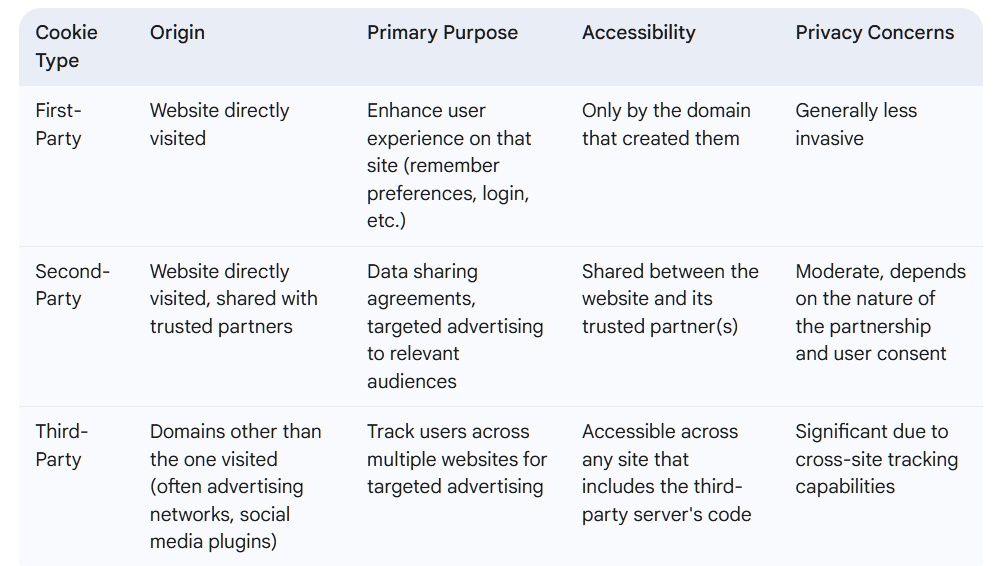
The impending phase-out of third-party cookies by major browsers signifies a notable shift in the online tracking landscape . This move is prompting the development and adoption of alternative tracking and advertising strategies that prioritize user privacy while still allowing for website functionality and revenue generation.
Leveraging the Internet Protocol (IP) Address for Tracking
An Internet Protocol (IP) address is a fundamental element of online communication, serving as a unique numerical identifier assigned to every device connected to the internet . This address is essential for enabling devices to communicate with each other, as it specifies the destination for data being sent across the network .
Websites routinely log the IP addresses of visitors . This practice allows them to track user sessions and gain insights into website traffic patterns . Furthermore, an IP address can be used to determine the approximate geographical location of a user . This location tracking serves various purposes, including providing geo-tailored experiences by displaying content in the user’s language or showing local products . It is also utilized in marketing to target users based on their region and in fraud prevention by detecting unusual login locations .
However, relying solely on IP addresses for tracking has several limitations. Within a local network, multiple devices often share the same public IP address . Additionally, many internet service providers assign dynamic IP addresses, which can change over time, making it challenging to track a single user persistently . Moreover, users can easily mask their IP address by using Virtual Private Networks (VPNs) or proxy servers, thereby obscuring their actual location and making IP-based tracking less reliable .
The accuracy of geolocation based on IP addresses varies. At the country level, it is generally quite accurate, with a success rate of nearly 99% . City-level accuracy is also impressive for fixed-line connections, averaging around 80-90% . However, the precision is considerably lower for mobile devices due to their dynamic IP addresses and reliance on cellular towers . Importantly, while an IP address can reveal the city or region a user is likely in, it cannot pinpoint an exact physical address .
Despite its limitations, the IP address remains a fundamental identifier in online tracking. Its primary value lies in its automatic logging by web servers, providing a basic level of user identification and location data. However, the increasing prevalence of IP masking technologies and the inherent inaccuracies in geolocation mean that it is often used in conjunction with other, more sophisticated tracking methods to create a more comprehensive understanding of user behavior. The approximate nature of location data derived from IP addresses necessitates caution when precise geographical information is required.
The Significance of the HTTP Referrer Header
The HTTP referrer header is another mechanism that contributes to online tracking. This HTTP header field contains the address (URL) of the webpage that a user was on immediately before navigating to the current page . Essentially, when a user clicks a link on a webpage to visit another site, the browser sends an HTTP request to the new website, and this request includes the referrer header, which indicates the origin of the link .
Websites can utilize the information contained in the referrer header for several purposes . It allows them to understand how users are discovering their content, identifying the websites or search engines that are driving traffic to them . This is particularly valuable for marketing and analytics, enabling website owners to assess the effectiveness of their promotional efforts and understand user navigation patterns .
From a user privacy perspective, the HTTP referrer header has implications as it can reveal a user’s previous browsing activity . For instance, if a user clicks a link on a social media site to visit a news article, the news website can see that the user came from the social media platform . While this information is often used for legitimate purposes like analytics, it does contribute to the overall tracking of a user’s online journey.
Users have some limited ability to control the sharing of referrer information. Certain browser extensions are available that allow users to block or modify the referrer header, preventing websites from knowing the exact origin of their visit . Additionally, some browser settings might offer options to limit referrer information sharing. However, for the average user, this information is typically transmitted automatically, highlighting a potential area where privacy could be enhanced by providing more user control over this aspect of web browsing.
Advanced Identification with Browser Fingerprinting
Browser fingerprinting represents a more advanced and often more persistent method of online tracking. It involves the collection of detailed information about a user’s web browser and device configuration to create a unique digital identifier, or “fingerprint” . This fingerprint can then be used to identify and track users across multiple browsing sessions, even when they are using incognito mode or a Virtual Private Network (VPN) .
Several techniques are employed in browser fingerprinting to gather this information. One common method is the analysis of the User-Agent string, which is automatically sent by the browser to the web server and reveals details about the browser type, version, and the operating system being used . Websites can also detect the screen resolution and color depth of a user’s device , as well as enumerate the fonts and plugins installed in the browser . Additionally, the time zone and language settings of the user’s device can be identified .
More sophisticated fingerprinting techniques include Canvas fingerprinting, which leverages subtle differences in how the HTML5 canvas element is rendered by different browsers and devices to create a unique signature . Similarly, WebGL fingerprinting exploits variations in the rendering of graphics through the WebGL API . Audio fingerprinting analyzes the unique way in which a device’s software and hardware process sound . Other techniques include HTTP fingerprinting, which examines the implementation of a device’s HTTP protocol ; TLS/TCP fingerprinting, which captures clues from the TLS and TCP protocols ; mobile fingerprinting, which uses hardware and software identifiers of mobile devices ; mouse tracking, which collects data on the user’s mouse cursor positions ; behavioral fingerprinting, which tracks user actions like mouse movements and typing patterns ; and even the detection of battery status .
By combining these various data points, websites can create a highly specific and often unique “digital fingerprint” for each user . This method of identification offers several advantages over traditional cookies. Fingerprints are more persistent as they are not stored as easily deletable files and can be difficult for users to remove . They can also effectively track users even when cookies are blocked or cleared, and across incognito browsing sessions .
Browser fingerprinting is utilized for a variety of purposes, including fraud detection and prevention of bot activity . It is also employed to serve personalized content to users based on their device characteristics and to facilitate targeted advertising by identifying users across different websites . However, this technique raises significant privacy concerns as it often operates without the explicit knowledge or consent of the user and can be challenging to detect and prevent . The comprehensive nature of the data collected allows for highly accurate identification, making it a powerful tool in the realm of online tracking.
The Unseen Trackers: Web Beacons and Tracking Pixels
Web beacons, also known as tracking pixels, web bugs, or clear GIFs, are another prevalent method used for online tracking. These are typically small, often transparent images, frequently just 1×1 pixel in size, or snippets of code that are embedded in web pages or emails .
These trackers are embedded into the HTML code of webpages, emails, or digital advertisements . When a user visits the webpage or opens the email, their browser or email client automatically loads the pixel from a server . This loading process involves sending a request to the server hosting the pixel, which in turn allows the server to collect various data points about the user and their interaction .
The data collected through web beacons can include the user’s IP address, the type of browser and device used, the date and time of access, any actions taken such as clicks or conversions, the referring website, and whether an email has been opened .
Web beacons serve several key purposes. In email marketing, they are used to track email open rates, click-through rates on links within the email, and to verify the validity of email addresses . For website analytics, they help in tracking visitor behavior, such as page views, the amount of time spent on a site, and interactions with specific elements . In advertising, they are used to monitor the performance of digital advertisements, including how many times an ad was viewed (impressions) and clicked . They can also be used for retargeting users with tailored advertisements based on their browsing history .
Unlike cookies, web beacons and tracking pixels cannot be easily disabled from the client-side by users . However, some measures can be taken to limit their effectiveness. Blocking images from loading in emails can prevent email-based web beacons from functioning . Similarly, using privacy-focused browser extensions or anti-tracking software can help block web beacons and other tracking technologies on websites . Despite these measures, web beacons remain a powerful and often invisible tool for tracking user activity across the web and in email communications.
Browser Storage Mechanisms and Tracking
Modern web browsers provide storage mechanisms beyond traditional cookies, namely Local Storage and Session Storage, accessible through the Web Storage API . These client-side storage options allow websites to store data directly within a user’s browser .
Local Storage and Session Storage differ from cookies in several key aspects . They offer a significantly larger storage capacity, typically ranging from 5 to 10 megabytes, compared to the approximately 4-kilobyte limit of cookies . Data stored in Local Storage persists across browser tabs and sessions, remaining available until it is manually deleted by the user or through website code . In contrast, data in Session Storage is tied to a specific browser tab or session and is automatically cleared when the tab or the entire browser is closed . Unlike cookies, data stored in Local Storage and Session Storage is not automatically transmitted with every HTTP request made to the server .
Despite these differences, Local Storage and Session Storage can be employed for various tracking purposes . Local Storage can be used to store persistent user identifiers for analytics and personalization across multiple browsing sessions, allowing websites to recognize returning users and remember their preferences . Session Storage can serve a similar function but is limited to the duration of a single browsing session. Both storage mechanisms can be used to track user preferences, website settings, and the contents of shopping carts . They can also be utilized to count events, such as clicks or page views, with Local Storage providing persistent tracking and Session Storage offering temporary tracking within a session .
The use of Local Storage and Session Storage for tracking has privacy implications and is subject to regulations like the GDPR . Data stored locally can potentially be used to track users even when they are offline . Because these mechanisms can be used similarly to cookies for storing personal data and tracking behavior, they often fall under privacy regulations that require obtaining user consent . Website owners are generally required to inform users about their use of Local Storage and Session Storage in their privacy policies . The ability of Local Storage to retain data indefinitely until explicitly deleted raises particular considerations regarding long-term data retention and user control.
The Role of ETags (Entity Tags) in User Tracking
ETags, or Entity Tags, are HTTP response headers primarily used for web cache validation . They serve as identifiers for specific versions of a resource, such as a webpage or an image, allowing browsers to efficiently check if the content has changed since the last time it was requested, without needing to re-download the entire resource .
When a browser requests a resource from a web server, the server may include an ETag in its HTTP response header . The browser then stores this ETag along with the cached resource. In subsequent requests for the same resource, the browser sends the stored ETag back to the server in an If-None-Match request header . The server can then compare the received ETag with the ETag of the current version of the resource. If the ETags match, the server can send a “304 Not Modified” response, indicating that the browser’s cached version is still up-to-date, thus saving bandwidth and improving performance .
While their primary function is cache validation, ETags can be cleverly misused for user tracking across browsing sessions . A server can generate a unique ETag when a user first visits a website and then use that same ETag to identify the user on subsequent visits, even if cookies have been disabled or the user’s IP address has changed . Because ETags are cached by the browser and automatically returned with requests for the same resource, a tracking server can simply reissue the same ETag to ensure persistent identification .
The mechanism of ETag tracking typically involves the server generating a unique, hash-like ETag for a user’s browser during their initial visit to a website. This ETag then acts as a session identifier for all subsequent requests from that same browser . As long as the browser’s cache is not cleared, this ETag will be sent back to the server, allowing the website to recognize the returning user.
Users have some options to mitigate ETag tracking. Regularly clearing the browser’s cache will remove the stored ETags, preventing them from being used for long-term tracking . Using privacy-focused browsers that are more aggressive in combating tracking techniques can also be effective . Additionally, some browser extensions, such as Privacy Badger, are designed to block invisible trackers, which can include the misuse of ETags . While ETags serve a legitimate purpose in web performance optimization, their potential for surreptitious user tracking makes them a concern for privacy-conscious individuals.
Beyond the Basics: Cross-Site Tracking Techniques
Cross-site tracking refers to the practice of monitoring and collecting data about a user’s online activities across multiple distinct websites . This is often employed by advertising networks and data brokers to build comprehensive profiles of users for targeted advertising and other purposes . While cookies and browser fingerprinting are primary methods for this, several other techniques are also utilized, especially as privacy regulations and browser restrictions on traditional methods increase .
Beyond cookies and fingerprinting, cross-site tracking can be achieved through various means. Link decoration involves adding unique tracking parameters to URLs when a user clicks on a link, allowing the destination website to identify the source and potentially track the user’s journey . CNAME cloaking is a technique where third-party trackers are made to appear as first-party by using a Canonical Name (CNAME) record in the website’s DNS settings, which can help bypass some tracking prevention measures . Graph attribution relies on matching user activity data with existing customer records and using probabilistic methods to attribute conversions and track user behavior across different touchpoints . IP attribution, while facing challenges due to IP address obfuscation efforts like Apple’s Private Relay and Chrome’s IP Protection, still attempts to track users based on their IP address .
Emerging technologies like the Privacy Sandbox Attribution Reporting API (ARAPI) from Google and similar APIs from other browsers aim to provide privacy-preserving ways to measure ad conversions without relying on cross-site tracking cookies . The increasing focus on first-party data involves websites directly collecting and analyzing data about their users to personalize experiences and for their own advertising purposes . Publisher Provided Identifiers (PPIDs) are unique IDs generated by website publishers to identify their users across different devices and sessions on their own properties . Contextual advertising, which targets ads based on the content of the webpage a user is currently viewing rather than their browsing history, is also seeing a resurgence as a privacy-friendly alternative . User Identity Graphs aggregate data from various sources to create a unified view of individual users, enabling tracking across different platforms and devices . Clean Rooms are secure environments where different companies can share and analyze aggregated or pseudonymized data for measurement and attribution purposes without directly revealing user-level information .
The ultimate goal of these cross-site tracking techniques is to create comprehensive user profiles that detail individuals’ interests, behaviors, and demographics. This information is highly valuable for advertisers as it allows them to deliver more targeted and effective advertising campaigns . The landscape of cross-site tracking is continuously evolving in response to technological advancements and growing concerns about user privacy.
Privacy Implications and the Evolving Landscape of Tracking Prevention
The various online tracking methods discussed carry significant privacy implications for internet users . A primary concern is the lack of transparency surrounding data collection and the limited control users often have over how their information is gathered and used. The ability to create detailed profiles of individuals based on their browsing habits raises concerns about potential profiling and targeted exploitation, where sensitive information could be used to manipulate or discriminate against users . Furthermore, the vast amounts of personal data collected through tracking are potential targets for data security breaches, which could expose users to identity theft or other harms. The fundamental ethical question of tracking users without their explicit and informed consent is also a major point of contention .
In response to these privacy concerns, web browsers have begun implementing various tracking prevention features . Many browsers now offer options to block third-party cookies, with some, like Safari (Intelligent Tracking Prevention), Firefox (Enhanced Tracking Protection), and Brave, doing so by default . Efforts are also being made to block or limit browser fingerprinting techniques, with browsers like Safari, Firefox (with the resistFingerprinting setting enabled), Brave, and Tor Browser offering varying levels of protection . Private browsing modes, available in most modern browsers, aim to limit the storage of cookies and browsing history during a session . Additionally, users have the option to manually clear cookies and other browsing data from their browsers .
Regulatory frameworks like the General Data Protection Regulation (GDPR) in Europe and the California Consumer Privacy Act (CCPA) in the United States have significantly impacted online tracking practices . These regulations mandate greater transparency regarding data collection practices and require websites to obtain explicit user consent before collecting and processing personal data for tracking purposes . They also provide users with rights, such as the ability to opt-out of tracking and to access, correct, or delete their personal information . Furthermore, these regulations impose obligations on companies to ensure the security of the data they collect .
The ongoing debate surrounding online tracking has led to significant developments in cookieless tracking methods and privacy-preserving alternatives . Google’s Privacy Sandbox initiative aims to develop new web standards for online advertising that enhance user privacy while still supporting a free web . Browsers are also exploring and implementing new APIs that allow for privacy-preserving measurement and attribution of online advertising . There is an increasing emphasis on the importance of first-party data strategies, where companies focus on collecting data directly from their own users and building direct relationships . Additionally, research into and potential adoption of technologies like differential privacy, which adds noise to datasets to protect individual privacy, and federated learning, which allows machine learning models to be trained on decentralized data without exchanging it, may offer future pathways for privacy-respecting data analysis and advertising. The landscape of online tracking and privacy is constantly evolving, with ongoing efforts to find a balance between the functionalities of the web, the needs of advertisers, and the fundamental rights of users to privacy.
Conclusion: Navigating the Complexities of Web Browser Tracking
In conclusion, individuals are tracked online through web browsers using a diverse array of methods. These techniques range from the well-established use of HTTP cookies to more sophisticated approaches like browser fingerprinting, web beacons, and the exploitation of browser storage mechanisms and cache validation processes. Each method has its own mechanism of action, collects different types of data, and presents unique implications for user privacy.
Understanding these tracking techniques is of paramount importance for both users seeking to protect their online privacy and for organizations navigating the complex landscape of data collection and privacy regulations. The ability of websites and third parties to monitor and analyze user behavior has profound implications for individual autonomy and the overall digital experience.
The future of online tracking is likely to be shaped by ongoing technological advancements, evolving privacy regulations, and the increasing awareness of users regarding their digital footprint. The industry is witnessing a shift towards more privacy-preserving methods, but the fundamental tension between the desire for personalized experiences and the right to privacy will continue to drive innovation and debate in this dynamic field.