Path MTU
The Network Path MTU (Path Maximum Transmission Unit) is the smallest MTU value along the entire network path between two communicating devices. Unlike the local MTU (which applies to a single link), the Path MTU ensures packets can traverse all hops (routers, switches, etc.) without fragmentation. Here’s a detailed breakdown:
Key Concepts
Definition:
- Path MTU = Minimum MTU of all links in the transmission path.
- Example: If a packet travels through links with MTUs of 1500, 9000, and 1492 bytes, the Path MTU is 1492 bytes.
Path MTU Discovery (PMTUD):
- A process to dynamically determine the Path MTU.
- How it works:
- The sender transmits packets with the “Don’t Fragment” (DF) flag set.
- If a router encounters a packet larger than its MTU, it drops the packet and sends an ICMP “Fragmentation Needed” message back to the sender.
- The sender reduces the packet size and retries until no ICMP errors occur.
- IPv4 vs. IPv6:
- IPv4: Routers can fragment packets, but PMTUD avoids this for efficiency.
- IPv6: Routers never fragment packets; PMTUD is mandatory.
Check the Ethernet Network Interface MTU
First make sure the MTU value of the IPv4 and IPv6 Ethernet network interface is set to the default value of 1500.
Command to show the IPv4 network interface details:
- netsh interface ipv4 show interface

Command to show the IPv6 network interface details:
- netsh interface ipv6 show interface

Ping tool syntax
Usage: ping [-l size] [-f] [-4] [-6] <targetname>
Options:
- -l : Specifies the length, in bytes, of the Data field in the echo Request messages. The default is 32. The maximum size is 65,500.
- -f : Specifies that echo Request messages are sent with the Do not Fragment flag in the IP header set to 1 (available on IPv4 only). The echo Request message can’t be fragmented by routers in the path to the destination. This parameter is useful for troubleshooting path Maximum Transmission Unit (PMTU) problems.
- -4 : Specifies IPv4 used to ping. This parameter isn’t required to identify the target host with an IPv4 address. It’s only required to identify the target host by name.
- -6 : Specifies IPv6 used to ping. This parameter isn’t required to identify the target host with an IPv6 address. It’s only required to identify the target host by name.
<targetname>Specifies the host name or IP address of the destination.
The data field size is the payload size of the ICMP packets used by the ping tool.
Ping command line tool verifies IP-level connectivity to another TCP/IP computer by sending Internet Control Message Protocol (ICMP) echo Request messages. The receipt of the corresponding echo Reply messages is displayed, along with round-trip times. ping is the primary TCP/IP command used to troubleshoot connectivity, reachability, and name resolution.
IP and ICMP headers size of a IPv4 packet
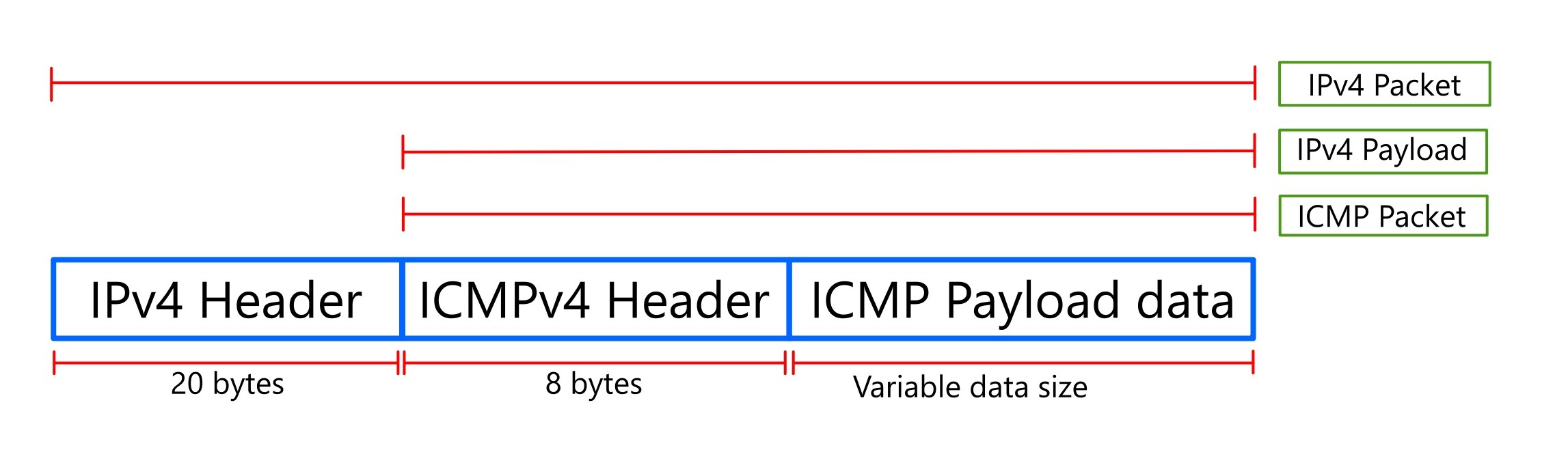
To understand the sizes of IP and ICMP headers in an IPv4 packet, let’s break it down:
IPv4 Header:
- Variable Size:
- The IPv4 header has a variable size, ranging from a minimum of 20 bytes to a maximum of 60 bytes.
- The base IPv4 header, without any options, is 20 bytes.
- Options within the IPv4 header can increase its size up to the maximum of 60 bytes.
- Key Fields:
- It contains essential information like source and destination IP addresses, protocol, and other control data.
ICMP Header:
- Fixed Size:
- The ICMP (Internet Control Message Protocol) header has a fixed size of 8 bytes.
- Purpose:
- ICMP is used for error reporting and network diagnostics, such as the “ping” utility.
- Placement:
- The ICMP header follows the IPv4 header within the IP packet.
Putting it Together:
- When an ICMP payload(message) is encapsulated within an IPv4 packet, the total header size is the sum of the IPv4 header and the ICMP header.
- Therefore, in a typical scenario (without IPv4 options), the combined header size would be 20 bytes (IPv4) + 8 bytes (ICMP) = 28 bytes.
IP and ICMP headers size of a IPv6 packet

When looking at IPv6 header sizes, there are some key differences compared to IPv4. Here’s a breakdown:
IPv6 Header:
- Fixed Size:
- The IPv6 base header has a fixed size of 40 bytes.
- This streamlined design simplifies packet processing for routers.
- Extension Headers:
- IPv6 utilizes extension headers to provide optional functionalities. These extension headers are added after the base header and can vary in size.
- These extension headers are designed to be processed more efficiently than IPv4 options.
ICMPv6 Header:
- Fixed Size:
- ICMPv6 has a fixed header size of 8 bytes.
- ICMPv6 plays a crucial role in IPv6 networks, handling error reporting and network diagnostics.
Therefore:
- IPv6 header: 40 bytes.
- ICMPv6 header: 8 bytes.
Therefore, in a typical scenario, the combined header size would be 40 bytes (IPv6) + 8 bytes (ICMPv6) = 48 bytes.
Find the IPv4 network path MTU using ping tool
In IPv4 network the typical combined IP header size + ICMP header = 28 bytes. The ping test done here to find the path MTU by assuming that combined IP header and ICMP header size is 28 bytes
With default MTU of local network interface of 1500 bytes, the maximum payload size of ICMP packets used by the ping tool will be (1500 bytes – 28 bytes = 1472 bytes).
So we will start using the ping tool with payload size of 1472 bytes and gradually decrease the payload size until payload is successfully transmitted without being fragmented.
- Run the command prompt or Powershell.
- ping -4 -f http://www.reddit.com -l 1472
- ping -4 -f http://www.reddit.com -l 1462
- ping -4 -f http://www.reddit.com -l 1452

- ping -4 -f http://www.reddit.com -l 1454
- ping -4 -f http://www.reddit.com -l 1453

The maximum payload size of the IPv4 ICMP packets that can be transmitted successfully without being fragmented is of size 1452 bytes.
So the path MTU value for IPv4 packets = 20 bytes (IPv4 header size) + 8 bytes (ICMPv4 header size) + 1452 bytes (ICMPv4 payload size) = 1480 bytes
Find the IPv6 network path MTU using ping tool
In IPv6 network the combined IP header size + ICMP header size is fixed at 48 bytes.
With default MTU of local network interface of 1500 bytes, the maximum payload size of ICMP packets used by the ping tool will be (1500 bytes – 48 bytes = 1452 bytes).
So we will start using the ping tool with payload size of 1452 bytes and gradually decrease the payload size until payload is successfully transmitted without being fragmented.
- Run the command prompt or Powershell.
- ping -6 http://www.youtube.com -l 1452
- ping -6 http://www.youtube.com -l 1402
- ping -6 http://www.youtube.com -l 1352
- ping -6 http://www.youtube.com -l 1302

- ping -6 http://www.youtube.com -l 1312
- ping -6 http://www.youtube.com -l 1322
- ping -6 http://www.youtube.com -l 1313

The maximum payload size of the IPv6 ICMP packets that can be transmitted successfully without being fragmented is of size 1312 bytes.
So the path MTU value for IPv6 packets = 40 bytes (IPv6 header size) + 8 bytes (ICMPv6 header size) + 1312 bytes (ICMPv6 payload size) = 1360 bytes