These are the list of softwares and runtime environments that needs to be installed in every Windows systems. It is recommended that you install each of these software in your PC.
- Microsoft Visual C++ 2008, 2010, 2012, 2013, 2015, 2017 Redistributable Package
- Microsoft .NET Framework
- Adobe Flash Player
- Adobe Air
- Silverlight
- DirectX 9.0c (full package)
1.) Microsoft Visual C++ 2008, 2010, 2012 SP1,2013, 2015 Redistributable Package
The Microsoft Visual C++ Redistributable Package installs runtime components of Visual C++ Libraries required to run applications developed with Visual C++.
These are small is size and is very important to most of the users. You must install it.
You need to install all the version of visual C++.
Users with 32 bit OS will require to install only 32 bit version (x86) of Microsoft visual C++ redistributable package.
Users with 64 bit OS will require to install both 32 bit & 64 bit version (x86 & x64) of Microsoft visual C++ redistributable package.
Microsoft Visual C++ 2008 SP1 Redistributable Package (x86)
Microsoft Visual C++ 2008 SP1 Redistributable Package (x64)
Download Microsoft Visual C++ 2010 SP1 Redistributable Package (x86)
Download Microsoft Visual C++ 2010 SP1 Redistributable Package (x64)
Download Visual C++ Redistributable for Visual Studio 2012 Update 4
Visual C++ Redistributable Packages for Visual Studio 2013
Visual C++ Redistributable for Visual Studio 2015
Microsoft Visual C++ Redistributable for Visual Studio 2017
- x64 — https://go.microsoft.com/fwlink/?LinkId=746572
- x86 — https://go.microsoft.com/fwlink/?LinkId=746571
System requirements
Supported Operating Systems: Windows 10, Windows 8.1, Windows 8, Windows 7, Windows Server 2003, Windows Server 2008, Windows Server 2008 R2, Windows Vista, Windows XP
2.) Microsoft .NET Framework 4 Client Profile/.NET Framework Version 4.5.2
Windows XP users
DOWNLOAD Microsoft .NET Framework 4 Client Profile
- http://www.softpedia.com/get/Programming/Other-Programming-Files/Microsoft-NET-Framework-Client-Profile.shtml
- http://www.microsoft.com/en-us/download/confirmation.aspx?id=24872
- http://download.cnet.com/Microsoft-NET-Framework-4-Client-Profile/3000-10250_4-75450163.html
For Windows Vista/7/8 users (x86/x64)
DOWNLOAD Microsoft .NET Framework 4.6 FROM LINKS BELOW:
- http://www.filehorse.com/download-dotnet-framework-4/download/
- http://www.filehippo.com/download_dotnet_framework_4/
3) .net framework 3.5
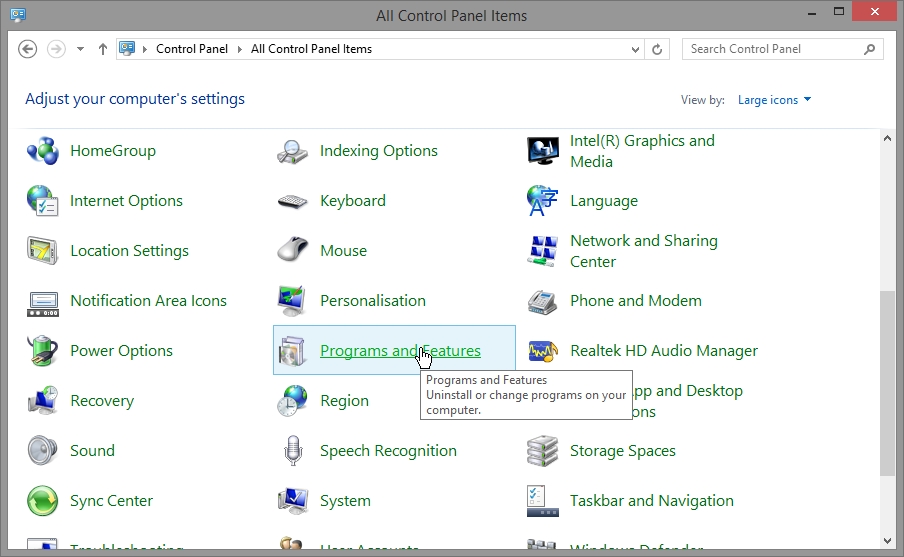
- Windows 8.1 & 10 users may want to install .net framework 3.5 . For that they need to open control panel
- Click on “programs and features”
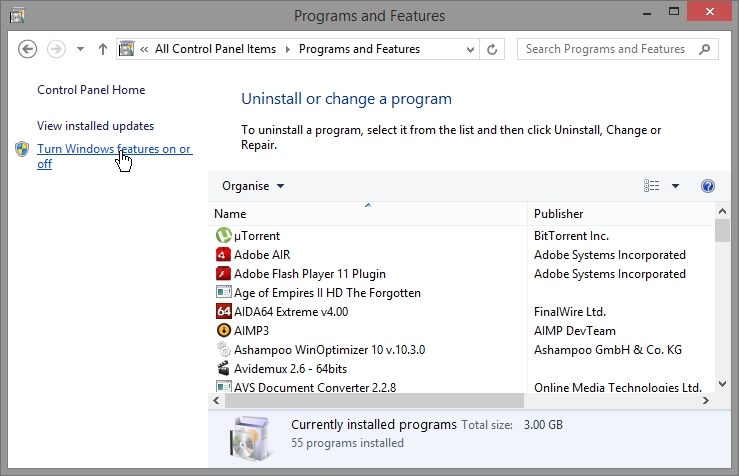
- click “turn Windows features on or off”
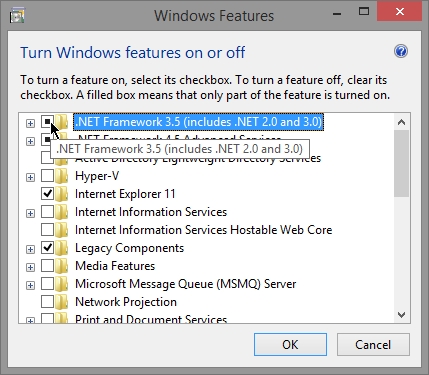
- Click “.NET Framework 3.5 “. Click “OK”.
- You need to have internet access to install .net framework 3.5
4.) Adobe Flash Player
DOWNLOAD LINKS
5) Adobe Air
DOWNLOAD Adobe Air :
6) Silverlight
DOWNLOAD LINKS :
- 64 bit : http://www.filehorse.com/download-silverlight-64/
- 32 bit : http://www.filehorse.com/download-silverlight-32/